Unsynced Tickets
Summary
The purpose of the script is to send an email with information about all the tickets that failed to sync with PSA in the past X hours. X is the number of hours set for the Global Parameter Threshold.
Requirements:
- Ticket Sync should be enabled in the CW Manage Plugin.
- The System Property 'Unsynced_Ticket_Email_Address' MUST be manually created. The script will NOT function without this property.
Note:
- All locations and clients that are 'Ignored' within the Manage Plugin will NOT report unsynced tickets for those locations/clients.
- It will detect the tickets that were generated at least 30 minutes ago to avoid false positives.
Remove the internal monitor Ticket Sync Unsuccessful from the partner's environment before implementing this script.
Sample Run
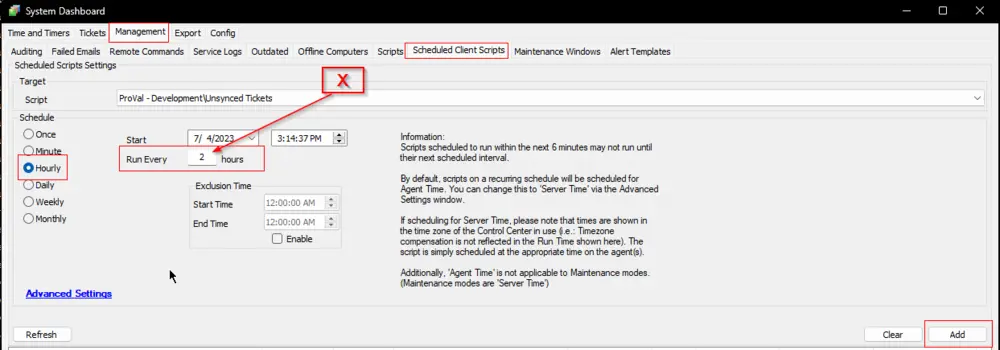
It is a client script and should be scheduled to run once per X hours. X is the number of hours set for the script's Global Parameter Threshold.

Schedule:
Variables
| Name | Description |
|---|---|
| Email Address(es) to send the Email | |
| Subject | Email Subject |
| Body | Email Content |
Global Parameters
| Name | Default | Required | Description |
|---|---|---|---|
| Threshold | 2 | True | Number of past hours to check the unsynced tickets from. |
System Properties
| Name | Example | Required | Description |
|---|---|---|---|
| Unsynced_Ticket_Email_Address | example@example.com | True | Address(es) to send the email. Multiple addresses should be separated by a semicolon (;). |
Examples:
- Single Email Address:
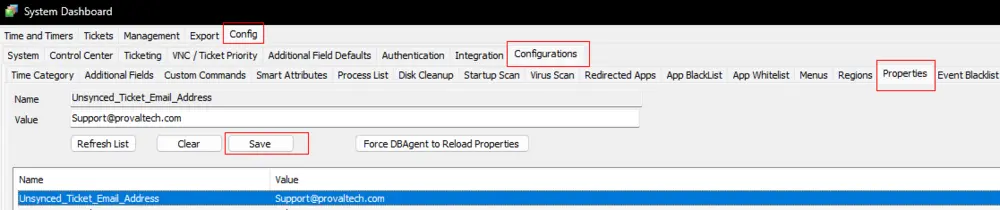
- Multiple Email Addresses:

Note: The script will not create the system property. Hence, this system property should be created before scheduling/running the script. Otherwise, the script will not work.
Output
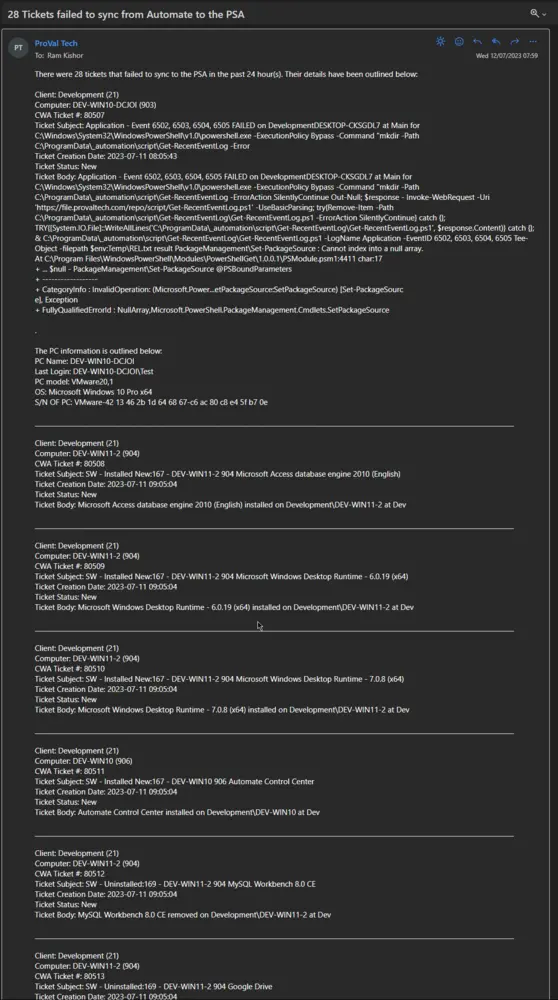
Email
Subject: <Count of Unsynced Tickets> Tickets failed to sync from Automate to the PSA
Body:
There were <Count of Unsynced Tickets> tickets that failed to sync to the PSA in the past <Threshold> hour(s). Their details have been outlined below:

Client: <Client Name> (<ClientID>)
Computer: <Computer Name> (<ComputerID>)
CWA Ticket #: <CW Automate TicketID>
Ticket Subject: <Ticket Subject>
Ticket Creation Date: <Ticket Creation Date>
Ticket Status: <Ticket Status>
Ticket Body: <Ticket Body>
Sample Screenshot:
Changelog
2025-07-15
- Updated the script to look for the tickets that were created at least 30 minutes ago and updated the ticket body to show correct hours.
2025-04-10
- Initial version of the document