cPVAL Lock Status
Summary
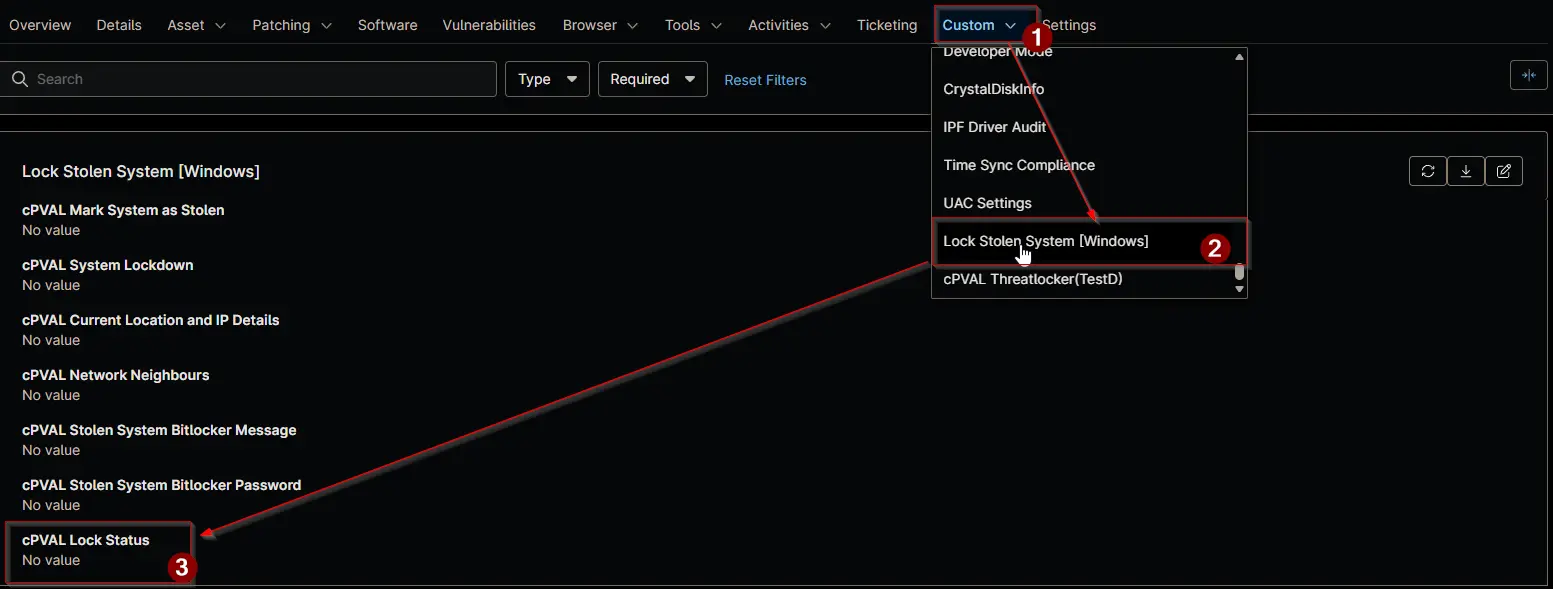
Shows whether the Lock Stolen System solution has locked the device. It shows Locked after a successful lockdown, Partially Locked when a Mac lockdown couldn't lock every user account, and Unlocked after an unlock automation reverses the lockdown. It's empty if the device was never locked. The field is on the Lock Stolen System [Windows] tab of Windows devices and the Lock Stolen System [Macintosh] tab of Macs.
Details
| Label | Field Name | Example | Definition Scope | Type | Required | Default Value | Dropdown Options | Editable | Custom Field Tab |
|---|---|---|---|---|---|---|---|---|---|
| cPVAL Lock Status | cpvalLockStatus | Locked | Device | Text | No | Yes |
|
Dependencies
- Automation: Lock Stolen System [Windows]
- Automation: Lock Stolen System [Macintosh]
- Automation: Unlock Stolen System [Windows]
- Automation: Unlock Stolen System [Macintosh]
- Solution: Lock Stolen System
Custom Field Creation
Sample Screenshot
Changelog
2026-11-12
- Added the field to Mac devices on the Lock Stolen System [Macintosh] tab, moved it to the Lock Stolen System [Windows] tab on Windows devices, and added the Partially Locked and Unlocked values.
2026-02-25
- Initial version of the document