cPVAL Network Adapter Details
Summary
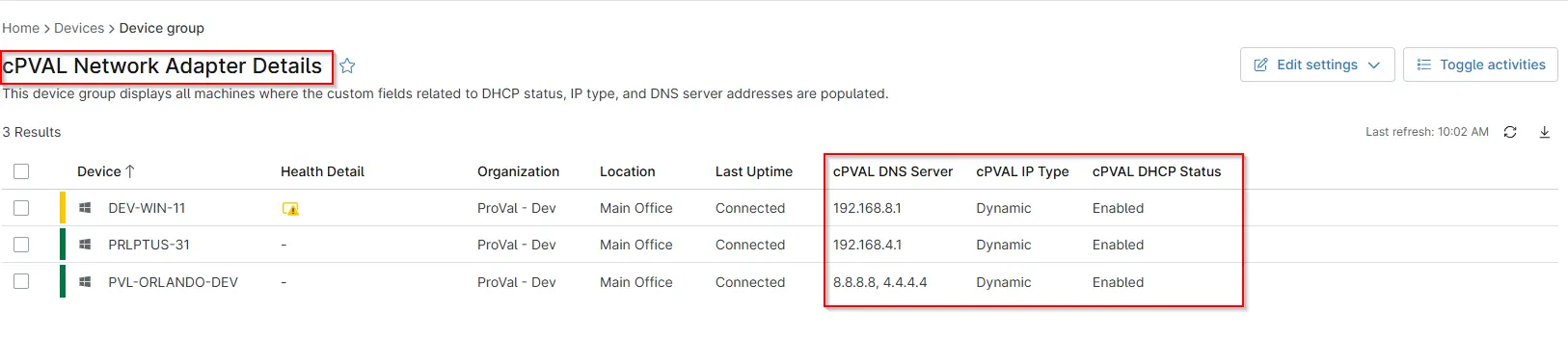
This device group displays all machines where the custom fields related to DHCP status, IP type, and DNS server addresses are populated.
Details
| Name | Description |
|---|---|
| cPVAL Network Adapter Details | This device group displays all machines where the custom fields related to DHCP status, IP type, and DNS server addresses are populated. |
Dependencies
- cPVAL DNS Server
- cPVAL Dhcp Status
- cPVAL IP Type
- cPVAL Check Network Adapter Details
- Solution - Network Adapter Details
Group Creation
Group View
Please follow the steps below to add the necessary custom fields to the view.
- Create the group and ensure it is saved successfully.
- Open the newly created group for editing.
- Navigate to the Table Settings option.
- Update the table layout to include the required custom fields.
- Save the changes to apply the updated group view.
URL TO THE GUIDE
Below Custom fields that needs to add under the Group View:
cPVAL DNS ServercPVAL Dhcp StatuscPVAL IP Type
Group Screenshot
This is how the group should looks like after adding the custom fields:
Changelog
2026-01-19
- Initial version of the document