Restart-HyperVHost
Overview
This script uses the agnostic script Restart-HyperVHost to restarts a Windows Hyper-V host, ensuring that the running state of all hosted virtual machines (VMs) is preserved. It is designed for environments where VM state preservation is critical during maintenance, patching, or updates, and where live migration to another host is not available or desired.
Dependencies
Implementation
-
Download the component
Restart-HyperVHostfrom the attachments. -
After downloading the attached file, click on the
Importbutton -
Select the component just downloaded and add it to the Datto RMM interface.

-
After Importing the component to the Datto RMM, make sure to add the component to the
ProValGroup always.- Steps to Add the component under
ProValGroup.
i. Click onDrop Down Icon.
ii. Click onAdd to Group.
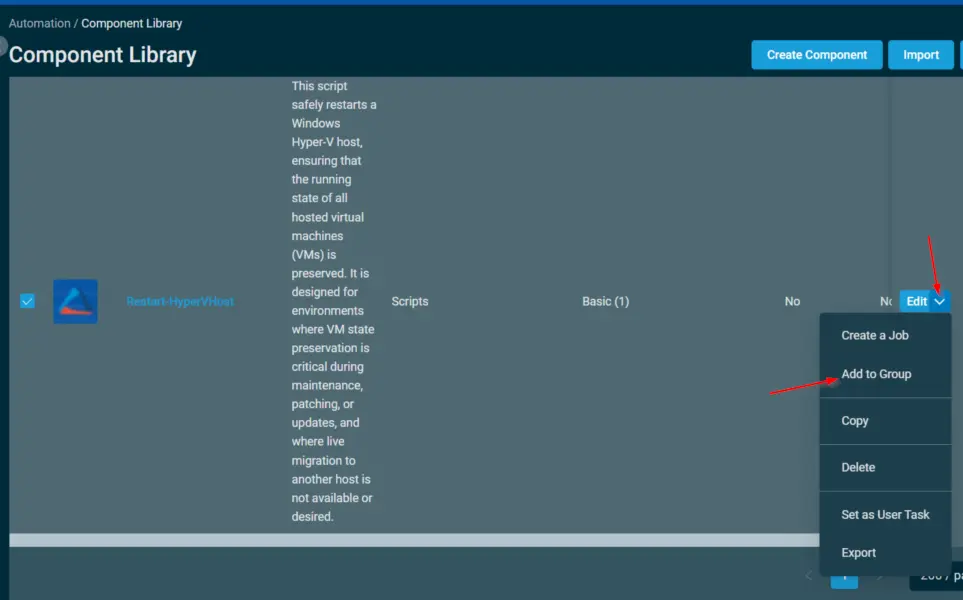
iii. Select the group asProval

- Steps to Add the component under
Sample Run
To execute the Restart-HyperVHost over a specific machine, follow these steps:
-
Select the machine you want to run the
Restart-HyperVHoston from the Datto RMM. -
Click on the
Quick Jobbutton.

-
Search the component
Restart-HyperVHostand click onSelect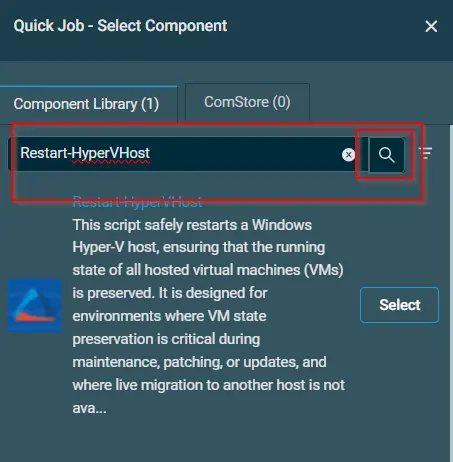
-
Click on
Run
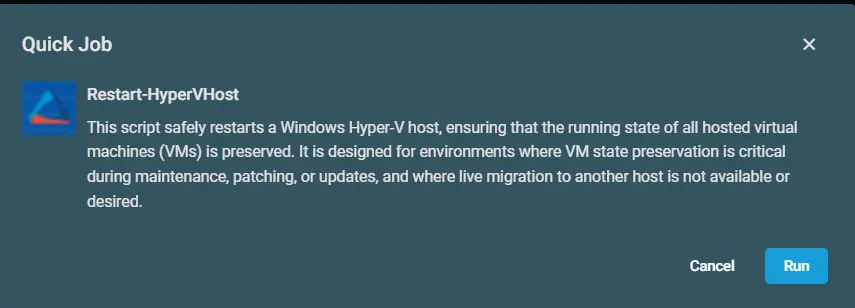
Output
- Activity
The main script and the post-reboot restore script both log via the Strapper module:
.\Restart-HyperVHost-log.txt
.\Restart-HyperVHost-error.txt
C:\ProgramData\_Automation\Script\Set-VMState\Set-VMState-log.txt
C:\ProgramData\_Automation\Script\Set-VMState\Set-VMState-error.txt
Attachments
Changelog
2026-08-06
- Initial version of the document