Offboard_Action
Summary
Marks a replaced device for offboarding by the Device Offboarding [RMM, Intune and Entra] bot, and sets which systems the device is removed from. Setting any option other than None adds the device to the Offboard - Pending group, and the bot offboards it at the next daily 6:00 AM run.
| Option | What happens |
|---|---|
None | Nothing. The device is left alone. |
RMM Only | The CW RMM agent is uninstalled. Microsoft isn't contacted, so the client doesn't need any credentials set. |
RMM and Intune | The device is deleted from Intune, then the CW RMM agent is uninstalled. The device stays in Entra. |
RMM Intune and Entra | The device is deleted from Intune, then from Entra, then the CW RMM agent is uninstalled. |
Dependencies
- Solution: Device Offboarding [RMM, Intune and Entra]
- Bots: Device Offboarding [RMM, Intune and Entra]
- Group: Offboard - Pending
Custom Field Setup Location
Custom Fields Path: SETTINGS ➞ Custom Fields
Details
| Name | Description | Level | Type | Option Type | Options | Help Text | Default Value | Editable |
|---|---|---|---|---|---|---|---|---|
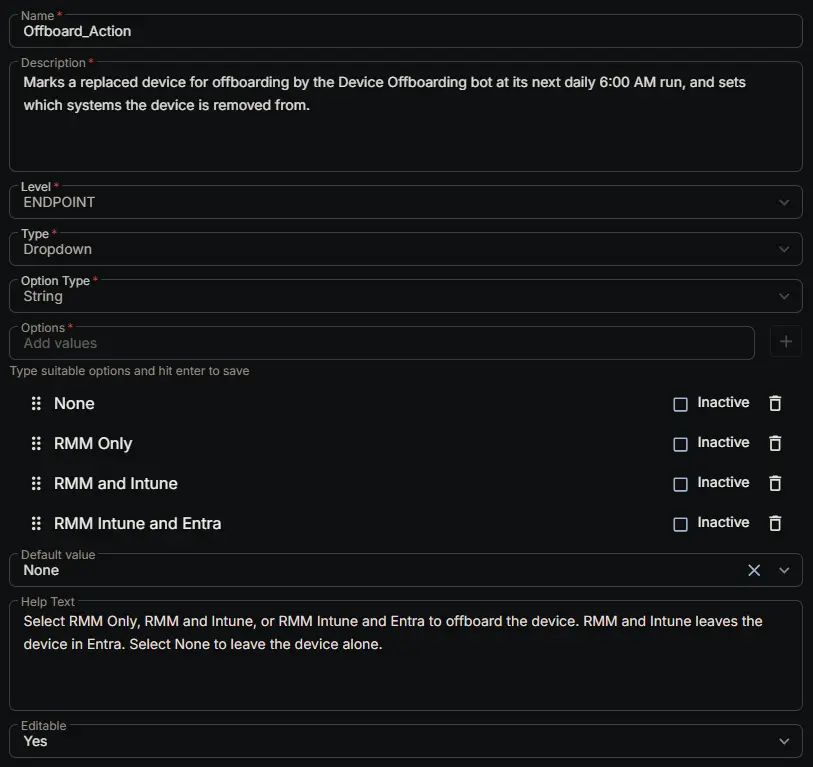
| Offboard_Action | Marks a replaced device for offboarding by the Device Offboarding bot at its next daily 6:00 AM run, and sets which systems the device is removed from. | Endpoint | Dropdown | String | None, RMM Only, RMM and Intune, RMM Intune and Entra | Select RMM Only, RMM and Intune, or RMM Intune and Entra to offboard the device. RMM and Intune leaves the device in Entra. Select None to leave the device alone. | None | Yes |
note
Type the options exactly as shown. The Offboard - Pending group and the bot both look for this text, and a device set to an option the bot doesn't recognize fails with the reason written to Offboard_Failure_Reason.
RMM and Intune and RMM Intune and Entra need the client's Offboard_Tenant_ID, Offboard_App_Client_ID and Offboard_App_Client_Secret fields filled in.
Completed Custom Field
Changelog
2026-10-27
- Initial version of the document