Active Directory & Domain Environment Audit
Purpose
This solution document delineates the contents applicable for monitoring the Active Directory Domain environment. Please review the implementation steps meticulously as a significant portion of the content relies on the Active Directory plugin.
This article encompasses multiple components and contents. Please import and implement only the required components.
Associated Content
Internal Monitor
| Content | Type | Function |
|---|---|---|
| Active Directory - Sync Out of Date | Internal Monitor | This monitor looks for the AD server that has been onboarded for more than 30 days and is experiencing a credential issue in the Active Directory Plugin. |
| Active Directory - New User Account Created | Internal Monitor | This monitor looks for new domain user accounts that have a creation date within the past day. A ticket is created for each new account discovered. |
| Active Directory - Monitor - Password Expires This Week [G] | Internal Monitor | Detects the domain users whose password is going to expire within a week. |
| Active Directory - Enabled Test Accounts | Internal Monitor | This monitor will look for any account with the name Test in the account name and will flag that account if it is enabled on the domain. |
| Active Directory - Account Disabled | Internal Monitor | This monitor looks for the disabled accounts on Active Directory servers through the Active Directory plugin and creates a ticket for each one found. |
| Active Directory - User Last Logon > X Days | Internal Monitor | This monitor will check for users who have not logged in for more than X days and are not administrator accounts. |
| Active Directory - Active Computers in AD with No Agent | Internal Monitor | The monitor set generates a client-level ticket containing details of domain-joined computers active within the domain, which have been joined to the domain for at least 7 days but do not have the Automate agent installed. |
| Active Directory - ADPluginUser - Create/Update | Internal Monitor | The purpose of this monitor set is to create an 'ADPluginUser' account for the domain controllers detected in AD Plugin. |
| Active Directory - GPO Modified | Internal Monitor | This Custom RAWSQL monitor shows GPO modified time on the computer if the GPO was modified in the last day. |
Remote Monitor
| Content | Type | Function |
|---|---|---|
| Reset AD Users Password Age | Remote Monitor | This remote monitor checks AD user's login password age to see if the age is set to unlimited, and if so it will change the user password from never expire to expire and will also change the Default domain policy password age to 90 days. |
| New Domain Admin | Remote Monitor | The purpose of the remote monitor is to detect the newly created/promoted domain admins and create a ticket. |
| AD Recycle Bin State Check | Remote Monitor | This is a remote PowerShell monitor which detects whether the AD Recycle Bin is enabled or disabled on Windows Active Directory servers. |
| AD Account Lockout Detection | Remote Monitor | The monitoring system is set up to gather data on event ID 4740 that occurred within the last 15 minutes and to generate an alert with the relevant information. |
| Active Directory Replication Anomaly Monitoring | Remote Monitor | The monitor set operates on a cluster of Primary Domain Controllers (Infrastructure Masters) for each domain, triggering a failure alert upon detecting any Active Directory Replication Failure. |
Script
| Content | Type | Function |
|---|---|---|
| AD - Enable AD Recycle Bin | Script | This script enables the AD Recycle Bin. Microsoft TechNet Article |
| Weak Passwords - AD Test | Script | The script tests the hashed credentials in AD against a known compromised or weak list. |
| Active Directory - Plugin User Account - Create/Update | Script | This script will create/update a domain admin account to be used with the AD plugin with a random password. |
| Group Policy - Audit | Script | This process will execute PowerShell to gather GPO data. |
| AD - Create Views/Table/Schedule for AD Reporting Solution | Script | This creates all of the needed items in the Database to ensure the Active Directory Reporting Solution functions correctly. |
| ScreenConnect - AD Plugin - Sync Out of Date [Ticket,RMM+]* | Script | This script is intended to be used as an auto fix for the Active Directory - Sync Out of Date internal monitor. This script will not function if run manually. |
| Active Directory - Alerting - Password Expires This Week [Global,Autofix]* | Script | The script covers the alerting section of the Active Directory - Password Expires This Week [G] monitor set. |
Dataview
| Content | Type | Function |
|---|---|---|
| AD Users | Dataview | This dataview displays all users associated with a domain and general information about all the users. |
| Active Directory - Domain Groups and Members | Dataview | This dataview shows you all domains and their respective groups and a corresponding list of members. |
| Group Policy Objects | Dataview | This dataview shows information about GPOs, their applied policies, where they are linked to, and to what trustees they are applied to. |
| Group Policy Settings | Dataview | This dataview shows information about GPOs, their applied policies, and settings. |
| Group Policy Object Links | Dataview | This dataview shows information about GPOs, their applied policies, and where they are linked to. |
| Group Policy Object Security Filtering | Dataview | This dataview displays information related to Group Policy Objects in Active Directory, specifically related to security policies. |
Report
| Content | Type | Function |
|---|---|---|
| Report - Active Directory User Assessment | Report | Displays an overall health view of the Client's Active Directory along with a full user report. |
| Report - Active Directory User Groups - Detail | Report | Displays a complete user list with all groups that each user is in, along with an overall view of what groups are used the most. |
| Report - Computers in Active Directory - No Agent | Report | Displays a list of all computers that are in Active Directory but not in Automate. Can be used to clean up Client Active Directories. |
| SubPageHeaderLandscape | Subreport | Used as the template for the page header on these reports. |
Implementation (Active Directory Plugin Dependent Solutions)
-
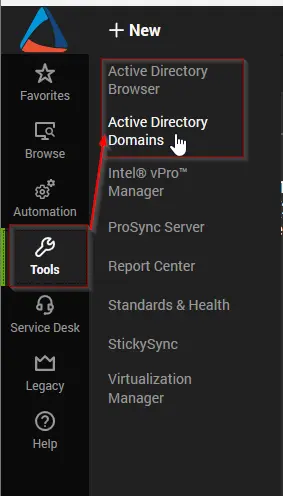
The solutions presented in this section rely on the functionality provided by the
Active Directoryplugin. Therefore, it is imperative to verify that both theActive DirectoryandActive Directory Remoteplugins are correctly installed and operational within the environment.
-
Active Directory Reporting Solution
Follow the steps outlined in the Active Directory Reporting Solution document to import and configure the following reports:
-
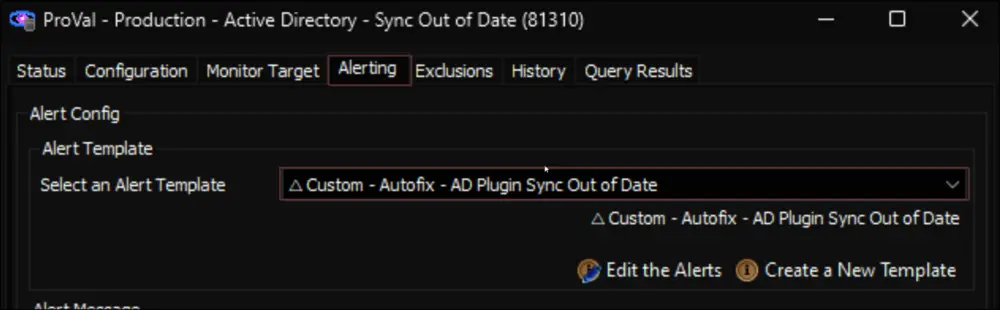
Active Directory - Sync Out of Date
- Import the Active Directory - Sync Out of Date internal monitor set from the
ProSyncplugin. - Import the ScreenConnect - AD Plugin - Sync Out of Date [Ticket,RMM+]* script from the
ProSyncplugin. - Import the
△ Custom - Autofix - AD Plugin Sync Out of Datealert template from theProSyncplugin. - Reload the system cache.
- Ensure that the RMM+ Plugin is correctly configured and operational within the environment, as this solution relies on the proper configuration of the RMM+ Plugin Configuration.
- Assign the
△ Custom - Autofix - AD Plugin Sync Out of Datealert template to the Active Directory - Sync Out of Date monitor set.
- Import the Active Directory - Sync Out of Date internal monitor set from the
-
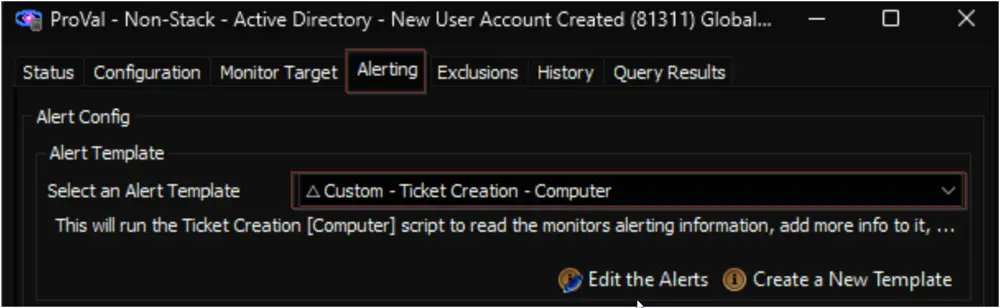
Active Directory - New User Account
- Import the Active Directory - New User Account Created internal monitor from the
ProSyncplugin. - Import the
△ Custom - Ticket Creation - Computeralert template from theProSyncplugin, if it's not already present in the environment. - Import the Ticket Creation - Computer script from the
ProSyncplugin, if it's not already present in the environment. - Reload the System Cache.
- Assign the
△ Custom - Ticket Creation - Computeralert template to the Active Directory - New User Account Created monitor set.
- Import the Active Directory - New User Account Created internal monitor from the
-
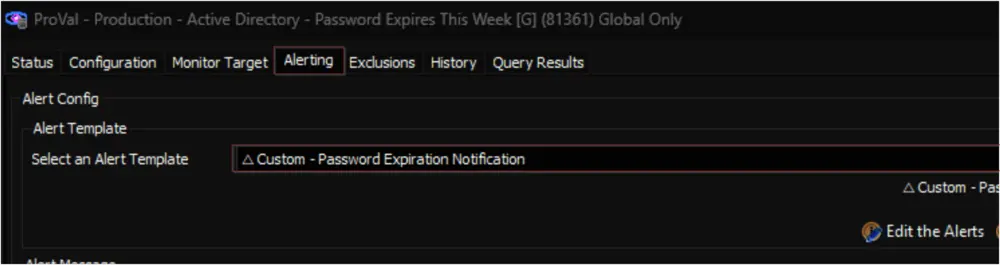
Active Directory - Password Expires This Week
- Import the Password Expires This Week [G] internal monitor from the
ProSyncplugin. - Import the Active Directory - Alerting - Password Expires This Week [Global,Autofix]* script from the
ProSyncplugin. - Import the
△ Custom - Password Expiration Notificationalert template from theProSyncplugin. - Reload the System Cache.
- Go through the script's document and perform the customization if necessary.
- Assign the
△ Custom - Password Expiration Notificationalert template to the Password Expires This Week [G] monitor set.
- Import the Password Expires This Week [G] internal monitor from the
-
Active Directory - Enabled Test Accounts
- Import the Active Directory - Enabled Test Accounts internal monitor from the
ProSyncplugin. - Import the
△ Custom - Ticket Creation - Computeralert template from theProSyncplugin, if it's not already present in the environment. - Import the Ticket Creation - Computer script from the
ProSyncplugin, if it's not already present in the environment. - Reload the System Cache.
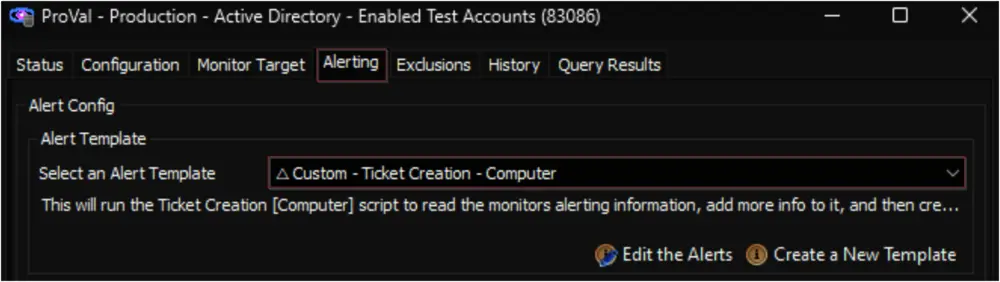
- Assign the
△ Custom - Ticket Creation - Computeralert template to the Active Directory - Enabled Test Accounts monitor set.
- Import the Active Directory - Enabled Test Accounts internal monitor from the
-
Active Directory - Account Disabled
- Import the Active Directory - Monitor - Account Disabled internal monitor from the
ProSyncplugin. - Import the
△ Custom - Ticket Creation - Computeralert template from theProSyncplugin, if it's not already present in the environment. - Import the Ticket Creation - Computer script from the
ProSyncplugin, if it's not already present in the environment. - Reload the System Cache.
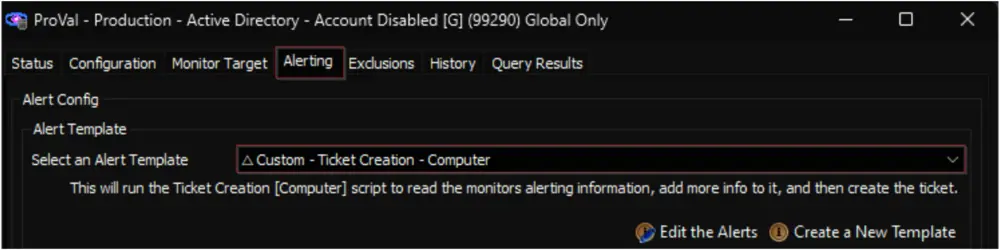
- Assign the
△ Custom - Ticket Creation - Computeralert template to the Active Directory - Monitor - Account Disabled monitor set.
- Import the Active Directory - Monitor - Account Disabled internal monitor from the
-
Active Directory - User Last Logon > X Days
- Import the Active Directory - User Last Logon > X Days internal monitor from the
ProSyncplugin. - Import the
△ Custom - Ticket Creation - Computeralert template from theProSyncplugin, if it's not already present in the environment. - Import the Ticket Creation - Computer script from the
ProSyncplugin, if it's not already present in the environment. - Reload the System Cache.
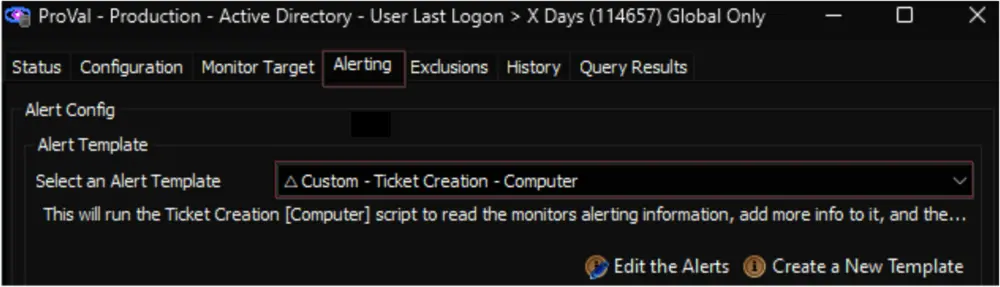
- Assign the
△ Custom - Ticket Creation - Computeralert template to the Monitor - Active Directory - User Last Logon > X Days monitor set.
- Import the Active Directory - User Last Logon > X Days internal monitor from the
-
Active Directory - Domain Computers Missing Automate Agent
- Import the Active Computers in AD with No Agent internal monitor from the
ProSyncplugin. - Import the
△ Custom - Ticket Creation - Clientalert template from theProSyncplugin, if it's not already present in the environment. - Import the Ticket Creation - Client script from the
ProSyncplugin, if it's not already present in the environment. - Reload the System Cache.
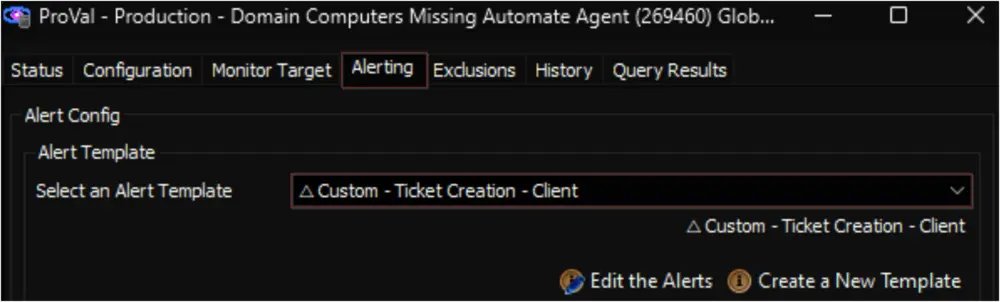
- Assign the
△ Custom - Ticket Creation - Clientalert template to the Active Computers in AD with No Agent monitor set.
- Import the Active Computers in AD with No Agent internal monitor from the
-
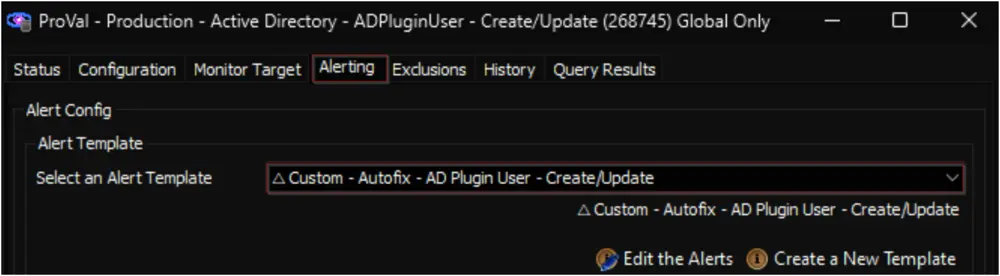
Active Directory - ADPluginUser - Create/Update
- Import the Active Directory - ADPluginUser - Create/Update internal monitor set from the
ProSyncplugin. - Import and implement the Active Directory - Plugin User Account - Create/Update script as instructed in the
Implementationsection of the script's document. - Import the
△ Custom - Autofix - AD Plugin User - Create/Updatealert template from theProSyncplugin, if it's not already present in the environment. - Assign the
△ Custom - Autofix - AD Plugin User - Create/Updatealert template to the Internal Monitor - Active Directory - ADPluginUser - Create/Update monitor set.
- Import the Active Directory - ADPluginUser - Create/Update internal monitor set from the
-
Active Directory - AD Users
- Import the Active Directory - AD Users dataview from the
ProSyncplugin.
- Import the Active Directory - AD Users dataview from the
-
Active Directory - Domain Group and Members
- Import the Active Directory - Domain Groups and Members - With Count dataview from the
ProSyncplugin.
- Import the Active Directory - Domain Groups and Members - With Count dataview from the
Implementation (Independent Solutions)
-
The solutions presented in this section do not rely on any plugin.
-
Group Policy Audit
- Import the Group Policy - Audit script from the
ProSyncplugin. - Import the following dataviews from the
ProSyncplugin: - Schedule the Group Policy - Audit script to run once per day against the domain controllers group.
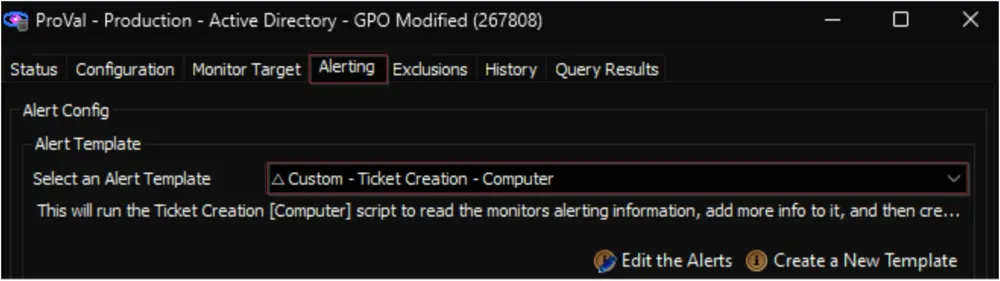
- Import the Active Directory - GPO Modified internal monitor from the
ProSyncplugin. - Implement the monitor set as explained in the
Implementationsection of the monitor's document. - Import the
△ Custom - Ticket Creation - Computeralert template from theProSyncplugin, if it's not already present in the environment. - Import the Ticket Creation - Computer script from the
ProSyncplugin, if it's not already present in the environment. - Reload the System Cache.
- Assign the
△ Custom - Ticket Creation - Computeralert template to the GPO Modified monitor set.
- Import the Group Policy - Audit script from the
-
Reset AD Users Password Age
- Import the
△ Custom - Ticket Creation - Computeralert template from theProSyncplugin, if it's not already present in the environment. - Import the Ticket Creation - Computer script from the
ProSyncplugin, if it's not already present in the environment. - Import the Reset AD Users Password Age remote monitor by following the instructions outlined in the Import - Remote Monitor - Reset AD Users Password Age document.
- Reload the System Cache.
- Locate the Reset AD Users Password Age remote monitor by opening the relevant group(s) and apply the
△ Custom - Ticket Creation - Computeralert template to the group monitor.
- Import the
-
New Domain Admin
- Import the
△ Custom - Ticket Creation Computer - Failures Onlyalert template from theProSyncplugin, if it's not already present in the environment. - Import the Ticket Creation - Computer [Failures Only]* script from the
ProSyncplugin, if it's not already present in the environment. - Import the New Domain Admin remote monitor by following the instructions outlined in the Implement - Remote Monitor - New Domain Admin document.
- Reload the System Cache.
- Locate the New Domain Admin remote monitor by opening the
Domain Controllersgroup.
- Import the
-
Enable AD Recycle Bin
- Import the AD - Enable AD Recycle Bin script from the
ProSyncplugin. - Import the
△ Custom - Execute Script - AD - Enable AD Recycle Binalert template from theProSyncplugin. - Import the AD Domain Recycle Bin Feature role and the AD Recycle Bin State Check remote monitor by following the instructions outlined in the Import - Remote Monitor - AD Recycle Bin State Check document.
- Reload the System Cache.
- Locate the AD Recycle Bin State Check remote monitor by opening the
Domain Controllersgroup and apply the△ Custom - Execute Script - AD - Enable AD Recycle Binalert template to the group monitor.
- Import the AD - Enable AD Recycle Bin script from the
-
AD Account Lockout Detection
- Import the
△ Custom - Ticket Creation Computer - Failures Onlyalert template from theProSyncplugin, if it's not already present in the environment. - Import the Ticket Creation - Computer [Failures Only]* script from the
ProSyncplugin, if it's not already present in the environment. - Import the AD Account Lockout Detection remote monitor by following the instructions outlined in the Implement - Remote Monitor - AD Account LockOut Detection document.
- Reload the System Cache.
- Locate the AD Account Lockout Detection remote monitor by opening the
Domain Controllersgroup and apply the△ Custom - Ticket Creation Computer - Failures Onlyalert template to the group monitor.
- Import the
-
Active Directory Replication Anomaly Monitoring
- Import the
△ Custom - Ticket Creation - Computeralert template from theProSyncplugin, if it's not already present in the environment. - Import the Ticket Creation - Computer script from the
ProSyncplugin, if it's not already present in the environment. - Import the Active Directory Replication Anomaly Monitoring remote monitor by following the instructions outlined in the Implement - Remote Monitor - Active Directory Replication Anomaly Monitoring document.
- Reload the System Cache.
- Locate the Active Directory Replication Anomaly Monitoring remote monitor by opening the
Domain Controllersgroup and apply the△ Custom - Ticket Creation - Computeralert template to the group monitor.
- Import the
Changelog
2026-05-18
- Document enhancement only
2025-04-10
- Initial version of the document