Remove - PUA
Summary
This is a CW Automate implementation of the agnostic script Remove-PUA. It manages the removal of predefined bloatware packages or lists installed bloatware based on a centrally maintained list. It offers three primary operations: bulk removal, selective removal, and bloatware listing. The remove parameter allows bypassing the PUA List to remove any installed AppxPackage.
PUA List: PUA List
EXERCISE EXTREME CAUTION - Removing system components may cause system instability.Note: Data fetched by the script using the ListBloatware script can be viewed in the Bloatware Audit dataview.
Sample Run
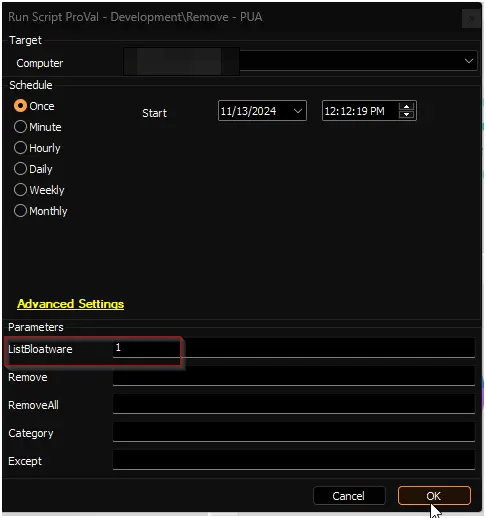
To fetch the list of installed bloatware into the Bloatware Audit dataview:
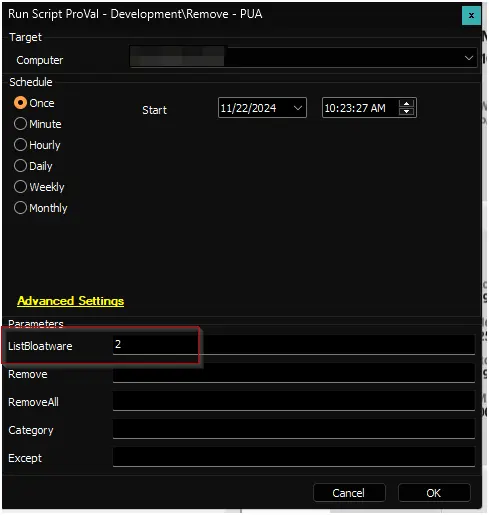
To fetch the list of installed bloatware and email it to the user running the script:
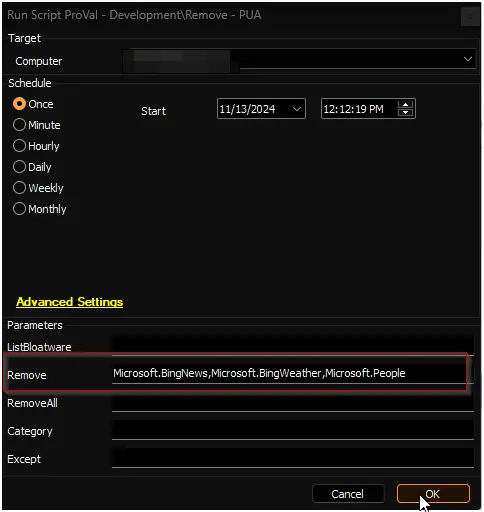
To remove specific bloatware Microsoft.BingNews, Microsoft.BingWeather, and Microsoft.People:
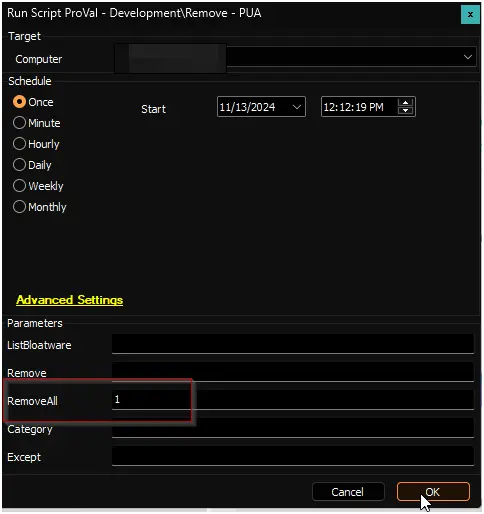
To remove all installed bloatware supported by the script:
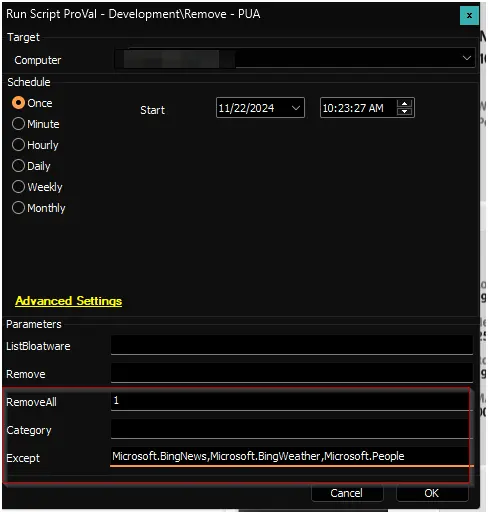
To remove all installed bloatware supported by the script except Microsoft.BingNews, Microsoft.BingWeather, and Microsoft.People:
Dependencies
User Parameters
| Name | Example | Accepted Values | Required | Description |
|---|---|---|---|---|
| ListBloatware | 1 | - 1- 2 | Partially | 1: Fetch installed bloatware into the Bloatware Audit dataview. 2: Fetch installed bloatware into the Bloatware Audit dataview and send the list to the user running the script. |
| Remove | Microsoft.BingNews, Microsoft.BingWeather, Microsoft.People | Partially | The name(s) of the application or applications you wish to uninstall | |
| Remove All | 1 | Partially | Set it to 1 to remove all bloatware by category or all found bloatware with or without exceptions | |
| Category | XboxFeaturesApps | - MsftBloatApps - ThirdPartyBloatApps - WindowsStoreApps - XboxFeaturesApps - NonAppxApps | False | Used with RemoveAll to filter bloatware to a certain category, allowing you to select just a specific category of bloatware |
| Except | xboxGameOverlay | False | Used with RemoveAll or Category to remove all except some item(s) from a category or all together |
Global Parameters
| Name | Example | Accepted Values | Required | Description |
|---|---|---|---|---|
| PUAListSource | https://my.cdn.example/pua.json, C:\ProgramData\_Automation\Script\PUA\pua.json | False | Optional source for an alternate PUA list JSON. When provided, the script will use the specified local JSON file or downloadable URL instead of the default PUA list (https://content.provaltech.com/attachments/potentially-unwanted-applications.json). |
Emailing
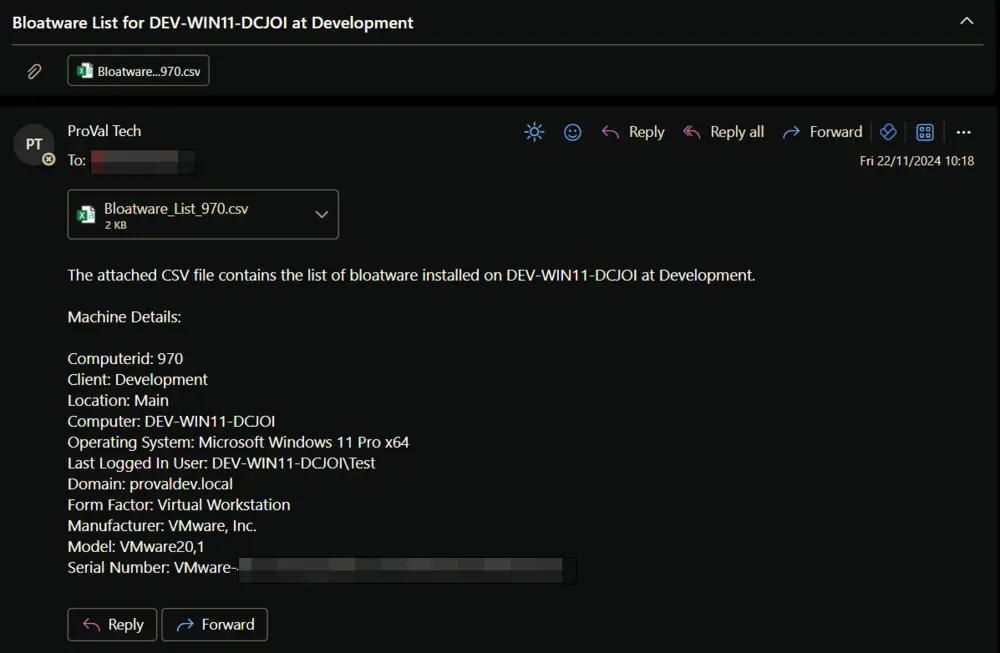
The script is designed to send the list of installed bloatware to the user running the script if the ListBloatware parameter is set to 2.
Sample Email:
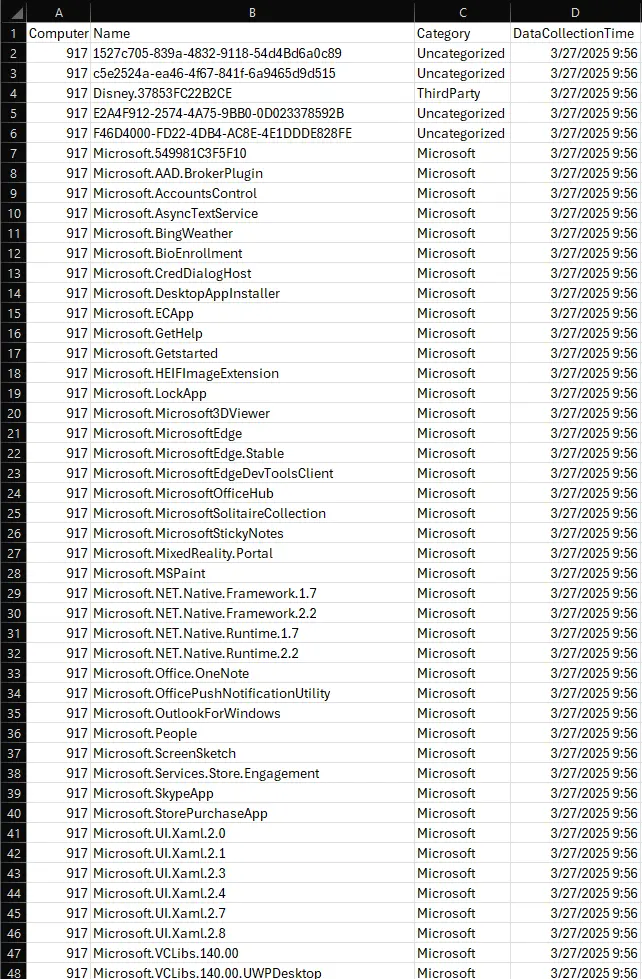
Sample CSV File:
Output
- Script log
- Dataview (if
ListBloatwareparameter is used)
Supported Bloatware
| MsftBloatApps | ThirdPartyBloatApps | WindowsStoreApps | XboxFeaturesApps | NonAppxApps |
|---|---|---|---|---|
| Microsoft.3DBuilder | 46928bounde.EclipseManager | Microsoft.DesktopAppInstaller | Microsoft.Xbox.TCUI | Clean Your Device |
| Microsoft.AppConnector | 4DF9E0F8.Netflix | Microsoft.WindowsStore | Microsoft.XboxApp | Dell Optimizer Service |
| Microsoft.BingFinance | 828B5831.HiddenCityMysteryofShadows | Microsoft.XboxGameOverlay | Dell Power Manager Service | |
| Microsoft.BingNews | 89006A2E.AutodeskSketchBook | Microsoft.XboxIdentityProvider | Dell SupportAssist OS Recovery Plugin for Dell Update | |
| Microsoft.BingSports | 9E2F88E3.Twitter | Microsoft.XboxSpeechToTextOverlay | HP Notifications | |
| Microsoft.BingWeather | A278AB0D.DisneyMagicKingdoms | Microsoft.XboxLive | HP TechPulse | |
| Microsoft.CommsPhone | A278AB0D.MarchofEmpires | Microsoft.XboxGamingOverlay | Lenovo Quick Clean | |
| Microsoft.ConnectivityStore | ActiproSoftwareLLC.562882FEEB491 | Microsoft.GamingApp | Lenovo Vantage Service | |
| Microsoft.Getstarted | AD2F1837.HPPCHardwareDiagnosticsWindows | |||
| Microsoft.Messaging | AD2F1837.HPPowerManager | |||
| Microsoft.Microsoft3DViewer | AD2F1837.HPPrivacySettings | |||
| Microsoft.MicrosoftOfficeHub | AD2F1837.HPQuickDrop | |||
| Microsoft.MicrosoftPowerBIForWindows | AD2F1837.HPSupportAssistant | |||
| Microsoft.MicrosoftSolitaireCollection | AD2F1837.HPSystemInformation | |||
| Microsoft.MicrosoftStickyNotes | AD2F1837.myHP | |||
| Microsoft.MinecraftUWP | AdobeSystemsIncorporated.AdobePhotoshopExpress | |||
| Microsoft.MixedReality.Portal | CAF9E577.Plex | |||
| Microsoft.MSPaint | D52A8D61.FarmVille2CountryEscape | |||
| Microsoft.NetworkSpeedTest | D5EA27B7.Duolingo-LearnLanguagesforFree | |||
| Microsoft.Office.OneNote | Drawboard.DrawboardPDF | |||
| Microsoft.Office.OneNote | E046963F.cameraSettings | |||
| Microsoft.Office.Sway | E046963F.LenovoCompanion | |||
| Microsoft.OneConnect | E046963F.LenovoSettingsforEnterprise | |||
| Microsoft.People | Facebook.Facebook | |||
| Microsoft.Print3D | flaregamesGmbH.RoyalRevolt2 | |||
| Microsoft.RemoteDesktop | GAMELOFTSA.Asphalt8Airborne | |||
| Microsoft.SkypeApp | KeeperSecurityInc.Keeper | |||
| Microsoft.Windows.Photos | king.com.BubbleWitch3Saga | |||
| Microsoft.WindowsAlarms | king.com.CandyCrushSodaSaga | |||
| Microsoft.WindowsCamera | laregamesGmbH.RoyalRevolt2 | |||
| microsoft.windowscommunicationsapps | WhatsApp.WhatsAppDesktop | |||
| Microsoft.WindowsFeedbackHub | Clipchamp.Clipchamp | |||
| Microsoft.WindowsMaps | LinkedIn.LinkedIn | |||
| Microsoft.WindowsPhone | HPInc.MyHP | |||
| Microsoft.WindowsSoundRecorder | SpotifyAB.SpotifyMusic | |||
| Microsoft.ZuneMusic | ||||
| Microsoft.ZuneVideo | ||||
| Microsoft.OneDrive | ||||
| Microsoft.GetHelp | ||||
| Microsoft.PowerAutomateDesktop | ||||
| Microsoft.QuickAssist | ||||
| Microsoft.LinkedIn | ||||
| Microsoft.WindowsCopilot | ||||
| Microsoft.549981C3F5F10 | ||||
| Microsoft.WhatsAppDesktop | ||||
| Microsoft.Todos | ||||
| Microsoft.OneDriveSync | ||||
| Microsoft.Paint3D | ||||
| MicrosoftCorporationII.QuickAssist | ||||
| Microsoft.SpotifyMusic |
Changelog
2026-08-24
- Added another parameter
PuaListSource. Its an Optional source for an alternate PUA list JSON. When provided, the script will use the specified local JSON file or downloadable URL instead of the default PUA list. - Updated the script to use this new parameter and as per our new CWA script standards.
2025-04-01
- Fixed the bug where the script contained several outdated and potentially incorrect AppxPackage IDs in the bloatware removal arrays. Some Microsoft apps have changed their package identifiers in newer Windows versions, and some third-party apps may have incorrect publisher IDs.
2025-04-10
- Initial version of the document