Winget - Install/Update [Autofix,Param]
Summary
This script is created to install and update applications whose packages are available in Winget.
Please find the application package at the following URL: https://winget.run/search
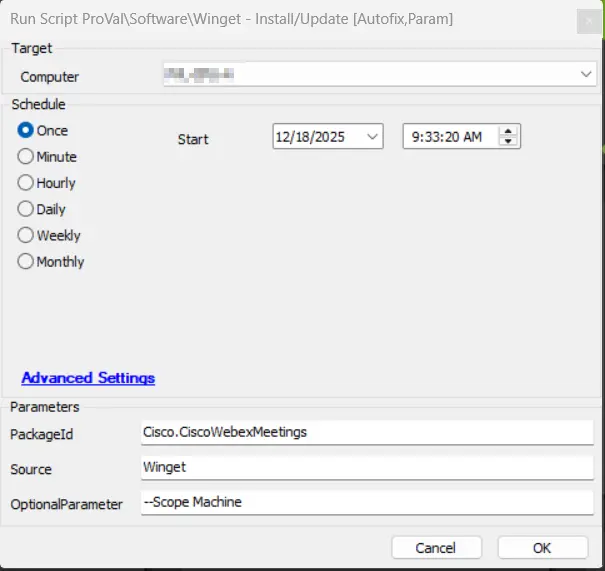
Sample Run
Dependencies
Global Variables
| Name | Value | Accepted Values | Description |
|---|---|---|---|
| Debug | False | False, True | When True, enables informational logging; when False (default), informational logs are suppressed to avoid adding entries to the h_scripts table. Set to True to assist with troubleshooting. |
| ScriptEngineEnableLogger | False | False, True | When True, enables final (success/failure) logging; when False (default), these logs are suppressed to avoid adding entries to the h_scripts table. Set to True to assist with troubleshooting. |
| ProjectName | Invoke-WingetProcessor | This references the Agnostic Script name without the .ps1 and should not be changed. |
User Parameters
| Name | Example | Required | Description |
|---|---|---|---|
| PackageId | Cisco.CiscoWebexMeetings | True | The Winget package you wish to install. |
| Scope | msstore, winget | True | The source to use when obtaining the package. |
| OptionalParameter | --Scope Machine | False | Specifies option parameters to deploy/update/remove the application(s) |
Process
Please refer to Invoke-WingetProcessor for the process.
Output
- Script Log
FAQ
Q. For auto-deployment of application we have monitor Application - Install/Update - [Winget], does the auto-deployment work with the optional parameter needed?
A. No, for auto-deployment you need to copy this script and have to set the OptionalParameter user param to the global parameter with the value set to it and apply that as an autofix because the auto-deployment monitor do not pass the optional parameter value.
Changelog
2026-04-30
- Code signed the script.
2026-01-05
- Fixed the issue where the script was failing due to typographical error in the PowerShell.
2025-05-08
- Added OptionalParameter as a new user parameter to pass any arguments related to installation or configurations.
2025-04-10
- Initial version of the document