PHP2Shell Vulnerability - Audit and Fix
Overview
This is a Datto implementation of the agnostic Detect-PHP2ShellVulnerability script.
The component finds every PHP installation on a Windows device and checks whether it is affected by PHP2Shell (CVE-2026-109618 and CVE-2026-109619). The full result of each installation is saved to a CSV file on the device, and a short status can be written to a user-defined field (UDF) so affected devices are easy to filter. With FixLocalInstall, the component also updates vulnerable standalone PHP installations to a patched release.
PHP2Shell is fixed in PHP 8.5.12, 8.4.27, 8.3.36 and 8.2.35. PHP 8.1 and older are end-of-life and have no fix.
Run the component as a scheduled job so the UDF stays current. Devices without PHP are left unchanged and get the status Not Found.
Only standalone PHP installations are updated. PHP that comes with a stack (XAMPP, WampServer, Laragon and so on) or with another vendor's application is reported but never changed. Update it through that product. End-of-life branches are also reported only.
While a standalone installation is updated, IIS, services and processes that use it are stopped and started again. Run FixLocalInstall during a maintenance window on web servers.
Dependencies
Implementation
- Download the component PHP2Shell Vulnerability - Audit and Fix from the attachments.
- After downloading the file, click on the
Importbutton in the Datto RMM interface. - Select the component just downloaded and add it to the Datto RMM interface.

- After Importing the component to the Datto RMM, make sure to add the component to the
PVALGroup always.- Steps to Add the component under
PVALGroup.
i. Click onDrop Down Icon.
ii. Click onAdd to Group.

iii. Select the group asPVAL

- Steps to Add the component under
For detailed instructions on importing a Datto component, see Workflow for Implementing Engineers.
Sample Run
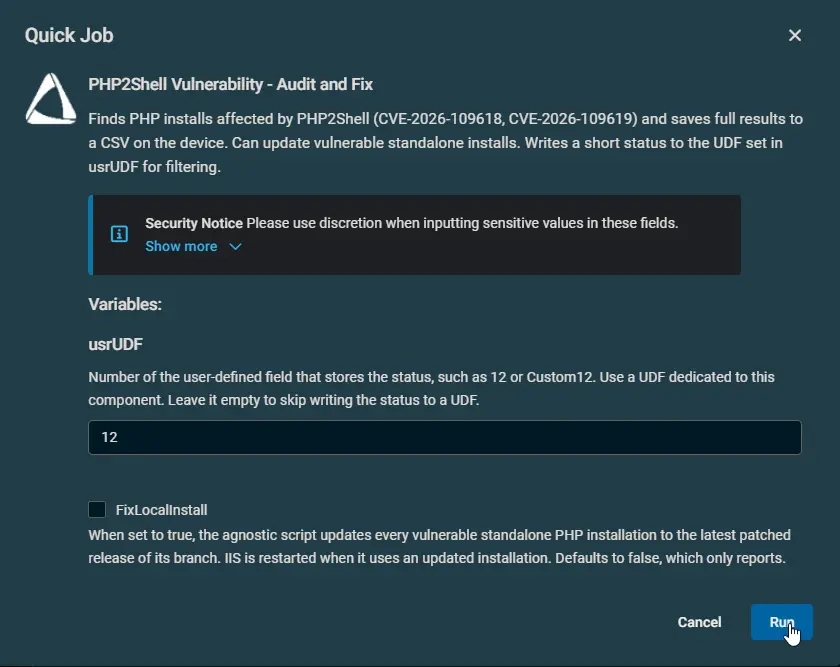
Examples
Scenario 1: Standard Deployment
Run with all variables left at their defaults.
Expected output:
- Every PHP installation is checked, and nothing on the device is changed.
- The result of each installation is saved to the CSV file, and a summary is shown in the Activity Log.
- No UDF is updated.
Scenario 2: usrUDF
Run with user parameter usrUDF = 12.
Expected output:
- The same check as the standard deployment.
- The device status, such as
VulnerableorAll Good, is written to UDF 12. See UDF Status.
Scenario 3: FixLocalInstall
Run with user parameters FixLocalInstall = True and usrUDF = 12.
Expected output:
- Each vulnerable standalone PHP installation is updated to the latest patched release of its branch. The installation folder is backed up to a zip file first, and
php.iniand third-party extensions are kept. - An installation managed by winget at machine level is updated through winget. If winget doesn't bring it to a patched version, the files are replaced directly.
- If an update fails, the original files are restored from the backup and the status is
Update Failed. - The CSV file shows what was done with each installation, and UDF 12 shows the status after the update.
Datto Variables
| Variable Name | Type | Default | Description |
|---|---|---|---|
FixLocalInstall | Boolean | False | Updates every vulnerable standalone PHP installation to the latest patched release of its branch. False only reports. |
usrUDF | String | Number of the UDF that stores the status, such as 12. Use a UDF dedicated to this component. Blank skips the UDF. |
UDF Status
The UDF holds one short status so devices can be filtered in views and used as targeting criteria. The details for each installation are in the CSV file.
| Status | Meaning |
|---|---|
Not Found | No PHP installation was found. |
All Good | Every PHP installation is patched. |
Vulnerable | At least one installation is vulnerable or on an end-of-life branch. |
Unknown Version | The version of at least one installation couldn't be read. The rest are patched. |
Update Failed | FixLocalInstall couldn't update at least one installation. |
Script Failed | The check couldn't finish. |
No status contains another, so a view filter such as UDF 12 contains Vulnerable matches only that status. contains Failed matches both failure statuses.
Results by Device
| Device | Result |
|---|---|
| No PHP installation | Success. No CSV file. UDF set to Not Found. |
| All installations patched | Success. UDF set to All Good. |
| Vulnerable or end-of-life installation found | Success. UDF set to Vulnerable. |
| Version of an installation couldn't be read | Success. UDF set to Unknown Version. |
| All vulnerable standalone installations updated | Success. UDF set to All Good, or Vulnerable if stack, vendor or end-of-life installations remain. |
| An update failed | Failure. The CSV file and the UDF (Update Failed) are written first. The Activity Log shows the error log. |
| The check couldn't finish | Failure. UDF set to Script Failed. The Activity Log shows the reason. |
usrUDF isn't a valid number | Failure. No changes. |
| Component or script failed its signature check | Failure. No changes. The UDF keeps its previous value. |
| Script could not be downloaded and no copy is on the device | Failure. No changes. The UDF keeps its previous value. |
| Script blocked by a security application | Failure. The Activity Log states that a security application seems to have interrupted the script. |
Output
- Activity Log
- UDF set in
usrUDF - CSV file on the device:
C:\ProgramData\_Automation\Script\Detect-PHP2ShellVulnerability\Detect-PHP2ShellVulnerability.csv
- Script logs on the device:
C:\ProgramData\_Automation\Script\Detect-PHP2ShellVulnerability\Detect-PHP2ShellVulnerability-log.txtC:\ProgramData\_Automation\Script\Detect-PHP2ShellVulnerability\Detect-PHP2ShellVulnerability-error.txt
- Backups made by
FixLocalInstall:C:\ProgramData\_Automation\Script\Detect-PHP2ShellVulnerability\Backup\
CSV File
The CSV file is replaced on every run, so it always reflects the latest run. It has one row per PHP installation.
| Column | Description |
|---|---|
Path | Folder of the PHP installation. |
Name | Owning product: PHP, the stack name, the application that bundles PHP, or Unknown application. |
Publisher | Publisher of the owning product, when known. |
IsNative | True for a standalone PHP installation, otherwise False. |
InstallType | Standalone, Stack or Vendor. |
ManagedBy | Winget, Winget (user scope) or None. |
PackageId | Winget package ID of a winget installation. |
ExecutablePath | php.exe, php-cgi.exe or the engine DLL the version was read from. |
Version | PHP version. After a successful update, the new version. |
Architecture | x64, x86, arm64 or Unknown. |
ThreadSafety | TS, NTS or Unknown. |
InIis | True when IIS uses the folder, otherwise False. |
Running | True when PHP from the folder is running, otherwise False. |
Status | Patched, Vulnerable, EndOfLife or Unknown. |
RequiredVersion | First fixed release for the installation's branch. |
Action | What was done with the installation, such as None, the update details, or why it was skipped or failed. |
ScriptRunTime | Time the component ran (yyyy-MM-dd HH:mm:ss). |
Attachments
Changelog
2026-11-06
- Initial version of the document