QuickPass Agent Deployment
Overview
Deploys the QuickPass Agent, replacing the older agent when needed, and can also configure the Duo Security Credential Provider to allow QuickPass.
Requirements
- Windows
- Run As:
System - PowerShell 5.1
Sample Run
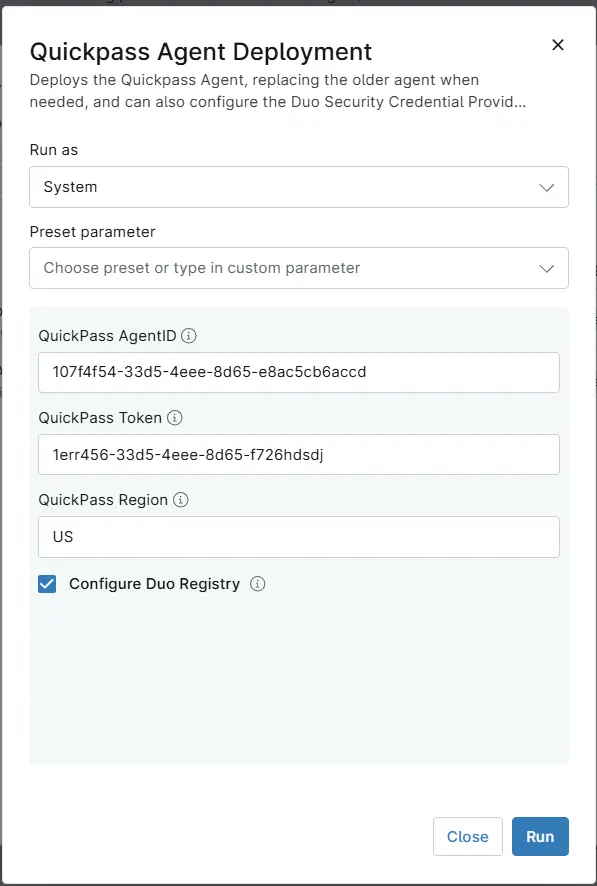
Parameters
| Name | Example | Accepted Values | Required | Default | Type | Description |
|---|---|---|---|---|---|---|
| QuickPass AgentID | 107f4f54-33d5-4eee-8d65-e8ac5cb6accd | False | - | Text | Enter the QuickPass Agent ID to associate the endpoint with the correct client organization for centralized management and site-level administration. | |
| QuickPass Token | 1err456-33d5-4eee-8d65-f726hdsdj | False | - | Text | Enter the QuickPass Token to authenticate the installer and associate the endpoint with the correct MSP/tenant account. | |
| QuickPass Region | 1err456-33d5-4eee-8d65-f726hdsdj | False | - | Text | Enter the QuickPass Region to connect the agent to the appropriate regional QuickPass service endpoint for installation and communication. | |
| Configure Duo Registry | False | - | Checkbox | Select it to configure the Duo Security Credential Provider to allow QuickPass. |
Custom Fields
| Custom Field | Scope | Type | Description |
|---|---|---|---|
| cPVAL QuickPass AgentID | Organization, Location, Device | Text | Custom field to enter the QuickPass Agent ID to associate the endpoint with the correct client organization for centralized management and site-level administration. |
| cPVAL QuickPass Token | Organization, Location, Device | Text | Custom Field to enter the QuickPass Token to authenticate the installer and associate the endpoint with the correct MSP/tenant account. |
| cPVAL QuickPass Region | Organization, Location, Device | Text | Custom field to enter the QuickPass Region to connect the agent to the appropriate regional QuickPass service endpoint for installation and communication. |
Dependencies
- Custom Field - cPVAL QuickPass AgentID
- Custom Field - cPVAL QuickPass Token
- Custom Field - cPVAL QuickPass Region
- Solution - Deploy QuickPass Agent
Automation Setup/Import
Output
- Activity Details
Changelog
2026-10-21
- Initial version of the document