Install Certificate - Macintosh
Overview
This script installs the certificate to a defined certificate location on MAC machines. If no particular location is defined, it will import the certificate at the root location of the machine and apply it to the entire system.
Sample Run
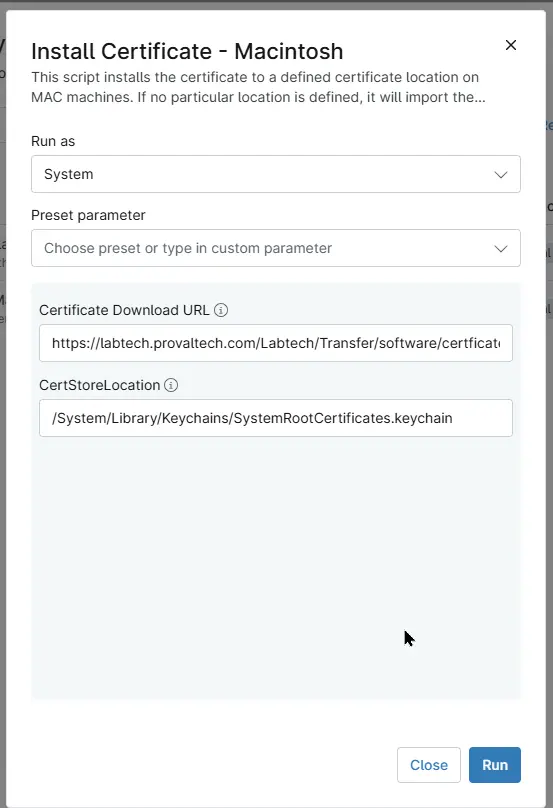
Dependencies
- Custom Field - cPVAL MAC Certificate Download URL
- Custom Field - cPVAL MAC CertStoreLocation
- Solution - Install Certificates - Windows/Mac
Parameters
| Name | Example | Required | Default | Type | Description |
|---|---|---|---|---|---|
| Certificate Download URL | https://example.com/certficates/DNSFilter.cer | False | - | Text/String | Direct download URL of the certificate. Something like this: https://example.com/certficates/DNSFilter.cer |
| CertStoreLocation | /System/Library/Keychains/SystemRootCertificates.keychain | False | /Library/Keychains/System.keychain | Text/String | Particular keychain to import a certificate on a MAC machine. It could be something like /System/Library/Keychains/SystemRootCertificates.keychain, /Users/YourUsername/Library/Keychains/login.keychain, etc. If nothing is mentioned in the parameter, it will use the default system-wide keychain, applying trusted root certificates to the entire system, i.e., /Library/Keychains/System.keychain. |
Automation Setup/Import
Output
- Activity Details
Changelog
2026-09-28
- Initial version of the document