Office C2R - Repair
Summary
This checks the office version, then runs a PS1 for repair. If you want to run a full repair, then type the variable FullRepair or QuickRepair as per your Requirements.
Accepted Values for the variable:
- QuickRepair
- FullRepair
Dependencies
- PowerShell 5.0+
MicrosoftC2RRepair.ps1- Solution - Microsoft365 Click-to-Run Solution
Implementation
-
Export the agent procedure from ProVal's VSA RMM instance.
Name:Office C2R - Repair

The export will download the necessary XML file. -
Import this XML file into the partner's VSA RMM instance.
-
Export the
MicrosoftC2RRepair.ps1from the ProVal's Internal VSA. This is also placed under the below path:
Manage Files>Shared Files>PVAL>MicrosoftC2RRepair.ps1
-
Map the
MicrosoftC2RRepair.ps1into the 12th step of the script in the client's environment.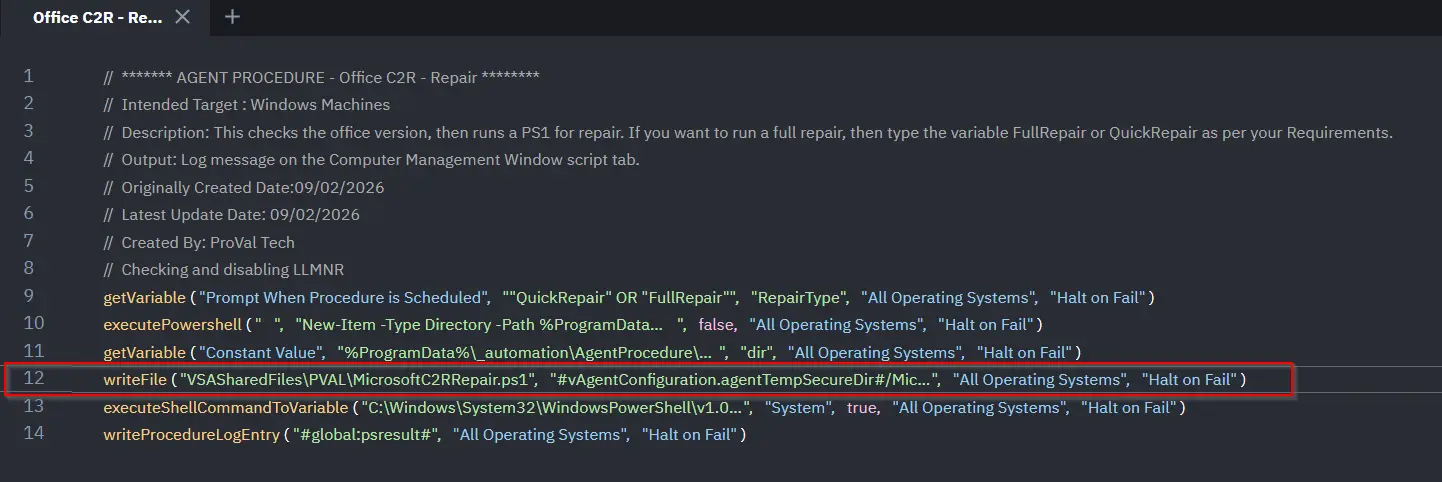
-
Execute the agent procedure in the partne's VSA RMM and put the Repair type that you want to do and click Submit:

Output
- Agent Procedure History Log
Changelog
2026-03-11
- Initial version of the document