.Net 3.5 Feature
Summary
This monitor verifies the installation status of the .NET Framework 3.5 feature on Windows 10 and Windows 11 workstations. It executes a PowerShell check for the 'NetFx3' feature state. If the feature is disabled, the monitor returns a 'Compliance Failure' alert, which triggers the associated autofix action to install the framework
Details
Suggested "Limit to": Enable .Net 3.5 Feature
Suggested Alert Style: Once
Suggested Alert Template: △ Custom - Enable - .Net 3.5 Feature
| Check Action | Server Address | Check Type | Comparator | Interval | Result |
|---|---|---|---|---|---|
| System | 127.0.0.1 | Run File | Does Not Contain | 86400 | Compliance Failure: |
Dependencies
Target
Managed Windows Workstations
Implementation
Step 1
Import the Alert Template △ Custom - Enable - .Net 3.5 Feature from ProSync plugin.
Step 2
Run this SQL query from a RAWSQL monitor set to import the required search:
INSERT INTO `sensorchecks` (`Name`, `SQL`, `QueryType`, `ListDATA`, `FolderID`, `GUID`, `SearchXML`)
SELECT
    'Enable .Net 3.5 Feature',
    'SELECT \r\n   computers.computerid as `Computer Id`,\r\n   computers.name as `Computer Name`,\r\n   clients.name as `Client Name`,\r\n   computers.domain as `Computer Domain`,\r\n   computers.username as `Computer User`,\r\n   IFNULL(IFNULL(edfAssigned1.Value,edfDefault1.value),\'0\') as `Computer - Client - Extra Data Field - Automation - Enable  - Net 3 - 5 Feature`,\r\n   IFNULL(IFNULL(edfAssigned2.Value,edfDefault2.value),\'0\') as `Computer - Location - Extra Data Field - Exclusions -  - Net 3 - 5 Feature - Exclusion`,\r\n   IFNULL(IFNULL(edfAssigned3.Value,edfDefault3.value),\'0\') as `Computer - Extra Data Field - Exclusions -  - Net 3 - 5 Feature - Exclusion`,\r\n   inv_operatingsystem.name as `Computer.OS.Name`\r\nFROM Computers \r\nLEFT JOIN inv_operatingsystem ON (Computers.ComputerId=inv_operatingsystem.ComputerId)\r\nLEFT JOIN Clients ON (Computers.ClientId=Clients.ClientId)\r\nLEFT JOIN Locations ON (Computers.LocationId=Locations.LocationID)\r\nLEFT JOIN ExtraFieldData edfAssigned1 ON (edfAssigned1.id=Clients.ClientId and edfAssigned1.ExtraFieldId =(Select ExtraField.id FROM ExtraField WHERE LTGuid=\'2f62be2d-b647-49ba-a6f5-285331fce078\'))\r\nLEFT JOIN ExtraFieldData edfDefault1 ON (edfDefault1.id=0 and edfDefault1.ExtraFieldId =(Select ExtraField.id FROM ExtraField WHERE LTGuid=\'2f62be2d-b647-49ba-a6f5-285331fce078\'))\r\nLEFT JOIN ExtraFieldData edfAssigned2 ON (edfAssigned2.id=Locations.LocationId and edfAssigned2.ExtraFieldId =(Select ExtraField.id FROM ExtraField WHERE LTGuid=\'958391f6-5501-42ac-991e-65af8a5b3463\'))\r\nLEFT JOIN ExtraFieldData edfDefault2 ON (edfDefault2.id=0 and edfDefault2.ExtraFieldId =(Select ExtraField.id FROM ExtraField WHERE LTGuid=\'958391f6-5501-42ac-991e-65af8a5b3463\'))\r\nLEFT JOIN ExtraFieldData edfAssigned3 ON (edfAssigned3.id=Computers.ComputerId and edfAssigned3.ExtraFieldId =(Select ExtraField.id FROM ExtraField WHERE LTGuid=\'2c30a38c-7f5b-47fd-a3f6-1a651328313d\'))\r\nLEFT JOIN ExtraFieldData edfDefault3 ON (edfDefault3.id=0 and edfDefault3.ExtraFieldId =(Select ExtraField.id FROM ExtraField WHERE LTGuid=\'2c30a38c-7f5b-47fd-a3f6-1a651328313d\'))\r\n WHERE \r\n((((IFNULL(IFNULL(edfAssigned1.Value,edfDefault1.value),\'0\')<>0) AND (IFNULL(IFNULL(edfAssigned2.Value,edfDefault2.value),\'0\')=0) AND (IFNULL(IFNULL(edfAssigned3.Value,edfDefault3.value),\'0\')=0) AND (((inv_operatingsystem.name like \'%Windows 11%\') OR (inv_operatingsystem.name like \'%Windows 10%\'))))))\r\n',
    4,
    'Select||=||=||=|^Select|||||||^',
    0,
    '964ceefc-09bf-4a62-9c37-fe95376607f3',
    '<LabTechAbstractSearch><asn><st>AndNode</st><cn><asn><st>AndNode</st><cn><asn><st>ComparisonNode</st><lon>Computer.Client.Extra Data Field.Automation.Enable .Net 3.5 Feature</lon><lok>Computer.Client.Edf.2f62be2d-b647-49ba-a6f5-285331fce078</lok><lmo>IsTrue</lmo><dv>NULL</dv><dk>NULL</dk></asn><asn><st>ComparisonNode</st><lon>Computer.Location.Extra Data Field.Exclusions..Net 3.5 Feature - Exclusion</lon><lok>Computer.Location.Edf.958391f6-5501-42ac-991e-65af8a5b3463</lok><lmo>IsFalse</lmo><dv>NULL</dv><dk>NULL</dk></asn><asn><st>ComparisonNode</st><lon>Computer.Extra Data Field.Exclusions..Net 3.5 Feature - Exclusion</lon><lok>Computer.Edf.2c30a38c-7f5b-47fd-a3f6-1a651328313d</lok><lmo>IsFalse</lmo><dv>NULL</dv><dk>NULL</dk></asn><asn><st>OrNode</st><cn><asn><st>ComparisonNode</st><lon>Computer.OS.Name</lon><lok>Computer.OS.Name</lok><lmo>TextLike</lmo><dv>%Windows 11%</dv><dk>%Windows 11%</dk></asn><asn><st>ComparisonNode</st><lon>Computer.OS.Name</lon><lok>Computer.OS.Name</lok><lmo>TextLike</lmo><dv>%Windows 10%</dv><dk>%Windows 10%</dk></asn></cn></asn></cn></asn></cn></asn></LabTechAbstractSearch>'
FROM
    (SELECT MIN(computerid) FROM computers) a
WHERE
    (SELECT COUNT(*) FROM SensorChecks WHERE `GUID` = '964ceefc-09bf-4a62-9c37-fe95376607f3') = 0;
Step 3
Obtain the group ID(s) of the group(s) that the remote monitor should be applied to.
Step 4
Copy the following query and replace YOUR COMMA SEPARATED LIST OF GROUPID(S) with the group ID(s) of the relevant groups. (The string to replace can be found at the very bottom of the query, right after WHERE).
SET @searchid = (SELECT sensid FROM sensorchecks WHERE `GUID` = '964ceefc-09bf-4a62-9c37-fe95376607f3');
SET @alertaction = (SELECT min(alertactionid) from alerttemplate where `Guid` = 'd7b0ca24-8152-400b-8534-6902f5fd9143');
INSERT INTO
    groupagents
SELECT
    '' as `AgentID`,
    `groupid` as `GroupID`,
    @searchid as `SearchID`,
    'ProVal - Production - .Net 3.5 Feature' as `Name`,
    6 as `CheckAction`,
    @alertaction as `AlertAction`,
    '<No Alert>~~~<No Alert>!!!<No Alert>~~~<No Alert>' as `AlertMessage`,
    '0' as `ContactID`,
    '86400' as `interval`,
    '127.0.0.1' as `Where`,
    '7' as `What`,
    'C:\\Windows\\System32\\WindowsPowerShell\\v1.0\\powershell.exe -ExecutionPolicy Bypass -Command "$ProgressPreference = \'SilentlyContinue\'; $state = (Get-WindowsOptionalFeature -Online -FeatureName \'NetFx3\' -ErrorAction SilentlyContinue).State; if ($state -eq \'Enabled\') { \'Status OK: .NET Framework 3.5 is enabled.\' } else { return (\'Compliance Failure: .NET Framework 3.5 is not enabled. Current state is \'\'{0}\'\'.\' -f $state) }"' as `DataOut`,
    '9' as `Comparor`,
    'Compliance Failure:' as `DataIn`,
    '' as `IDField`,
    '1' as `AlertStyle`,
    '0' as `ScriptID`,
    '' as `datacollector`,
    '21' as `Category`,
    '0' as `TicketCategory`,
    '1' as `ScriptTarget`,
    (UUID()) as `GUID`,
    'root' as `UpdatedBy`,
    (NOW()) as `UpdateDate`
FROM
    mastergroups m
WHERE
    m.groupid IN (YOUR COMMA SEPARATED LIST OF GROUPID(S))
    AND m.groupid NOT IN  (
        SELECT
            DISTINCT groupid
        FROM
            groupagents
        WHERE
            `Name` = 'ProVal - Production - .Net 3.5 Feature'
        );
Step 5
An example of the query with group IDs and modified thresholds:
SET @searchid = (SELECT sensid FROM sensorchecks WHERE `GUID` = '964ceefc-09bf-4a62-9c37-fe95376607f3');
SET @alertaction = (SELECT min(alertactionid) from alerttemplate where `Guid` = 'd7b0ca24-8152-400b-8534-6902f5fd9143');
INSERT INTO
    groupagents
SELECT
    '' as `AgentID`,
    `groupid` as `GroupID`,
    @searchid as `SearchID`,
    'ProVal - Production - .Net 3.5 Feature' as `Name`,
    6 as `CheckAction`,
    @alertaction as `AlertAction`,
    '<No Alert>~~~<No Alert>!!!<No Alert>~~~<No Alert>' as `AlertMessage`,
    '0' as `ContactID`,
    '86400' as `interval`,
    '127.0.0.1' as `Where`,
    '7' as `What`,
    'C:\\Windows\\System32\\WindowsPowerShell\\v1.0\\powershell.exe -ExecutionPolicy Bypass -Command "$ProgressPreference = \'SilentlyContinue\'; $state = (Get-WindowsOptionalFeature -Online -FeatureName \'NetFx3\' -ErrorAction SilentlyContinue).State; if ($state -eq \'Enabled\') { \'Status OK: .NET Framework 3.5 is enabled.\' } else { return (\'Compliance Failure: .NET Framework 3.5 is not enabled. Current state is \'\'{0}\'\'.\' -f $state) }"' as `DataOut`,
    '9' as `Comparor`,
    'Compliance Failure:' as `DataIn`,
    '' as `IDField`,
    '1' as `AlertStyle`,
    '0' as `ScriptID`,
    '' as `datacollector`,
    '21' as `Category`,
    '0' as `TicketCategory`,
    '1' as `ScriptTarget`,
    (UUID()) as `GUID`,
    'root' as `UpdatedBy`,
    (NOW()) as `UpdateDate`
FROM
    mastergroups m
WHERE
    m.groupid IN (2,3)
    AND m.groupid NOT IN  (
        SELECT
            DISTINCT groupid
        FROM
            groupagents
        WHERE
            `Name` = 'ProVal - Production - .Net 3.5 Feature'
        );
Step 6
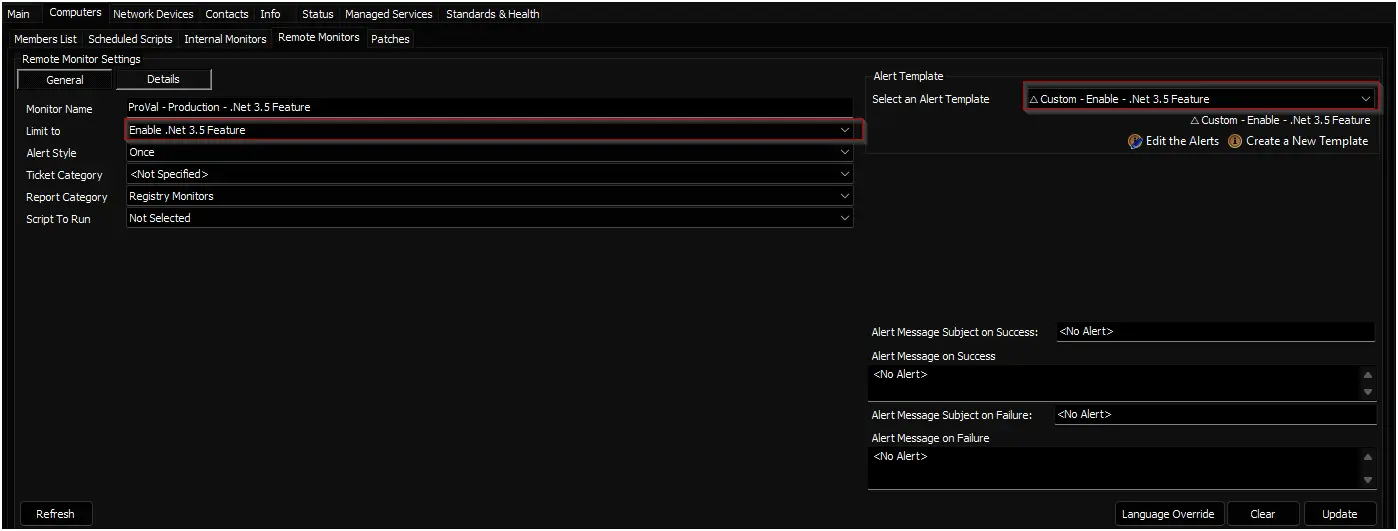
Check the concerned groups and ensure the monitor set is created and configured with the correct search and alert template.
Limit to: Enable .Net 3.5 Feature
Alert Template: △ Custom - Enable - .Net 3.5 Feature
Changelog
2026-01-14
- Initial version of the document