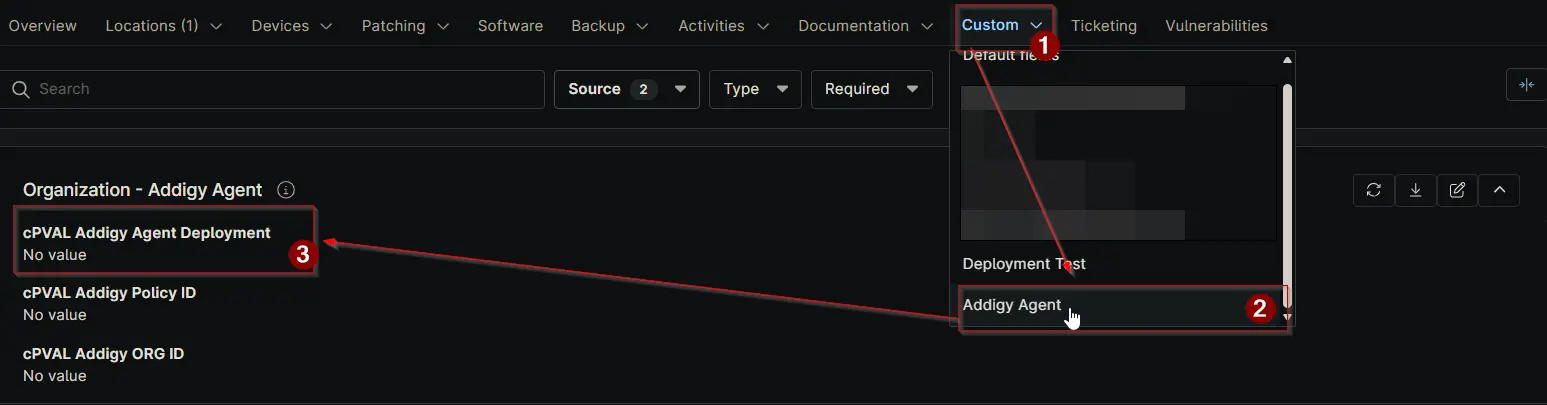
cPVAL Addigy Agent Deployment
Summary
Controls Addigy agent auto-deployment for macOS devices. Choose Enable to deploy agents at the selected level; choose Disable to prevent deployment. Device > Location > Organization in precedence.
Details
| Label | Field Name | Definition Scope | Type | Options | Required | Default Value | Technician Permission | Automation Permission | API Permission | Description | Tool Tip | Footer Text | Custom Field Tab Name |
|---|---|---|---|---|---|---|---|---|---|---|---|---|---|
| cPVAL Addigy Agent Deployment | cpvalAddigyAgentDeployment | Organization, Location, Device | Drop-down |
| False | Editable | Read_Write | Read_Write | Controls Addigy agent auto-deployment for macOS devices. Choose Enable to deploy agents at the selected level; choose Disable to prevent deployment. Device > Location > Organization in precedence. | Enable or disable automatic Addigy agent deployment for macOS devices at this level; device-level settings override location and organization. | Device-level settings take priority over Location and Organization. Disabling at Device stops deployment even if higher levels are enabled. Review hierarchy before changes. | Addigy Agent |
Dependencies
Custom Field Creation
Sample Screenshot
Changelog
2025-11-25
- Initial version of the document