cPVAL Whitelisted ScreenConnect Instances
Summary
This custom field lists which ScreenConnect instances are approved for an organization, location, or device.
The monitoring automation checks installed ScreenConnect instances against this list. Any instance not in the list is treated as unapproved and handled by the mode set in cPVAL Unknown ScreenConnect Monitoring custom-field.
Note: If this field is left blank, no ScreenConnect instances are considered approved. In that case,
Audit Onlyreports all instances as unapproved,Audit and Alertgenerates ticket output for all instances, andAutofix and Alert on Failureattempts to remove all detected instances.
Set this field carefully before enabling Autofix to avoid removing valid internal or support ScreenConnect instances.
Details
| Label | Field Name | Definition Scope | Type | Required | Default Value | Example | Technician Permission | Automation Permission | API Permission | Description | Tool Tip | Footer Text | Custom Field Tab Name |
|---|---|---|---|---|---|---|---|---|---|---|---|---|---|
cPVAL Whitelisted ScreenConnect Instances | cpvalWhitelistedScreenconnectInstances | Organization, Location, Device | Text | False | f9bd08838e48593e, 9cf67d59637466e5 | Editable | Read_Write | Read_Write | Defines approved ScreenConnect instances allowed on the device. Any instance not listed here is treated as non-approved and subject to auditing, alerting, or removal based on monitoring configuration. | Enter approved ScreenConnect instance identifiers. If left blank, all detected ScreenConnect instances are considered non-whitelisted. | Leaving this field empty will treat all ScreenConnect installs as unauthorized. When Autofix is enabled, all instances may be removed. | Unknown ScreenConnect Monitoring |
Dependencies
Custom Field Creation
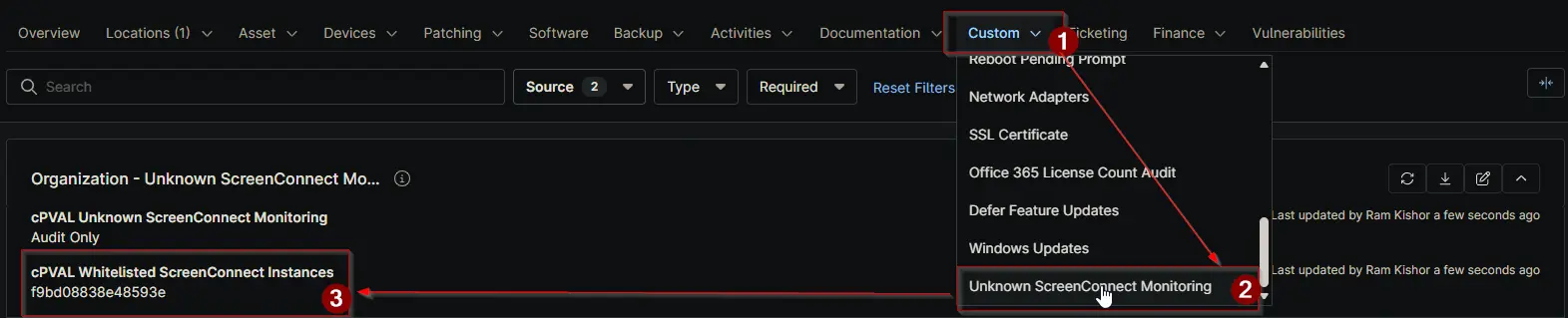
Sample Screenshot
Changelog
2026-04-09
- Initial version of the document