Test AD Health and Repair
Overview
This script automates health checks, self-healing, and conditional service restarts for Active Directory Domain Controllers. It helps administrators quickly identify and remediate AD issues, ensuring domain controller reliability and service continuity.
Sample Run
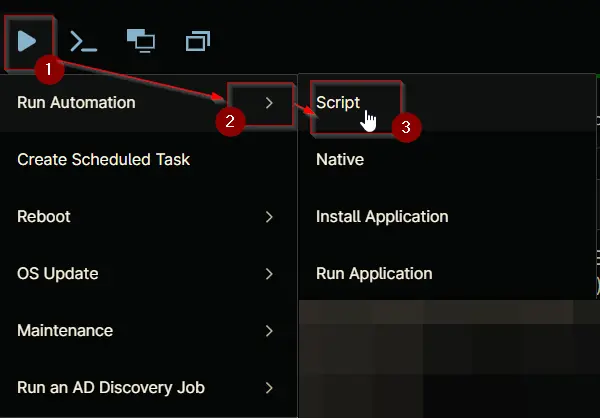
Play Button > Run Automation > Script
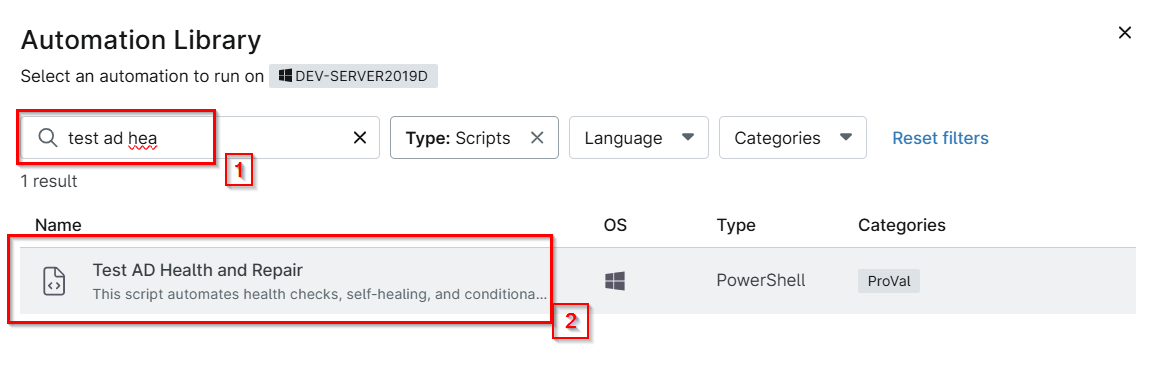
Search and select Test Ad Health and Repair
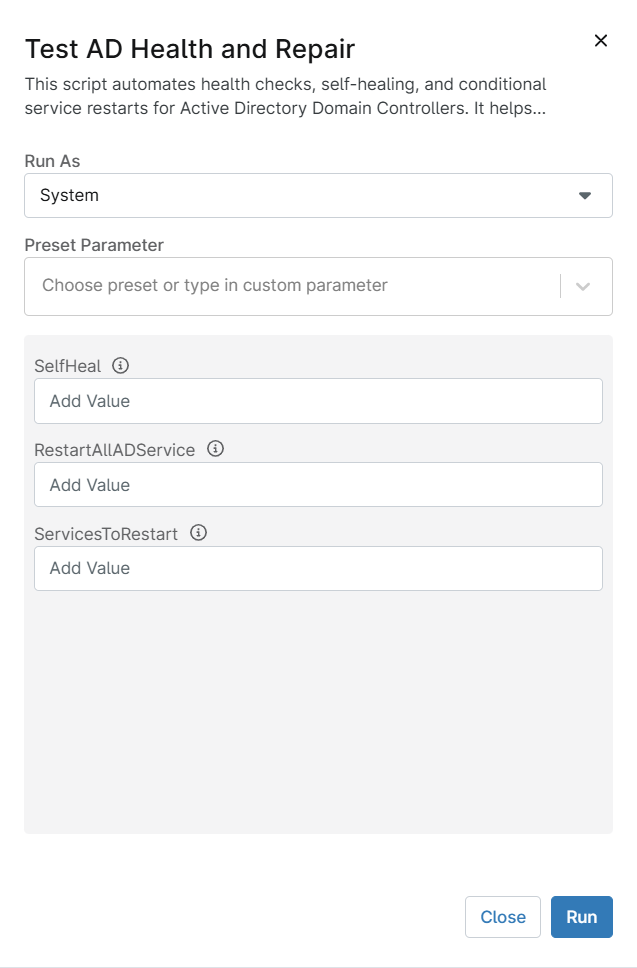
Set the required arguments and click the Run button to run the script.
- Run As:
System - Preset Parameter:
<Leave it Blank> - SelfHeal:
Initiates self-healing actions if AD issues are detected.Leave it blank to disable self-healing for the AD health issue fix, or set it to 1, to enable the self-healing feature. - RestartAllADService:
Restarts all core AD-related services if issues are detected and SelfHeal is enabled. Leave it blank for no action, or set it to 1, to allow all AD services to restart. Note: The SelfHeal parameter must be enabled for this feature to operate. - ServicesToRestart:
Specify one or more AD-related services to restart if issues are detected and SelfHeal is enabled. Ex: DNS, Netlogon. Note: The SelfHeal parameter must be enabled for this feature to operate.
Run Automation: Yes

Dependencies
Parameters
| Name | Required | Accepted Values | Default | Type | Description |
|---|---|---|---|---|---|
| SelfHeal | False | 1 | String/Text | Initiates self-healing actions if AD issues are detected. Leave it blank to disable self-healing for the AD health issue fix, or set it to 1, to enable the self-healing feature. | |
| RestartAllADService | False | 1 | String/Text | Restarts all core AD-related services if issues are detected and SelfHeal is enabled. Leave it blank for no action, or set it to 1, to allow all AD services to restart. Note: The SelfHeal parameter must be enabled for this feature to operate. | |
| ServicesToRestart | False | DNS, Netlogon | String/Text | Specify one or more AD-related services to restart if issues are detected and SelfHeal is enabled. Ex: DNS, Netlogon. Note: The SelfHeal parameter must be enabled for this feature to operate. |
Automation Setup/Import
Output
- Activity Details
- Refer to the logs: "C:\ProgramData_automation\Script\Test-ADHealthAndRepair\Test-ADHealthAndRepair-log.txt"
- Refer to the error logs: "C:\ProgramData_automation\Script\Test-ADHealthAndRepair\Test-ADHealthAndRepair-error.txt"
- Custom field - cPVAL AD Health Repair Result
Changelog
2025-12-17
- Updated the script to show the AD health status in the Custom Field
cPVAL AD Health & Repair Result
2025-08-05
- Initial version of the document