Windows Update - Repair
Summary
This script attempts to repair and reset Windows update settings using the ProVal script: Repair-WindowsUpdate
The goal of this script is to fix potential patching issues for Windows devices.
Files Hash
Potential File Name: C:\ProgramData\_automation\script\Repair-WindowsUpdate\Repair-WindowsUpdate-AI.ps1
File Hash (Sha256): 3F873CB313BAD5077DF1D9DF112E2420749AA7311E89866850D4B16F8A089C98
File Hash (MD5): 4787A5FD35BE02D086CB5732D84018C2
Sample Run
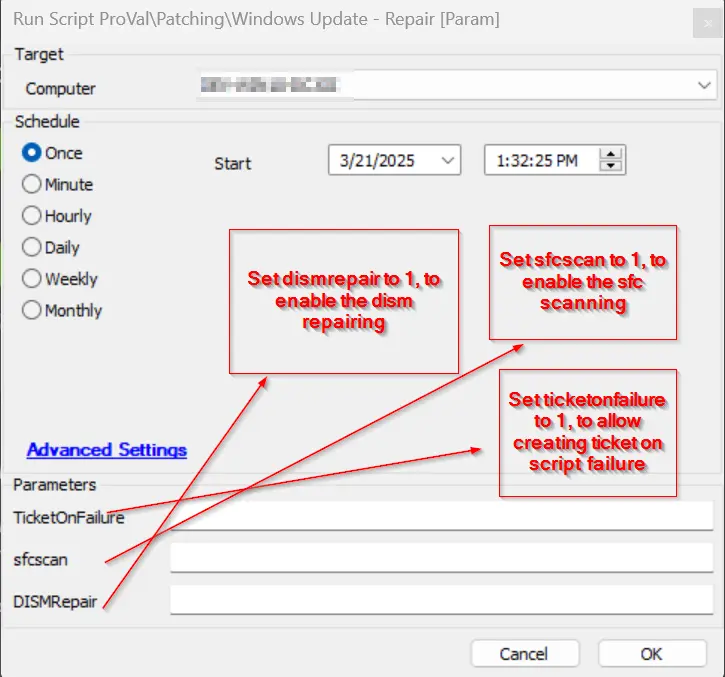
Dependencies
Global Parameters
| Name | Example | Description |
|---|---|---|
| Someone@somewhere.com | The email address of the recipient for any failed run of the script. | |
| TicketOnFailure-G | 1 or anything else | 1 will enable ticketing on failure; anything else disables this feature. |
| TicketCreationCategory | 178 | The ticket creation category for the created ticket. |
User Parameters
| Name | Example | Required | Description |
|---|---|---|---|
| SfcScan | 1 | False | 1 to execute SFC Scan as well; leave it blank to skip SFC Scan. |
| TicketOnFailure | 1 or anything else | False | 1 will enable ticketing on failure; anything else will disable this feature. |
| DISMRepair | 1 | False | 1 to execute the DISM repair task with the windows patch component reset |
Process
Executes the Agnostic script Repair-WindowsUpdate Attempts to remove the SoftwareDistribution.old and catroot2.old directories if new SoftwareDistribution and catroot2 directories are created. Reset the Windows update components. Logs successes and failures accordingly. If the script fails to repair the device, it will verify the global variable settings and notify as configured.
Output
- Script Logs
Changelog
2025-04-10
- Initial version of the document
2025-03-24
- Changes made to the agnostic and implementation script to add the dism feature. The hash changed, sample run demo changed, and addition made for the dism param
2025-03-18
- Fixed the Windows Update—Repair [Param] script, removing the execute PowerShell part and converting it to the execution method of write file format to create file hashing. Also, updated the powershell used in the agnostic to Reset the Windows Update Components.