DUO Auth Proxy Deployed Devices
Summary
This document shows the devices where the "DUO Security Authentication Proxy" application is deployed by the script "DUO Auth Proxy - Install/Update Latest Version." It is built for auditing purposes.
Dependencies
CW RMM Custom Fields - DUO Auth Proxy Deployment
Details
| Field Name | Type of Field (Machine or Organization) | Description |
|---|---|---|
| DUO Auth Proxy Deployed Devices | Dynamic | This shows the devices where the "DUO Security Authentication Proxy" application is deployed by the script "DUO Auth Proxy - Install/Update Latest Version." It is built for auditing purposes. |
Group Creation
-
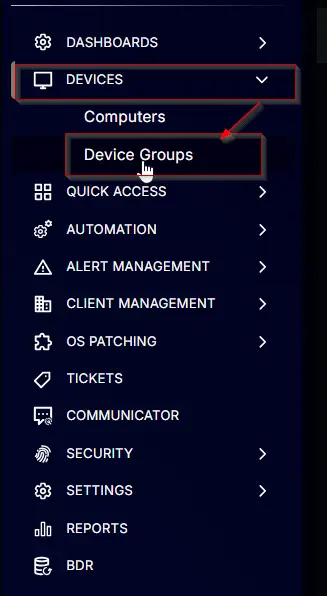
Navigate to
Devices>Device Groups.
-
Create a new dynamic group by clicking the
Dynamic Groupbutton.

This page will appear after clicking on theDynamic Groupbutton:

-
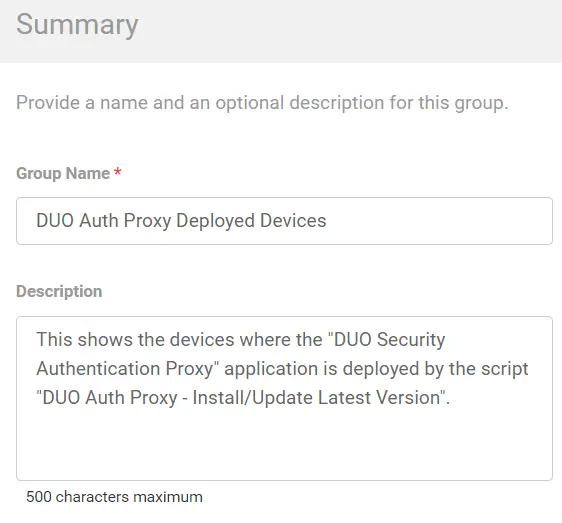
Set the group name to
DUO Auth Proxy Deployed Devices.
Description:This shows the devices where the "DUO Security Authentication Proxy" application is deployed by the script "DUO Auth Proxy - Install/Update Latest Version."
-
Search and select the
Duo Auth Proxy Resultcustom field from the search box.
SetSuccessin the comparison condition.

Condition:Duo Auth Proxy ResultContain any ofSuccess
Changelog
2025-04-10
- Initial version of the document