Microsoft Edge - Extension - Remove
Summary
This script is used to remove the enforcement of the installation of an extension or list of extensions in the Chromium version of the Microsoft Edge browser.
Time Saved by Automation: 10 Minutes
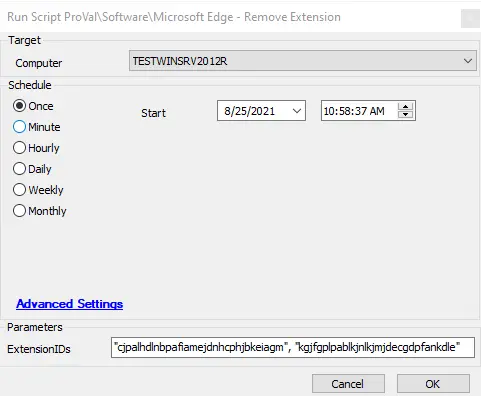
Sample Run
Dependencies
- Windows 10 1703+
- Chromium Version of Microsoft Edge Installed
Variables
| Variable Name | Description |
|---|---|
| ProjectName | The name of the project; in this case, it would be Unregister-EdgeExtension. |
| Parameters | This will take the ExtensionIDs. |
| BaseURL | The base URL here will be https://file.provaltech.com/repo. |
| WorkingDirectory | C:/ProgramData/provaltech/script/@ProjectName@. |
| PS1URL | @BaseURL@/script/@ProjectName@.ps1. |
| PS1Path | @WorkingDirectory@/@ProjectName@.ps1. |
| PS1TempPath | @WorkingDirectory@/@ProjectName@-temp.ps1. |
| PS1Log | @WorkingDirectory@/@ProjectName@-log.txt. |
| PS1DataLog | @WorkingDirectory@/@ProjectName@-data.txt. |
| PS1ErrorLog | @WorkingDirectory@/@ProjectName@-errors.txt. |
| LogContent | @PS1Log@ |
| DataLogContent | @PS1DataLog@ |
Global Parameters
| Name | Example | Required | Description |
|---|---|---|---|
| ExtensionIDs | cjpalhdlnbpafiamejdnhcphjbkeiagm | True | The Extension ID or list of Extension IDs to remove from managed status. |
Example:
# UBlock Origin
# Extension Page URL: https://chrome.google.com/webstore/detail/ublock-origin/cjpalhdlnbpafiamejdnhcphjbkeiagm
# ExtensionID: cjpalhdlnbpafiamejdnhcphjbkeiagm
Output
- Script log
- The results of the script can be found in the
-log.txtfile generated by the script, located in the same directory as the script.
./Unregister-EdgeExtension-log.txt
Changelog
2025-04-10
- Initial version of the document