PowerShell Version Information
Summary
This task will gather the PowerShell version of the machine and store the results in the PowerShell Version Custom Field.
The custom field is required before this script will run properly. Please ensure that the PowerShell Version Custom Field is present.
Manual Run
This script does not have any parameters and can be run against any online Windows device.
Dependencies
Custom Field - PowerShell Version
Variables
Document the various variables in the script. Delete any section that is not relevant to your script.
| Name | Description |
|---|---|
| %output% | The output is retrieved by PowerShell and will be inserted into the custom field. |
Create Script
To implement this script, please create a new "Script Editor" style script in the system.


Name: PowerShell Version Information
Description: This task will gather the PowerShell version of the machine and store the results in the PowerShell Version Custom Field
Category: Data Collection

Script Editor
From the script editor tab

Add three (3) new "Rows"
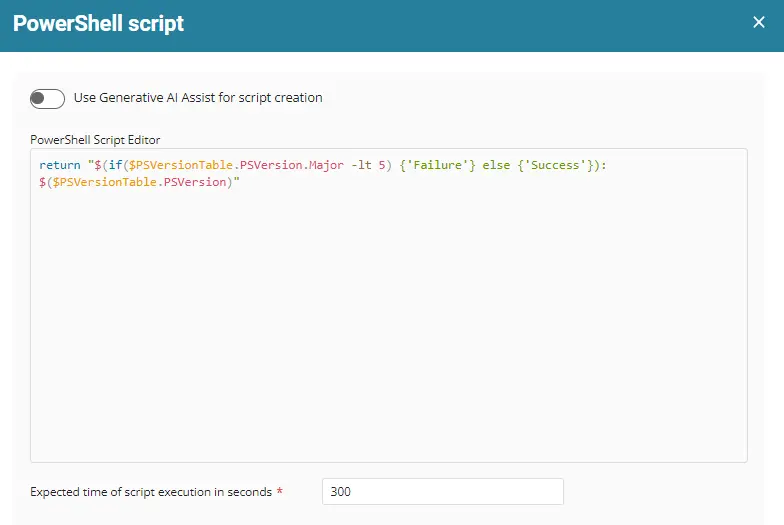
Row 1 function: PowerShell

This will bring up the PowerShell Editor. Paste the PowerShell into the PowerShell Script Editor Field
Row 2 function: Script Log

This will open the script log editor.

Please type %output% into this field. This will display the results of the above PowerShell in the script logs, making it easier to audit what happened when the script was run.
Row 3 function: Set Custom Field
NOTE: The custom field must be created first.

When you select the "Set Custom Field" function, you will get a dialog box used to write the output to a specific custom field.
Search for the custom field:


Please write %output% to the "PowerShell Version" custom field. This will write the results of the PowerShell script to the PowerShell Version Custom Field.
Script Deployment
ProVal recommends scheduling this task using a monitor and a machine group. Review the solution document here for best practice implementation.
Output
- Script log
- Custom Field
Changelog
2025-04-10
- Initial version of the document