Test VC Runtime
Overview
This script checks whether the Microsoft Visual C++ 2015-2022 runtime is healthy and can repair it if it is corrupted. Many Windows applications need this runtime to start. The script is part of the Visual C++ Health Remediation solution.
Choose a Mode
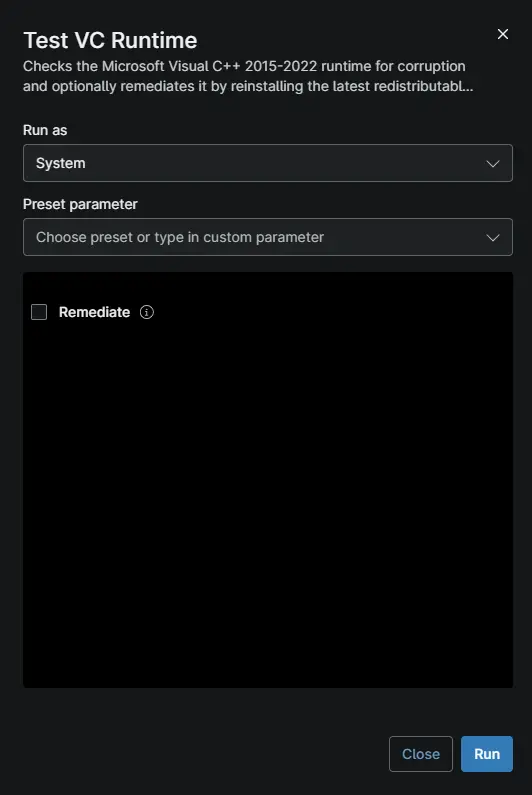
The Remediate checkbox decides whether the script only checks the runtime or also repairs it.
| Remediate | What Happens | Use It When |
|---|---|---|
| Unchecked | Checks the runtime and reports the result. Nothing on the device changes. | You want to find affected devices without making changes. |
| Checked | Checks the runtime and repairs it if it is corrupted. Healthy devices are left unchanged. | You want to fix affected devices. |
What the Repair Does
When the runtime is corrupted and Remediate is checked, the script:
- Downloads and installs the latest Visual C++ runtime from Microsoft.
- Repairs Windows system files with DISM and System File Checker (SFC), the built-in Windows repair tools.
- Checks the runtime again to confirm the repair worked.
- Deletes the files it downloaded.
The script never restarts the device. If a restart is needed to finish the repair, the activity output says so.
Understand the Results
After each run, the result is saved to the cPVAL VC Runtime Health Status custom field.
| Result | Exit Code | What It Means |
|---|---|---|
Healthy | 0 | The runtime is working. No action is needed. |
Corrupted | 1 | The runtime is damaged or missing files. Run the script with Remediate checked to repair it. |
Before You Run the Script
- The device needs internet access. Repair runs also download installers from Microsoft.
- Repair runs can take 30 minutes or more. Set the automation timeout to allow for this.
- Keep the automation's architecture set to 64-bit. The script stops if it runs as 32-bit.
Troubleshooting
| Problem | Cause | Solution |
|---|---|---|
| The activity shows as failed after a repair run. | The script records the original corruption as an error, even when the repair works. | Look for Visual C++ runtime state: Healthy in the activity output. This means the repair worked. |
The result is still Corrupted after a repair run. | A repair step failed, or the device needs a restart to finish. | Check the activity output for the failed step. Restart the device if the output asks for it, then run the script again. |
| Repairs fail on devices that get updates from WSUS (Windows Server Update Services). | DISM cannot download repair files through WSUS. | In Group Policy, enable Specify settings for optional component installation and component repair. Select the option to download repair content directly from Windows Update. |
| The script ends with an error before showing a result. | The device could not download the script, or security software blocked it. | Check the device's internet access and security software, then run the script again. |
Sample Run
Note: The Windows Workstations and Windows Servers compound conditions run this script automatically on devices in scope. Run it manually to check or repair a single device.
Dependencies
- Test-VcRuntime
- Custom Field: cPVAL VC Runtime Health Status
- Custom Field: cPVAL VC Runtime Remediation
- Solution: Visual C++ Health Remediation
Custom Fields
| Custom Field | Type | Example | Scope | Available Options | Editable | Description |
|---|---|---|---|---|---|---|
| cPVAL VC Runtime Health Status | Text | Healthy | Device | N/A | No | Shows the result of the latest run: Healthy or Corrupted. |
| cPVAL VC Runtime Remediation | Dropdown | Windows | System, Organization, Location, Device | Windows, Windows Servers, Windows Workstations, Disable | Yes | Selects which devices the solution runs on. Set to Disable to exclude a device or location. |
Script Variables
| Name | Type | Example | Default | Available Options | Description |
|---|---|---|---|---|---|
Remediate | Checkbox | True | False | True, False | Check to repair a corrupted runtime. Leave unchecked to only check it. |
💡 Note: Do not edit the script file. It is digitally signed, and any change stops it from running.
Automation Setup/Import
Output
- Activity Details: The result and a log of each step.
- Custom Field:
cPVAL VC Runtime Health StatusshowsHealthyorCorrupted.
Changelog
2026-09-28
- Initial version of the document