Windows 11 Installer
Summary
Designed to upgrade Windows systems to the latest version. It can be used to:
- Upgrade Windows 10 to Windows 11
- Install Windows 11 feature updates (e.g., 21H2 → 22H2 → 23H2 → 24H2)
Supports multiple source types including HTTP/HTTPS URLs, local files, and network shares (UNC paths).
Notes:
• If the script is run without the NoReboot flag, it will automatically schedule itself to run again 30 minutes after the upgrade completes to perform validation.
• If no parameters are supplied, the machine will be upgraded to 24H2 by default.
BitLocker Pre-Upgrade Checks
Before initiating the upgrade, the script evaluates the BitLocker status on the system drive. If BitLocker is enabled, it validates the TPM status, key protectors, and the presence of a recovery password. If all safety checks pass, BitLocker is temporarily suspended to prevent upgrade interruptions, and the recovery password is outputted for logging or backup purposes. If any safety checks fail (e.g., TPM is disabled or recovery password is missing), the script will halt the upgrade to prevent the machine from being locked out post-reboot.
Sample Run
First Run
Run the script with the Set_Environment parameter set to 1 to generate the required EDFs. For further details, refer to the EDFs section in the solution's document.
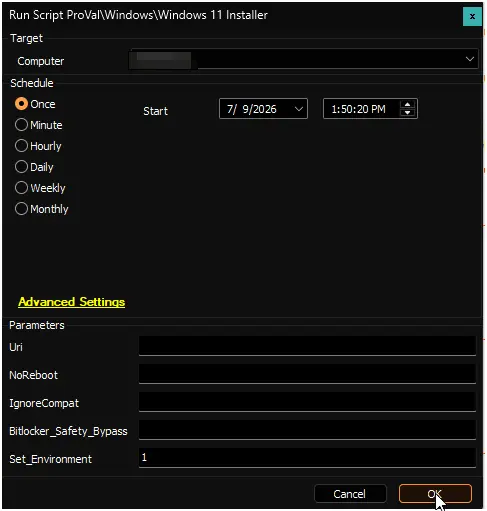
Example 1: Install Windows 11 24H2
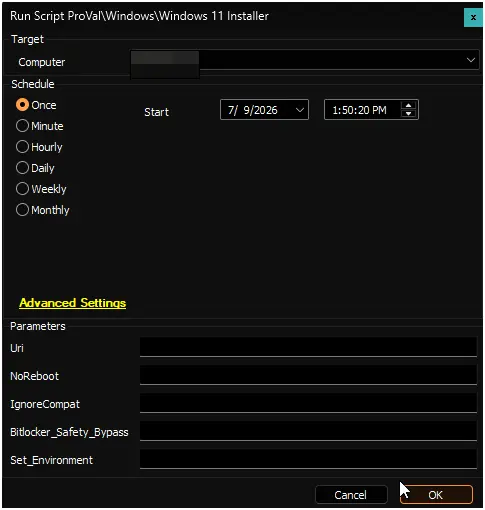
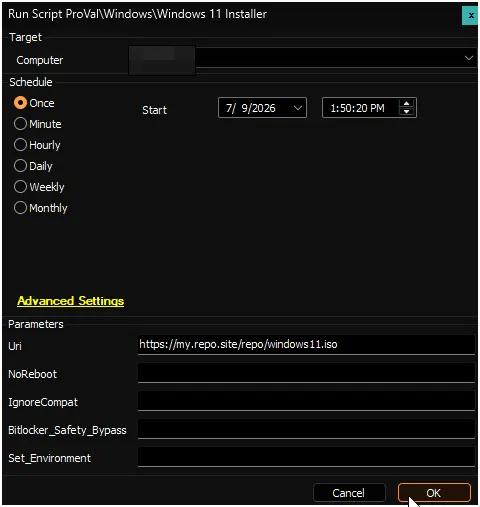
Example 3: Install Windows 11 from a custom URL
Dependencies
- If using the default file repository, the version of Windows being upgraded must be the US version.
- file.provaltech.com must be fully whitelisted in all security systems.
- contentrepo.net must be fully whitelisted in all security systems.
- windows-os-support.json must be whitelisted in all security systems.
- windows-upgrader.exe must be whitelisted in all security systems.
- App: Windows Upgrader
- Solution: Windows 11 Installation and Feature Update
Global Variables
| Name | Example | Required | Description |
|---|---|---|---|
| Multipart | 1 | False | Set to 1 if the custom URI is a multipart file in the format https://my.repo.site/repo/Windows11.zip.001. |
User Parameters
| Name | Example | Required | Description |
|---|---|---|---|
| Uri | https://my.repo.site/repo/Windows11.zip | False | A custom URI to either a local file or HTTP file that contains the target Windows 11 payload. If left blank, the script will automatically attempt to install Windows 11 24H2. |
| NoReboot | 1 | False | Set to 1 to suppress rebooting the machine after the upgrade. |
| IgnoreCompat | 1 | False | Set to 1 to ignore Windows 11 hardware/software requirements. |
| Set_Environment | 1 | Yes (first run only) | Set to 1 on the initial execution to generate the EDFs required by the solution. For further details, refer to the EDFs section in the solution's document. |
BitLocker_Safety_Bypass | 1 | False | Set to 1 to bypass BitLocker safety checks (e.g., TPM not enabled, missing TPM key protector, or missing recovery password). Use with caution, as bypassing these checks may result in BitLocker recovery prompts post-upgrade. |
Output
- Script log
Changelog
2026-07-09
- Added BitLocker pre-upgrade safety checks to validate TPM status, key protectors, and recovery password before initiating the Windows 11 upgrade.
- Implemented automatic suspension of BitLocker on the system drive when safety checks pass to prevent upgrade interruptions and lockouts.
- Added a new
BitLocker_Safety_Bypassuser parameter to allow bypassing the BitLocker safety checks when necessary. - Converted
Multipartto a global variable.
2026-03-26
- The script now exits when the operating system is Windows 11 24H2 or later.
2026-03-09
- Introduced new EDFs to enhance the solution's reporting and alerting capabilities.
- Added a
Set_Environmentparameter to provision the EDFs required by the solution. - Removed the
Versionparameter due to reliability issues with the 25H2 installation method. - The script now supports
24H2installations exclusively; if a customUriis provided, the script will attempt to install from that source.
2025-12-08
- Introduced a new
Versionparameter. - Added support for Windows 11 versions
24H2and25H2.
2025-11-03
- Added support for Windows 11.
- Added support for UNC paths.
- Added support for Azure Blob Storage URLs with SAS tokens (direct download URLs required).
2025-10-08
- Added support for local paths in the
Uriparameter. - Implemented a cleanup process to remove existing installers and extracted files prior to installation.
2025-01-15
- Addressed the
InsufficientSystemPartitionDiskSpaceHardblockissue. - Reference: InsufficientSystemPartitionDiskSpaceHardblock
- Acknowledgment: Hunter Line (Aptica, LLC) for their valuable contributions.
2024-11-03
- Updated document to remove beta from the name
2024-04-21
- Initial version of the document