cPVAL Stolen System BitLocker Password
Summary
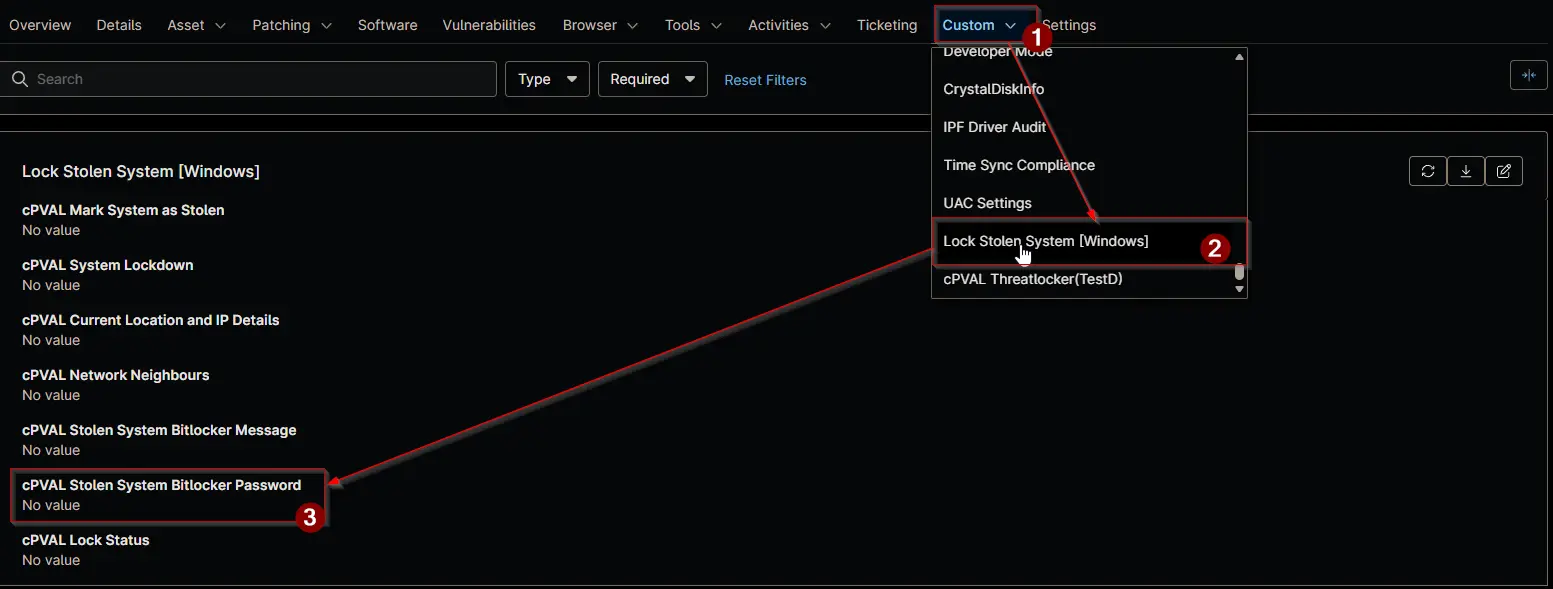
The lockdown password used by the Lock Stolen System solution. On Windows, it becomes the BitLocker password of the system drive, so the locked computer only starts with it. On a Mac, it becomes the new password of every locked user account, and users sign in with it after the Mac is unlocked. Use a strong password that meets your password rules, keep it somewhere safe, and preferably set a different one on each device. It's required for lockdown. The field is on the Lock Stolen System [Windows] tab of Windows devices and the Lock Stolen System [Macintosh] tab of Macs.
Details
| Label | Field Name | Example | Definition Scope | Type | Required | Default Value | Dropdown Options | Editable | Custom Field Tab |
|---|---|---|---|---|---|---|---|---|---|
| cPVAL Stolen System BitLocker Password | cpvalStolenSystemBitlockerPassword | A strong password of up to 200 characters | Device | Secure | No | Yes |
|
Dependencies
- Automation: Lock Stolen System [Windows]
- Automation: Lock Stolen System [Macintosh]
- Solution: Lock Stolen System
Custom Field Creation
Sample Screenshot
Changelog
2026-11-12
- Added the field to Mac devices on the Lock Stolen System [Macintosh] tab, where it becomes the password of the locked user accounts, and moved it to the Lock Stolen System [Windows] tab on Windows devices.
2026-02-25
- Initial version of the document