Stale Agents
Summary
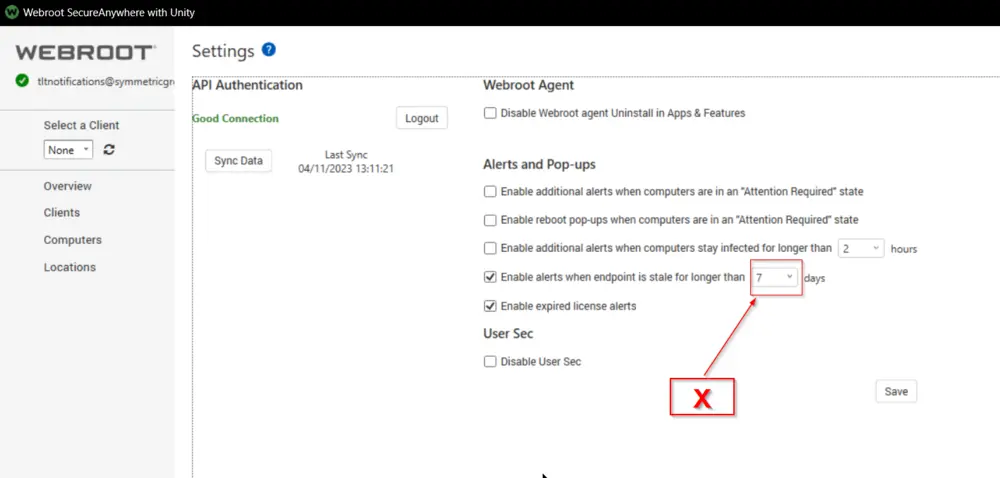
The purpose of the monitor set is to detect the machines that are active in Automate but are not checking in with the Webroot portal for X number of days.
X should be defined in the Webroot SecureAnywhere with Unity Plugin's settings.
Preferred Alert Template: △ Custom - Ticket Creation - Computer
Dependencies
Webroot SecureAnywhere with Unity Plugin

Target
Global
Ticketing
Subject:
Webroot - Stale Agents detected on %COMPUTERNAME%
Message on Failure:
A stale Webroot agent has been detected on %CLIENTNAME%\%COMPUTERNAME% at %LOCATIONNAME%. A Webroot stale agent means that although the machine is online and functioning, it is not reporting into the Webroot console as expected.

Last Seen by Webroot: %FIELDNAME%
Last Seen by Automate: %RESULT%
Message on Success:
The computer %CLIENTNAME%\%COMPUTERNAME% at %LOCATIONNAME% has cleared the Webroot stale agent detection monitor. This either means the machine has been offline for 7+ days or the problem is completely resolved. Closing ticket.
Changelog
2025-04-10
- Initial version of the document