cPVAL Windows Office Version
Summary
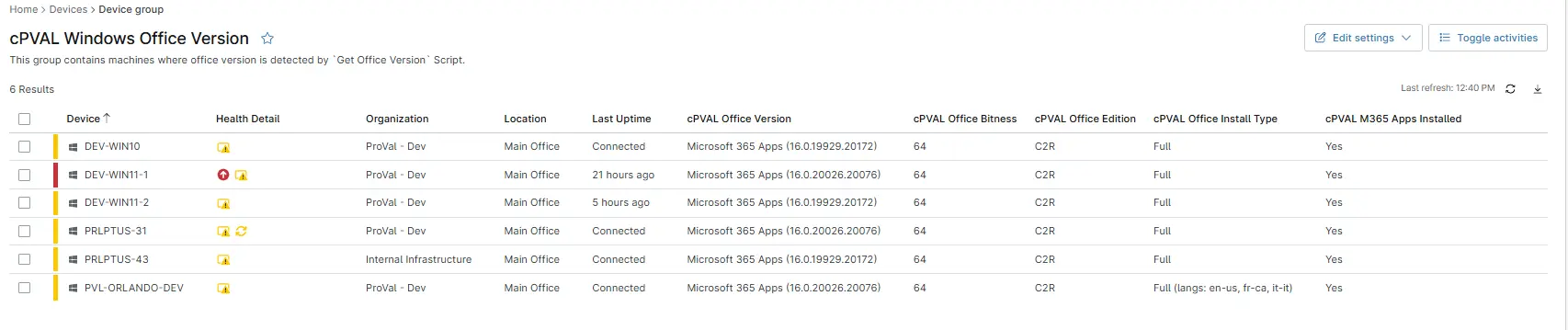
This device group displays an audit of Office versions when the following custom fields are populated: cPVAL Office Bitness, cPVAL Office Install Type, cPVAL Office Edition, cPVAL Office Version, and cPVAL M365 Apps Installed.
Dependencies
- Solution - Get Office Version
- cPVAL Office Version
- cPVAL Office Bitness
- cPVAL Office Edition
- cPVAL Office Install Type
- cPVAL M365 Apps Installed
Group Creation
Group View
Please follow the steps below to add the necessary custom fields to the view.
- Create the group and ensure it is saved successfully.
- Open the newly created group for editing.
- Navigate to the Table Settings option.
- Update the table layout to include the required custom fields.
- Save the changes to apply the updated group view.
URL TO THE GUIDE
Add the below custom fields under the Group View:
- cPVAL Office Version
- cPVAL Office Bitness
- cPVAL Office Edition
- cPVAL Office Install Type
- cPVAL M365 Apps Installed
Group Screenshot
This is how the group should looks like after adding the custom fields:
Changelog
2026-05-27
- Added 2 new custom fields to the group view:
- cPVAl M365 Apps Installed
- cPVAL Office Install Type
2025-12-12
- Initial version of the document