Ticket_Mgmt_Webhook_Url
Summary
Webhook URL for the ConnectWise workflow that manages ticket creation and closure.
Dependencies
Custom Field Setup Location
Custom Fields Path: SETTINGS ➞ Custom Fields
Details
| Name | Description | Level | Type | Help Text | Default Value | Editable |
|---|---|---|---|---|---|---|
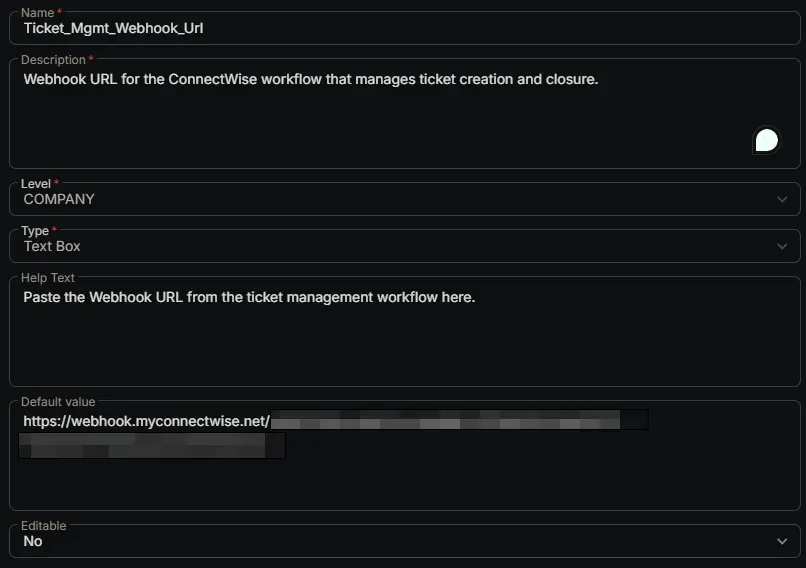
| Ticket_Mgmt_Webhook_Url | Webhook URL for the ConnectWise workflow that manages ticket creation and closure. | Company | Text Box | Paste the Webhook URL from the ticket management workflow here. | https://webhook.myconnectwise.net/... | No |
Set the workflow's webhook URL as this field's Default Value:
This custom field is the shared storage location for the webhook URL generated by the CWRMM Ticket Management for Monitors workflow. That URL does not exist until you create a webhook instance inside the workflow's trigger, and because webhook instances are environment‑specific they cannot be migrated — so the value has to be typed in here by hand as part of the workflow setup.
When you finish creating the webhook instance (Automation ➞ Workflows ➞ open the workflow ➞ click the Trigger node ➞ New Webhook Instance + ➞ copy the generated URL), paste that URL into the Default Value of this custom field and save the field. The https://webhook.myconnectwise.net/... shown in the table above is only a placeholder / example — replace it with the real URL copied from your trigger instance.
The monitor scripts (Enhanced Drive Space, CPU, Memory, etc.) read this default value to discover where to POST their Create / Close / Comment payloads. That is exactly why the field is defined at the Company level with Editable = No: it represents a single, global webhook endpoint — not a per‑device value — and locking it stops anyone from accidentally overriding it on an individual record.
If the Default Value is left blank or still set to the placeholder, the monitor scripts have no target to send to and alert ticketing will silently fail for every device. After saving, always double‑check that the stored default value is an exact, character‑for‑character match of the URL shown in the workflow's trigger instance.
Completed Custom Field
Changelog
2026-06-24
- Initial version of the document