Installed Remote Tool Audits
Overview
This script audits a Windows endpoint for known remote access tools using multiple detection methods: uninstall registry entries, running processes, running services, and common executable paths. It supports exclusions from both script variable and a Ninja custom field. The results are compiled into an HTML table and written to a Ninja custom field for easy visibility within the NinjaOne platform.
Tool display names supported by this script:
- AeroAdmin
- Ammyy Admin
- AnyDesk
- Atera
- Automate (ConnectWise Automate)
- BeyondTrust
- Chrome Remote Desktop
- CW RMM (ConnectWise RMM)
- DameWare
- Datto RMM
- DWService
- GoToAssist
- GoToMyPC
- ITSPlatform
- Kaseya
- Kaseya VSA (VSA)
- LiteManager
- LogMeIn
- Malwarebytes
- ManageEngine
- N-Able N-Central
- N-Able N-Sight
- NoMachine
- Parsec
- Remote Utilities
- RemotePC
- ScreenConnect / ConnectWise Control (instance-based detection)
- Splashtop
- Supremo
- Syncro
- TeamViewer
- TightVNC
- UltraVNC
- VNC (generic detection)
- VNC Connect (RealVNC)
- Zoho Assist
Sample Run
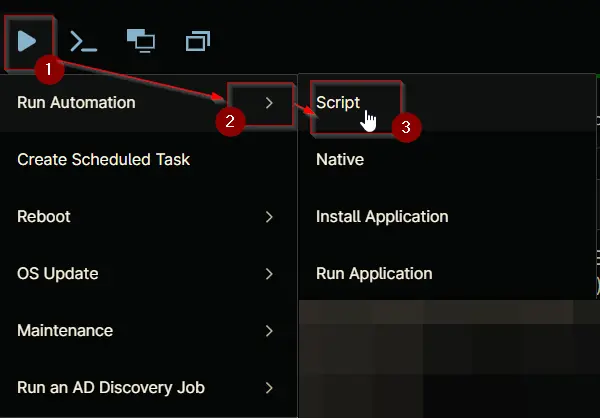
Play Button > Run Automation > Script
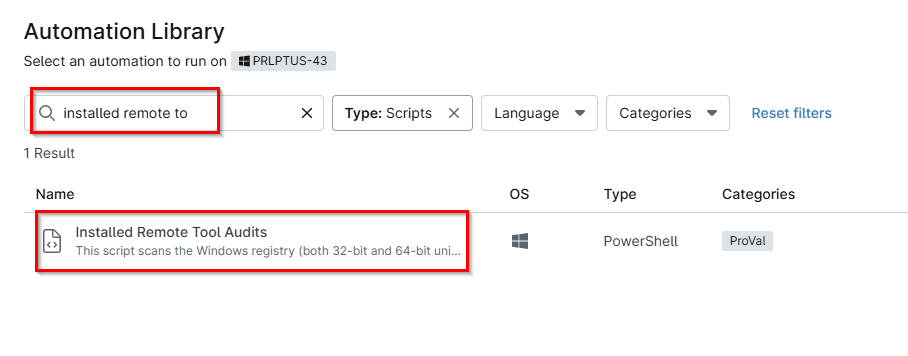
- Search for the
Installed Remote Tools Auditand then click on it
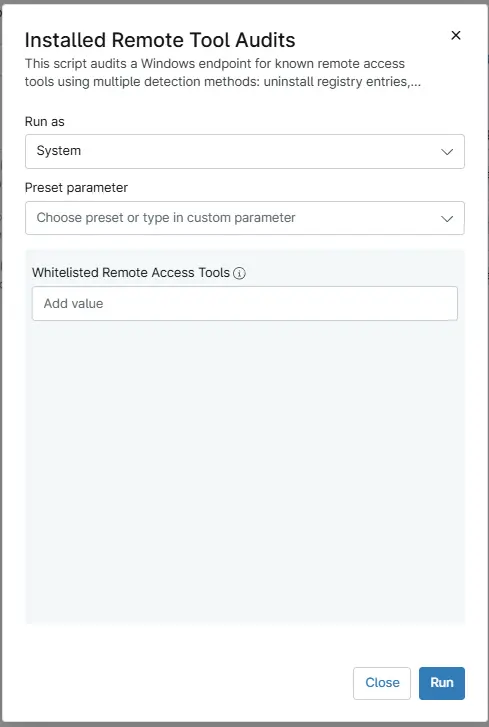
- Click Run
Dependencies
- Solution - Installed Remote Access Tool Audit
- Custom field - cPVAL Installed Remote Access Tools
- Custom field - cPVAL Detected Remote Tool Names
Parameters
| Name | Example | Accepted Values | Required | Default | Type | Description |
|---|---|---|---|---|---|---|
| Whitelisted Remote Access Tools | Ninja RMM, Datto RMM, Automate, ScreenConnect Client (342xxxxxxxxxxxf) | comma-separated list | False | - | String | Optional comma-separated list of remote access tools to exclude from detection. Tools specified here will be excluded globally across all clients. Additional client/location/machine-specific exclusions can be configured using the custom field. The script will combine exclusions from both sources when determining which tools to ignore. |
Automation Setup/Import
Output
- Activity Details
- Custom Field
Changelog
2026-09-28
- Fixed a bug where detecting a single tool resulted in a No remote access tools detected false negative.
2026-08-27
- Updated the script to bypass NinjaRMM detection and replaced exit code 2 with exit code 1.
2026-07-27
- Added a new Multi-Line Text Custom Field
cPVAL Detected Remote Tool Namesto store only the names of detected remote access tools as a simple list. - Updated the PowerShell script to extract tool names and populate the new text field, enabling the data to be used for dynamic grouping and exports (which is not possible with the existing WYSIWYG field).
2026-06-24
- Added more remote tools for detection and updated the powershell script to check processes, services and executable paths along with registries for remote tools.
- Added script variable to mention whitelisted remote tools.
- Updated script to whitelist the remote tools mentioned in the new custom field
cPVAL Whitelisted Remote Access Tools - Updated HTML output to show more columns like installed location, executable path, if tool is currently active and script last ran date.
2026-05-21
- Initial version of the document