Reboot Pending Prompt - Autofix [Windows]
Overview
This script acts as the remediation (Autofix) component of the "Reboot Pending Prompt" solution. It is triggered automatically when the Detection script determines that a reboot is necessary and conditions are right to interrupt the user.
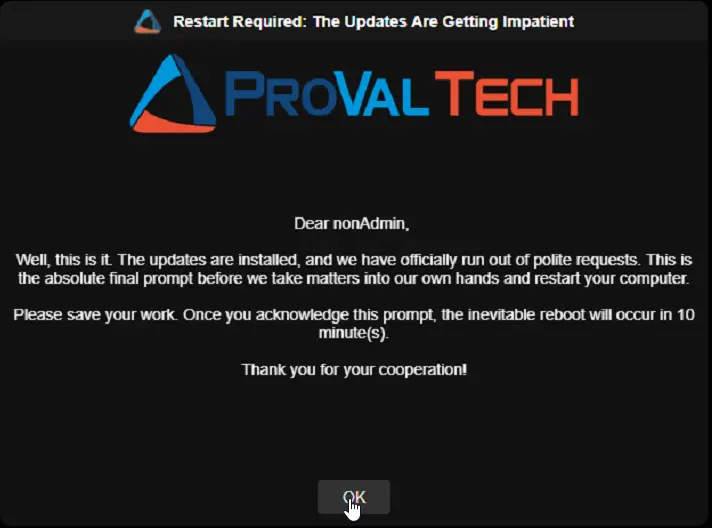
Since RMM scripts run in the background (Session 0) and cannot normally show windows to the user, this script utilizes a temporary Scheduled Task to bypass this limitation. The task runs SilentLauncher, which starts a branded GUI utility (OmniPrompt.exe) inside the active user's session without flashing a console window. Depending on how many times the user has already postponed the reboot, the script will either present a "Yes/No" deferral option or a "Final Warning" that enforces the reboot after a few minutes.
Optionally, that final warning can hand the decision back to the user: with the reboot scheduler enabled they pick their own restart time and receive a reminder shortly before it arrives. See Reboot Scheduler & Pre-Reboot Reminder.
Install-In-Progress Protection
Before rebooting an unattended machine (no user logged in, or locked screen with the forced reboot threshold reached), the script checks whether software or updates are currently being installed. If an install is detected, the script exits cleanly without rebooting. It will try again on the next cycle after the install finishes.
This prevents the machine from restarting in the middle of a Windows Update, application installer, or feature upgrade.
The following processes and signals are checked:
| Signal | What It Means |
|---|---|
| TiWorker.exe | Windows Update is actively installing an update |
| wusa.exe | A standalone Windows Update package is being installed |
| SetupHost.exe | A Windows Feature Update is in progress |
| MoUsoCoreWorker.exe | The Windows Update orchestrator is doing background work |
| Windows10Upgrader.exe | A feature upgrade using the Windows Update Agent is running |
| winget.exe (active) | Windows Package Manager is installing or updating software (only when actively using CPU) |
| MSI mutex held | An MSI installer package is currently running |
Note: This check only blocks unattended reboots. If a user clicks "Yes" to reboot, the reboot happens immediately. The user made a conscious choice to restart.
Reboot Scheduler & Pre-Reboot Reminder
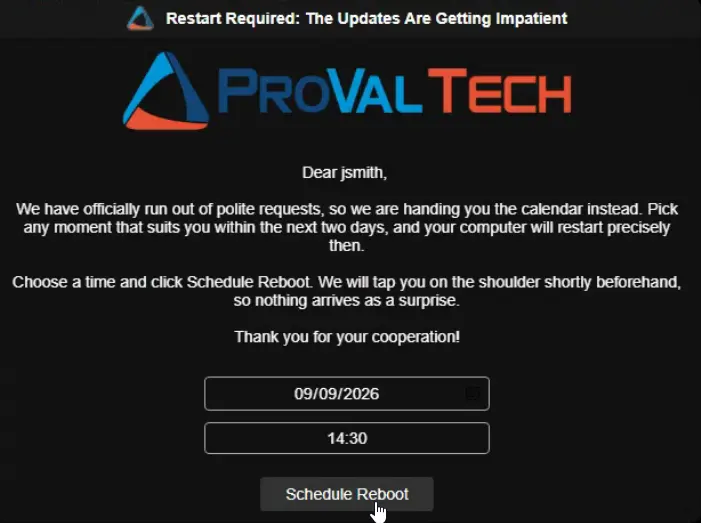
By default the final prompt is a single acknowledgement: the user clicks OK and the restart follows after the configured grace period. The optional scheduler changes that last step, letting the user choose their own restart time instead.
The feature is controlled entirely by cPVAL Reboot Schedule Max Hours:
| Value | Behaviour of the Final Prompt |
|---|---|
0 or blank | Unchanged. A single OK button, and the restart follows cPVAL Final Prompt Reboot Delay Minutes. |
Greater than 0 | A date and time picker is shown alongside a Schedule Reboot button, covering everything from now to this many hours ahead. |
How a scheduled restart plays out
- The user picks a time on the final prompt and clicks Schedule Reboot. The choice is written to
cPVAL Scheduled Reboot Time, the prompt cycle is marked complete, and the script exits without restarting anything. - The device is left alone while it waits. The Detection automation deliberately stops detecting it, so no further prompts appear for a restart the user has already agreed to.
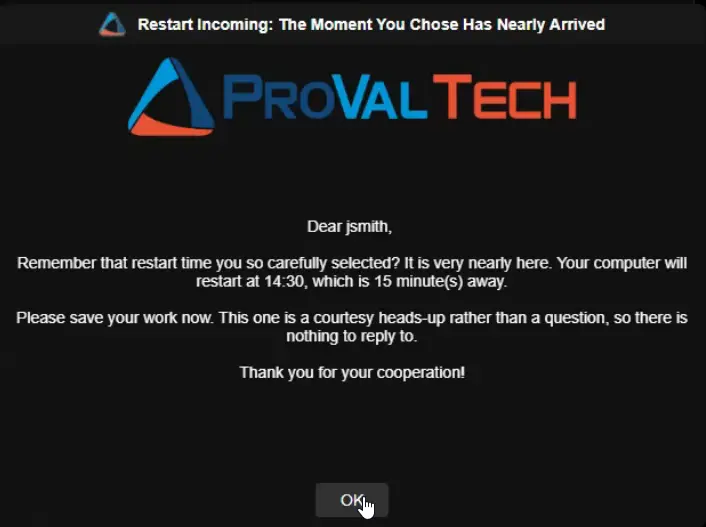
- The reminder appears once the chosen time comes within
cPVAL Reboot Reminder Lead Minutes. It states the real restart time and the actual minutes remaining, and carries a single acknowledgement button. - The restart happens at the moment the user selected. The script clears every tracking field, stamps
cPVAL Reboot Reminder Sent Time, and hands the countdown to Windows throughshutdown.exe, so the familiar Windows restart notification takes over.
The script exits as soon as the countdown is handed over, so it does not sit waiting.
A few edge cases are handled deliberately:
- A time that has already passed, or one already inside the reminder window, is treated as "restart now" rather than scheduled. The earliest option the picker offers is the current time, so this is the honest reading of the choice.
- A device switched off through its scheduled time is picked up as overdue on its next check-in and restarts late rather than never.
- An installation in progress when the reminder falls due pushes the scheduled time forward by one reminder window instead of restarting through the install.
- A cancelled countdown (the user runs
shutdown /a, or a policy aborts it) is noticed after 60 minutes, and the device returns to the normal prompt cycle.
⚠️ Important:
cPVAL Reboot Reminder Lead Minutesmust be set to the same value on both this Autofix automation and the Detection automation. The Detection automation decides when a scheduled restart is due for its reminder, and this script sizes the countdown from it.
Sample Run
Note:
- It is not recommended to run this script manually. The script is designed for the Autofix script of Reboot Pending Prompt - Windows Workstation compound condition.
- OmniPrompt is a cross-platform, Go-based GUI utility that runs natively on Windows without requiring .NET runtime.
Dependencies
- Custom Field: cPVAL Pending Reboot
- Custom Field: cPVAL Last Prompted
- Custom Field: cPVAL Times Prompted
- Custom Field: cPVAL Reboot Prompt Count
- Custom Field: cPVAL Reboot Prompt Duration Between Prompt
- Custom Field: cPVAL Reboot Prompt Title
- Custom Field: cPVAL Reboot Prompt Message
- Custom Field: cPVAL Reboot Prompt Timeout
- Custom Field: cPVAL Final Prompt Message
- Custom Field: cPVAL Final Prompt Timeout
- Custom Field: cPVAL Final Prompt Reboot Delay Minutes
- Custom Field: cPVAL Reboot Prompt Header Image
- Custom Field: cPVAL Reboot Prompt Icon Image
- Custom Field: cPVAL Reboot Prompt Theme
- Custom Field: cPVAL Reboot if Not Logged In
- Custom Field: cPVAL Reboot During Suppress Period
- Custom Field: cPVAL Reboot Prompt Suppress Time Window
- Custom Field: cPVAL Max Missed Prompts Before Force
- Custom Field: cPVAL Consecutive Missed Prompts
- Custom Field: cPVAL First Missed Prompt Time
- Custom Field: cPVAL Reboot Prompt Size
- Custom Field: cPVAL Reboot Prompt Text Box Size
- Custom Field: cPVAL Reboot Prompt Logo Size
- Custom Field: cPVAL Reboot Prompt Text Size
- Custom Field: cPVAL Reboot Prompt Text Style
- Custom Field: cPVAL Reboot Prompt Button Text Style
- Custom Field: cPVAL Reboot Prompt Button Text Size
- Custom Field: cPVAL Reboot Prompt Button Size
- Custom Field: cPVAL Reboot Prompt Title Text Style
- Custom Field: cPVAL Reboot Prompt Title Text Size
- Custom Field: cPVAL Reboot Prompt Title Field Size
- Custom Field: cPVAL Reboot Schedule Max Hours
- Custom Field: cPVAL Reboot Reminder Lead Minutes
- Custom Field: cPVAL Reboot Reminder Prompt Title
- Custom Field: cPVAL Reboot Reminder Prompt Message
- Custom Field: cPVAL Scheduled Reboot Time
- Custom Field: cPVAL Reboot Reminder Sent Time
- Application: OmniPrompt
- Application: SilentLauncher
- Automation: Reboot Pending Prompt - Detection
- Solution: Reboot Pending Prompt
Custom Fields
| Custom Field | Type | Example | Scope | Available Options | Editable | Description |
|---|---|---|---|---|---|---|
| cPVAL Reboot Prompt Count | Numeric | 5 | Organization, Location, Device | N/A | Yes | Max deferrals allowed before a forced reboot. |
| cPVAL Reboot Prompt Duration Between Prompt | Numeric | 4 | Organization, Location, Device | N/A | Yes | Minimum hours to wait between prompts. Used for message display text only in this script. |
| cPVAL Reboot Prompt Title | Text | IT Dept: Important Updates | Organization, Location, Device | N/A | Yes | Title of the GUI window. |
| cPVAL Reboot Prompt Message | Multi-line | We installed security patches. | Organization, Location, Device | N/A | Yes | Custom message body. Supports message substitution variables (e.g., PromptsLeft, PromptIntervalHours). Avoid using single quotation marks (') in the message. Use regular quotes (") if needed. |
| cPVAL Final Prompt Message | Multi-line | Deferrals exhausted. | Organization, Location, Device | N/A | Yes | Message displayed when no deferrals remain. Supports message substitution variables (e.g., DelayAfterFinalMinutes). Avoid using single quotation marks (') in the message. Use regular quotes (") if needed. |
| cPVAL Reboot Prompt Timeout | Numeric | 600 | Organization, Location, Device | N/A | Yes | Time in seconds before a "Warning" prompt closes automatically (defaults to deferral). |
| cPVAL Final Prompt Timeout | Numeric | 900 | Organization, Location, Device | N/A | Yes | Time in seconds before a "Final" prompt closes automatically (defaults to forced reboot). |
| cPVAL Final Prompt Reboot Delay Minutes | Numeric | 10 | Organization, Location, Device | N/A | Yes | Grace period (in minutes) after final acknowledgment before the forced reboot occurs. |
| cPVAL Reboot Prompt Header Image | Text | https://example.com/logo.png | Organization, Location, Device | N/A | Yes | Local file path or URL for the header image. |
| cPVAL Reboot Prompt Icon Image | Text | C:\Logos\icon.ico | Organization, Location, Device | N/A | Yes | Local file path or URL for the icon image. |
| cPVAL Reboot Prompt Theme | Dropdown | Dark | Organization, Location, Device | Dark, Light | Yes | UI Theme: "Dark" or "Light". |
| cPVAL Reboot if Not Logged In | Dropdown | Enable | Organization, Location, Device | Disable, Enable | Yes | Forces reboot immediately if no user session is active. |
| cPVAL Reboot During Suppress Period | Dropdown | Enable | Organization, Location, Device | Disable, Enable | Yes | Allows unattended/forced reboots during suppress windows or weekends. |
| cPVAL Reboot Prompt Suppress Time Window | Text | 1800-0800 | Organization, Location, Device | N/A | Yes | 24-hour time range (HHmm-HHmm) to suppress prompts. Leave blank to disable. |
| cPVAL Max Missed Prompts Before Force | Numeric | 3 | Organization, Location, Device | N/A | Yes | Number of consecutive missed prompts before forcing a reboot without showing the GUI. Set to 0 to disable. |
| cPVAL Reboot Prompt Size | Text | 640x480 | Organization, Location, Device | N/A | Yes | Size of the prompt window (WIDTHxHEIGHT). |
| cPVAL Reboot Prompt Text Box Size | Text | 500x200 | Organization, Location, Device | N/A | Yes | Size of the text box (WIDTHxHEIGHT). |
| cPVAL Reboot Prompt Logo Size | Text | 400x150 | Organization, Location, Device | N/A | Yes | Size of the logo (WIDTHxHEIGHT). |
| cPVAL Reboot Prompt Text Size | Numeric | 14 | Organization, Location, Device | N/A | Yes | Font size for the message text. |
| cPVAL Reboot Prompt Text Style | Text | Arial | Organization, Location, Device | N/A | Yes | Font family for the message text. |
| cPVAL Reboot Prompt Button Text Style | Text | Arial | Organization, Location, Device | N/A | Yes | Font family for button text. |
| cPVAL Reboot Prompt Button Text Size | Numeric | 14 | Organization, Location, Device | N/A | Yes | Font size for button text. |
| cPVAL Reboot Prompt Button Size | Text | 100x40 | Organization, Location, Device | N/A | Yes | Size of each button (WIDTHxHEIGHT). |
| cPVAL Reboot Prompt Title Text Style | Text | Arial | Organization, Location, Device | N/A | Yes | Font family for the title bar text. |
| cPVAL Reboot Prompt Title Text Size | Numeric | 14 | Organization, Location, Device | N/A | Yes | Font size for the title bar text. |
| cPVAL Reboot Prompt Title Field Size | Text | 640x35 | Organization, Location, Device | N/A | Yes | Size of the title bar (WIDTHxHEIGHT). |
| cPVAL Last Prompted | Text | 2024-05-20 14:30:00 | Device | N/A | No | Updated to current timestamp if user defers. Updated by script. |
| cPVAL Times Prompted | Numeric | 2 | Device | N/A | No | Incremented by 1 if user defers. Resets to 0 on Reboot. Updated by script. |
| cPVAL Pending Reboot | Checkbox | False | Device | True, False | Yes | Set to False upon successful reboot initiation. Updated by script. |
| cPVAL Consecutive Missed Prompts | Numeric | 2 | Device | N/A | No | Tracks consecutive missed prompts. Managed by the Detection script and reset on reboot. |
| cPVAL First Missed Prompt Time | Text | 2024-05-20 14:30:00 | Device | N/A | No | Records when the current missed-prompt streak started. Managed by the Detection script and reset on reboot. |
| cPVAL Reboot Schedule Max Hours | Numeric | 48 | Organization, Location, Device | N/A | Yes | Maximum hours ahead the user may schedule their restart on the final prompt. Set to 0 to disable the scheduler and the reminder entirely. |
| cPVAL Reboot Reminder Lead Minutes | Numeric | 15 | Organization, Location, Device | N/A | Yes | How many minutes ahead of a scheduled restart the reminder appears and the countdown begins. Must match the Detection value. |
| cPVAL Reboot Reminder Prompt Title | Text | Restart Starting Soon | Organization, Location, Device | N/A | Yes | Title of the pre-reboot reminder window. |
| cPVAL Reboot Reminder Prompt Message | Multi-line | Your restart begins at ScheduledRebootTime. | Organization, Location, Device | N/A | Yes | Message body of the pre-reboot reminder. Supports message substitution variables. Avoid using single quotation marks (') in the message. |
| cPVAL Scheduled Reboot Time | Text | 2026-09-09 14:30:00 | Device | N/A | No | The restart time the user selected. Written when a restart is scheduled and cleared once the reminder fires. Updated by script. |
| cPVAL Reboot Reminder Sent Time | Text | 2026-09-09 14:15:00 | Device | N/A | No | Records when the reminder was sent and the countdown began. A value here means a restart is already pending. Updated by script. |
Configuration Hierarchy
The solution evaluates settings using a strict top-down hierarchy. If a value is configured at a higher priority level, it overrides the lower levels.
| Priority | Level | Description |
|---|---|---|
| 1 (Highest) | Device Level Custom Field | Overrides all lower levels. Applied to a specific endpoint. |
| 2 | Location Level Custom Field | Overrides Organization level. Applied to all endpoints in a location. |
| 3 | Organization Level Custom Field | Global default for the entire tenant. |
| 4 (Lowest) | Script Runtime Variable | Ultimate fallback default used if the custom field is blank at all levels. |
Script Variables
Instead of hardcoding defaults, the script relies on NinjaRMM Script Variables as the ultimate fallback mechanism. You can configure these variables directly in the script's settings within NinjaRMM to establish global baseline behaviors without modifying the code-signed script file.
| Name | Type | Example | Default | Available Options | Description |
|---|---|---|---|---|---|
Prompt Title | String/Text | Action Required | Updates Installed - Reboot Required | N/A | Title of the GUI window. |
Regular Prompt Message | String/Text | Security updates applied. | Built-in standard message | N/A | Default message for regular prompts. Supports message substitution variables. |
Final Prompt Message | String/Text | Final warning. | Built-in final warning message | N/A | Default message for final prompts. Supports message substitution variables. |
Prompt Count | Integer | 5 | 4 | N/A | Max deferrals allowed before a forced reboot. |
Final Reboot Delay Minutes | Integer | 10 | 5 | N/A | Grace period after final acknowledgment. |
Duration Between Prompts | Integer | 6 | 4 | N/A | Minimum hours to wait between prompts. |
Regular Prompt Timeout Seconds | Integer | 600 | 300 | N/A | Time in seconds before a Warning prompt closes automatically. |
Final Prompt Timeout Seconds | Integer | 1200 | 900 | N/A | Time in seconds before a Final prompt closes automatically. |
Prompt Theme | Dropdown | Light | Dark | Dark, Light | Sets the UI theme. |
Header Image | String/Text | https://example.com/logo.png | (blank) | N/A | Local file path or URL for the header image. |
Icon Image | String/Text | C:\Logos\icon.ico | (blank) | N/A | Local file path or URL for the icon image. |
Suppress Time Window | String/Text | 1800-0800 | (blank) | N/A | 24h time range (HHmm-HHmm) to suppress prompts. |
Max Missed Prompts Before Force | Integer | 3 | 0 | N/A | Number of consecutive missed prompts before forcing a reboot without GUI. |
Reboot If Not Logged In | Dropdown | Enable | Disable | Disable, Enable | Enable to reboot immediately if no user is signed in. |
Reboot During Suppress Period | Dropdown | Enable | Disable | Disable, Enable | Fallback default. Allows unattended/forced reboots during suppress windows. |
Reboot Schedule Max Hours | Integer | 48 | 0 | N/A | Maximum hours ahead the user may schedule their restart on the final prompt. 0 disables the scheduler and the reminder. |
Reboot Reminder Lead Minutes | Integer | 15 | 15 | N/A | How many minutes ahead of a scheduled restart the reminder appears. Must match the Detection value. |
Reminder Prompt Title | String/Text | Restart Starting Soon | Reboot Required - Starting Soon | N/A | Title of the pre-reboot reminder window. |
Reminder Prompt Message | String/Text | Your restart begins shortly. | Built-in reminder message | N/A | Default message for the pre-reboot reminder. Supports message substitution variables. |
💡 Note: Do not attempt to change default values by editing the script file directly. The PowerShell script is code-signed, and modifying the code will break the signature and prevent execution. Always use Custom Fields or Script Variables to adjust behaviors.
Message Substitution Variables
The following tokens can be used in ANY prompt message - the Regular Prompt Message, the Final Prompt Message, the Reminder Prompt Message, or their custom-field equivalents. Write them in PascalCase with NO surrounding symbols; each is replaced with its live value when the prompt is displayed.
| Token | Description | Example |
|---|---|---|
PromptsToSend | Total prompts the user will receive (regular + final) | 5 |
PromptsSent | Number of prompts shown so far, including the current one | 2 |
PromptsLeft | Remaining prompts before the forced/final one | 3 |
PromptIntervalMinutes | Interval between prompts, in minutes | 240 |
PromptIntervalHours | Same interval, in hours | 4 |
NextPromptTime | Date and time the next prompt will appear if the user defers | Wed 09 Sep, 6:30 PM |
RegularTimeoutSeconds | Regular prompt timeout, in seconds | 600 |
RegularTimeoutMinutes | Same timeout, in minutes | 10 |
FinalTimeoutSeconds | Final prompt timeout, in seconds | 900 |
FinalTimeoutMinutes | Same timeout, in minutes | 15 |
DelayAfterFinalSeconds | Delay after the final prompt before reboot, in seconds | 900 |
DelayAfterFinalMinutes | Same delay, in minutes | 15 |
ScheduledRebootTime | Clock time (HH:mm) of the automatic reboot. On a regular or final prompt this is now plus the final delay; on the pre-reboot reminder it is the real time the user selected | 14:30 |
MinutesUntilReboot | Minutes until the automatic reboot. On a regular or final prompt this is the final delay; on the pre-reboot reminder it is the actual minutes remaining | 10 |
ScheduleMaxHours | How many hours ahead the user may schedule their restart | 48 |
ScheduleMaxDays | The same window expressed in whole days | 2 |
ScheduleWindowEnd | Date and time of the latest moment the user may select | Fri 11 Sep, 2:30 PM |
ReminderLeadMinutes | How many minutes of warning the user gets before a scheduled restart | 15 |
UptimeDays | Whole days the machine has been running since its last restart | 23 |
LastRebootTime | Date and time the machine was last restarted | 2026-08-17 09:14 |
ComputerName | Machine name | PC-OFFICE-01 |
UserName | Logged-in username | jsmith |
💡 Which tokens suit which prompt. Every token resolves on every prompt, but some only make sense in certain places.
ScheduleMaxHours,ScheduleMaxDaysandScheduleWindowEndbelong on the final prompt when the scheduler is enabled, since that is where the user chooses a time.ReminderLeadMinutesreads naturally on the final prompt too, as a promise of the nudge to come.NextPromptTimebelongs on regular prompts, where deferring is still an option. On the pre-reboot reminder there is no window left to choose from and no further prompt to come, soScheduleWindowEndandNextPromptTimeboth resolve to the scheduled restart itself.
💡 Keeping messages honest. Prefer
ScheduleMaxHoursorScheduleMaxDaysover writing the window into the message as prose. A message that says "within the next two days" becomes wrong the moment someone changescPVAL Reboot Schedule Max Hours, whereasScheduleMaxDaysfollows it automatically.ScheduleMaxDaysrounds at the half-day mark, so 36 hours reads as2days; for any window under 12 hours it resolves to0, so useScheduleMaxHoursfor short windows.
💡 Note:
UptimeDaysandLastRebootTimeare read from the operating system at display time. If either cannot be determined the token resolves to an empty string rather than failing the prompt, so avoid building a sentence that reads oddly when the value is missing.
Automation Setup/Import
Output
- Activity Details: Logs the interaction result (e.g., "User declined reboot", "User opted to reboot", or "Final prompt acknowledged").
- Custom Fields: Updates
cPVAL Last Promptedand incrementscPVAL Times Promptedif the user defers. ResetscPVAL Pending Reboot,cPVAL Last Prompted,cPVAL Times Prompted,cPVAL Consecutive Missed Prompts, andcPVAL First Missed Prompt Timeif the reboot is initiated. WritescPVAL Scheduled Reboot Timewhen a user schedules their restart, and stampscPVAL Reboot Reminder Sent Timewhen the reminder is sent and the countdown begins. - User Prompt
Prompt Progression & Message Examples
The script calculates the number of remaining prompts by subtracting the times the user has already been prompted (cPVAL Times Prompted) from the maximum allowed deferrals (cPVAL Reboot Prompt Count). The user sees this count in every message they receive.
Understanding the Count
The first prompt displays the same number as cPVAL Reboot Prompt Count (e.g., 4) because this represents the total "deferrals" available. However, an additional final mandatory prompt is always added after all deferrals are exhausted. This means if you set cPVAL Reboot Prompt Count to 4, the user will receive:
- 4 regular prompts (Yes/No buttons) — user can defer
- 1 final prompt (OK button only) — reboot is mandatory
- Total: 5 prompts before forced reboot
💡 Note: When the reboot scheduler is enabled through
cPVAL Reboot Schedule Max Hours, the final prompt becomes a scheduling prompt rather than a plain acknowledgement, and one further pre-reboot reminder is shown shortly before the restart the user chose. The number of regular prompts is unaffected.
Sample Prompts
Example Configuration: Standard Final Prompt
| Custom Field | Value |
|---|---|
cPVAL Pending Reboot | Yes |
cPVAL Reboot Prompt Count | 5 |
cPVAL Reboot Schedule Max Hours | 0 (scheduler disabled) |
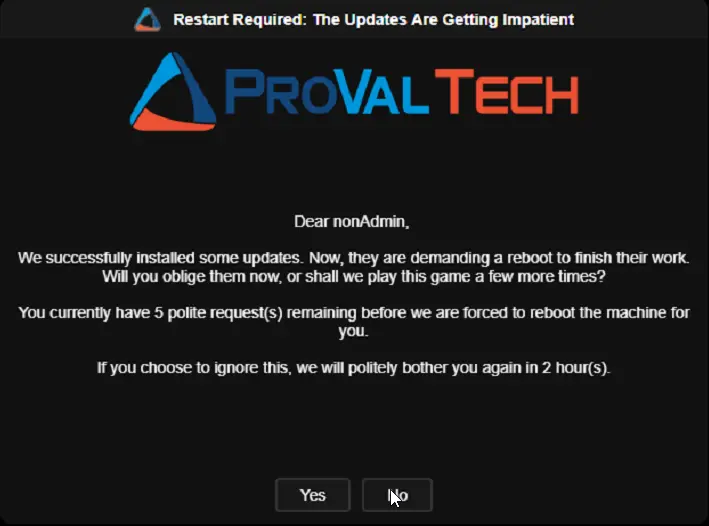
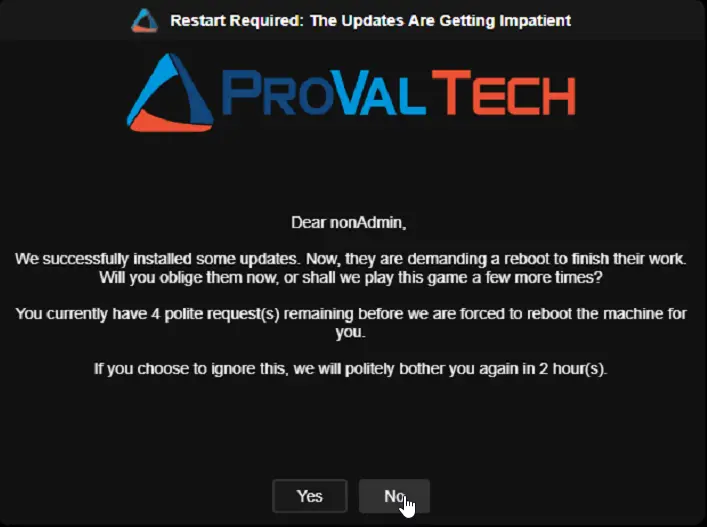
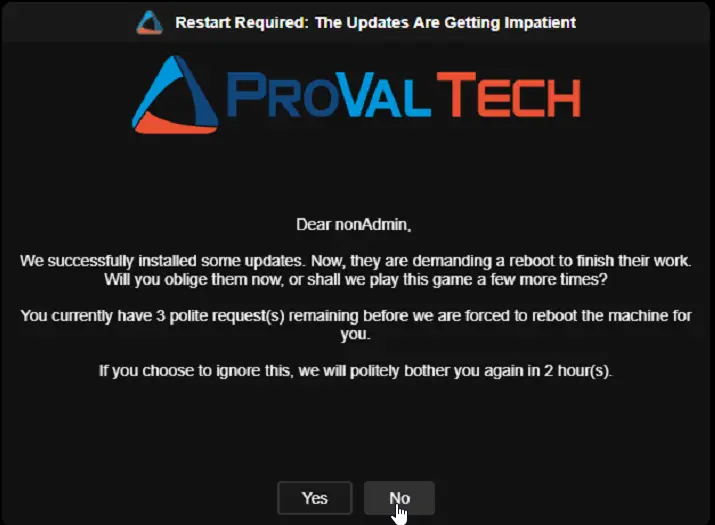
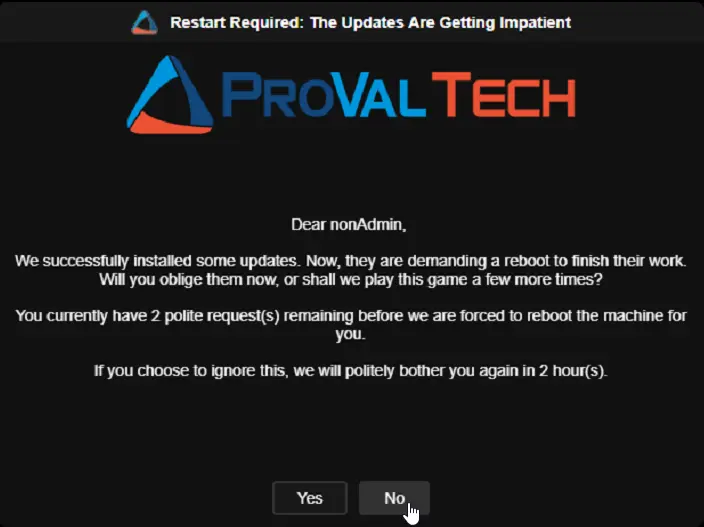
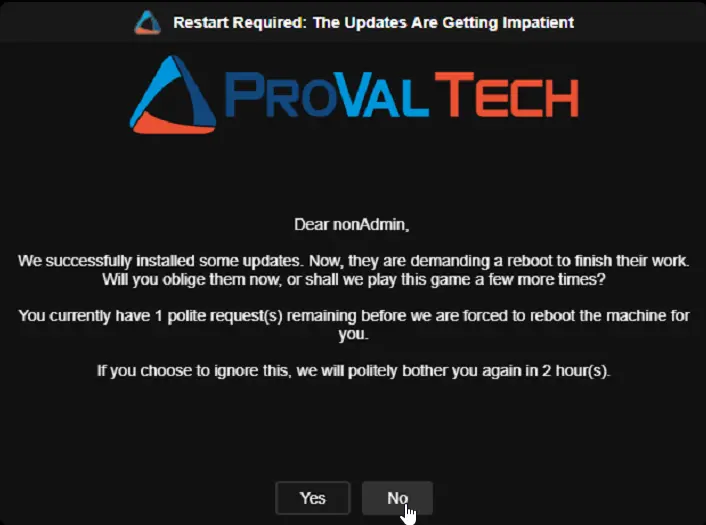
cPVAL Reboot Prompt Title | Restart Required: The Updates Are Getting Impatient |
cPVAL Reboot Prompt Message | Dear UserName, \n\nWe successfully installed some updates. Now, they are demanding a reboot to finish their work. Will you oblige them now, or shall we play this game a few more times?\n\nYou currently have PromptsLeft polite request(s) remaining before we are forced to reboot the machine for you.\n\nIf you choose to ignore this, we will politely bother you again in PromptIntervalHours hour(s). |
cPVAL Reboot Prompt Timeout | 600 |
cPVAL Final Prompt Message | Dear UserName, \n\nWell, this is it. The updates are installed, and we have officially run out of polite requests. This is the absolute final prompt before we take matters into our own hands and restart your computer.\n\nPlease save your work. Once you acknowledge this prompt, the inevitable reboot will occur in DelayAfterFinalMinutes minute(s).\n\nThank you for your cooperation! |
cPVAL Final Prompt Timeout | 900 |
cPVAL Reboot Prompt Theme | Dark |
cPVAL Reboot Prompt Header Image | https://content.provaltech.com/img/logo_r4.png |
cPVAL Reboot Prompt Icon Image | https://www.provaltech.com/favicon.ico |
Prompt 1 (5 remaining):
Prompt 2 (4 remaining):
Prompt 3 (3 remaining):
Prompt 4 (2 remaining):
Prompt 5 (1 remaining):
Prompt 6 (Final - 0 remaining):
Windows Default Shutdown Message:

Example Configuration: Scheduled Final Prompt
The configuration above ends with a plain acknowledgement because cPVAL Reboot Schedule Max Hours is 0. Raise it above zero and the last prompt hands the decision to the user instead, followed by a reminder shortly before their chosen moment arrives.
| Custom Field | Value |
|---|---|
cPVAL Pending Reboot | Yes |
cPVAL Reboot Prompt Count | 5 |
cPVAL Reboot Schedule Max Hours | 48 |
cPVAL Reboot Reminder Lead Minutes | 15 |
cPVAL Reboot Prompt Title | Restart Required: The Updates Are Getting Impatient |
cPVAL Final Prompt Message | Dear UserName, \n\nWe have officially run out of polite requests, so we are handing you the calendar instead. Pick any moment that suits you within the next ScheduleMaxDays days, and your computer will restart precisely then.\n\nChoose a time and click Schedule Reboot. We will tap you on the shoulder ReminderLeadMinutes minute(s) beforehand, so nothing arrives as a surprise.\n\nThank you for your cooperation! |
cPVAL Final Prompt Timeout | 900 |
cPVAL Reboot Reminder Prompt Title | Restart Incoming: The Moment You Chose Has Nearly Arrived |
cPVAL Reboot Reminder Prompt Message | Dear UserName, \n\nRemember that restart time you so carefully selected? It is very nearly here. Your computer will restart at ScheduledRebootTime, which is MinutesUntilReboot minute(s) away.\n\nPlease save your work now. This one is a courtesy heads-up rather than a question, so there is nothing to reply to.\n\nThank you for your cooperation! |
cPVAL Reboot Prompt Theme | Dark |
cPVAL Reboot Prompt Header Image | https://content.provaltech.com/img/logo_r4.png |
cPVAL Reboot Prompt Icon Image | https://www.provaltech.com/favicon.ico |
Prompts 1 through 5 are identical to the examples above. Only the final prompt changes, and a reminder is added:
Prompt 6 (Final - user picks a restart time):
Pre-Reboot Reminder (shown shortly before the chosen time):
Changelog
2026-09-09
- Added the optional reboot scheduler. When
cPVAL Reboot Schedule Max Hoursis greater than0, the final prompt presents a date and time picker so the user can choose their own restart time, and a pre-reboot reminder is shown shortly before it arrives. - Added the new custom fields
cPVAL Reboot Schedule Max Hours,cPVAL Reboot Reminder Lead Minutes,cPVAL Reboot Reminder Prompt Title,cPVAL Reboot Reminder Prompt Message,cPVAL Scheduled Reboot Time, andcPVAL Reboot Reminder Sent Time. - Added the new script variables
Reboot Schedule Max Hours,Reboot Reminder Lead Minutes,Reminder Prompt Title, andReminder Prompt Message. - Leaving
cPVAL Reboot Schedule Max Hoursat0keeps the previous behaviour exactly, with no scheduler and no reminder. - The
ScheduledRebootTimeandMinutesUntilRebootsubstitution variables now resolve to the real restart time and the actual minutes remaining when used on the pre-reboot reminder. - Replaced the VBScript launcher with
SilentLauncher, so the prompt no longer depends onwscript.exe. SilentLauncher is downloaded to its own directory and verified against its published hash. - The interactive wrapper script is now deployed from an embedded, code-signed and encoded copy rather than being written to disk unsigned.
- Fixed the scheduled task execution time limit, which was fixed at 10 minutes and could close a longer final prompt before it timed out.
- Removed
setup.exefrom the Install-In-Progress guard. Any unrelated vendor installer of that name would match it and defer the reboot indefinitely. - Prompt titles and messages containing an apostrophe or a percent sign are now passed through correctly.
2026-07-20
- Replaced Prompter with OmniPrompt, a cross-platform Go-based GUI utility that runs natively on Windows without requiring .NET runtime.
- Added new custom fields for prompt sizing and styling:
cPVAL Reboot Prompt Size,cPVAL Reboot Prompt Text Box Size,cPVAL Reboot Prompt Logo Size,cPVAL Reboot Prompt Text Size,cPVAL Reboot Prompt Text Style,cPVAL Reboot Prompt Button Text Style,cPVAL Reboot Prompt Button Text Size,cPVAL Reboot Prompt Button Size,cPVAL Reboot Prompt Title Text Style,cPVAL Reboot Prompt Title Text Size, andcPVAL Reboot Prompt Title Field Size. - Added new custom field
cPVAL Reboot During Suppress Periodto allow unattended or forced reboots to proceed during configured suppress windows or weekends. - Converted hardcoded default values to NinjaRMM Script Variables, allowing administrators to define global fallback defaults directly within the script configuration UI.
- Removed the BITS transfer job check from the Install-In-Progress guard to prevent false positives from regular background downloads (e.g., browser downloads, non-critical updates).
- Added message substitution variables support for dynamic content in prompt messages.
2026-06-10
- Missed prompt counter now uses real elapsed time instead of counting each script run. This makes the forced reboot timeline predictable no matter how often the detection script checks in.
- Added safety checks for active installations before rebooting unattended machines. The script now looks for Windows Updates, feature upgrades, MSI installers, and winget activity.
- If a forced reboot is due but an install is still running, the reboot waits until the install finishes. It will trigger automatically on the next check after the install completes.
- Machines with no user logged in will no longer reboot mid-update. The script exits safely and retries on the next cycle once servicing is done.
- Winget (Windows Package Manager) is only treated as active when it is actually doing work, preventing false detections from an idle process.
- Script documentation updated to reflect all of the above changes.
2026-06-03
- Added support for missed-prompt tracking custom fields and forced reboot threshold handling.
- Added default values for suppress window behavior, missed-prompt force reboot behavior, and no-user reboot behavior.
2026-05-26
- Updated the solution to install .Net 10 Desktop Runtime instead of .Net 8.
- Added a default values region in the PowerShell script.
2026-03-23
- Updated .Net8 Desktop Runtime installation logic to install the latest available version.
- Code Signed the PowerShell script.
2025-12-19
- Initial version of the document