Offboard_App_Client_ID
Summary
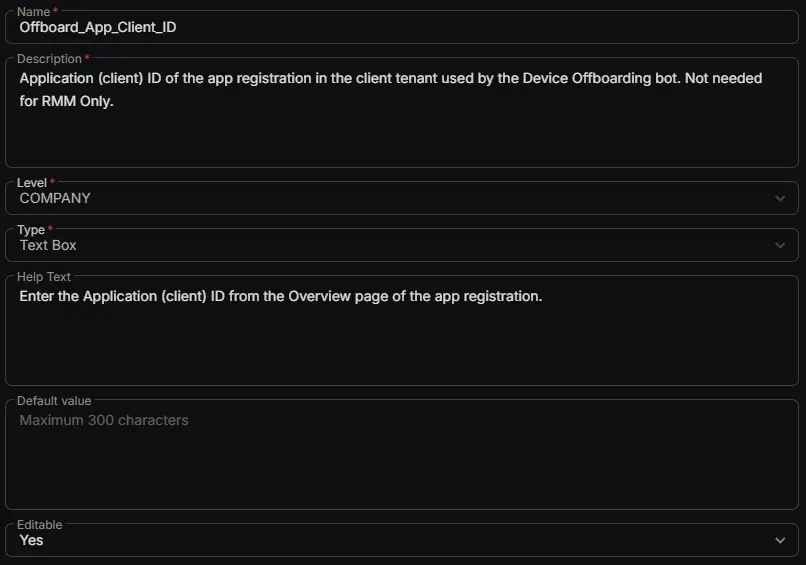
Holds the Application (client) ID of the app registration the Device Offboarding [RMM, Intune and Entra] bot signs in with. The app registration is created in the client's own tenant, so each client has its own value.
Copy the value from the Application (client) ID on the app registration's Overview page. See the app registration steps.
Dependencies
- Solution: Device Offboarding [RMM, Intune and Entra]
- Bots: Device Offboarding [RMM, Intune and Entra]
Custom Field Setup Location
Custom Fields Path: SETTINGS ➞ Custom Fields
Details
| Name | Description | Level | Type | Help Text | Default Value | Editable |
|---|---|---|---|---|---|---|
| Offboard_App_Client_ID | Application (client) ID of the app registration in the client tenant used by the Device Offboarding bot. Not needed for RMM Only. | Company | Text Box | Enter the Application (client) ID from the Overview page of the app registration. | Yes |
note
This field is only needed for clients that use the RMM and Intune or RMM Intune and Entra options of Offboard_Action. Leave it empty for clients that only use RMM Only.
Completed Custom Field
Changelog
2026-10-27
- Initial version of the document