PHP2Shell Vulnerability Audit
Purpose
The goal of this solution is to find every PHP installation on Windows computers, report which ones are affected by PHP2Shell, and update vulnerable standalone installations to a patched release.
PHP2Shell is a pair of critical PHP vulnerabilities (CVE-2026-109618 and CVE-2026-109619) that let an attacker take control of a web server that runs an affected PHP version, without signing in. PHP fixed both vulnerabilities in versions 8.5.12, 8.4.27, 8.3.36, and 8.2.35.
The solution audits each online Windows computer every 7 days, stores the results in a custom table, and displays them in a dataview. Vulnerable installations can then be updated by running the script with the FixLocalInstall parameter.
Associated Content
Script
| Content | Type | Function |
|---|---|---|
| PHP2Shell Vulnerability - Audit | Script | Audits every PHP installation on the computer and stores the results in the custom table. Updates vulnerable standalone installations when FixLocalInstall is set to 1. |
| OverFlowedVariable - SQL Insert - Execute | Script | Helper script used to insert the audit data into the custom table. |
Monitor
| Content | Type | Function |
|---|---|---|
| Execute Script - PHP2Shell Vulnerability - Audit | Internal Monitor | Detects online Windows computers that have not been audited in the past 7 days. |
Alert Template
| Content | Type | Function |
|---|---|---|
| △ Custom - Execute Script - PHP2Shell Vulnerability - Audit | Alert Template | Executes the PHP2Shell Vulnerability - Audit script against the computers detected by the internal monitor. |
Data and Reporting
| Content | Type | Function |
|---|---|---|
| pvl_php2shell_vulnerability_audit | Custom Table | Stores the PHP installations found by the audit and their PHP2Shell status. |
| PHP2Shell Vulnerability - Audit | Dataview | Displays the audit data gathered by the script. |
Implementation
-
Import the associated scripts, internal monitor, dataview, and alert template from the ProSync plugin.
-
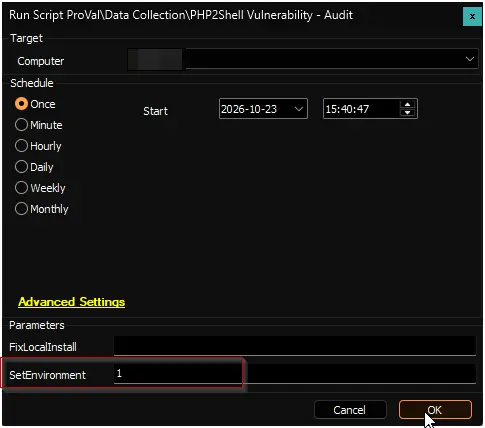
Execute the PHP2Shell Vulnerability - Audit script on any online Windows computer. Make sure to set the
SetEnvironmentparameter to1. This creates the pvl_php2shell_vulnerability_audit custom table.
-
Configure the solution as follows:
- Navigate to
Automation-->Monitorswithin the CWA Control Center and set up the following:- Execute Script - PHP2Shell Vulnerability - Audit
- Configure with the alert template:
△ Custom - Execute Script - PHP2Shell Vulnerability - Audit - Right-click and Run Now to start the monitor.
- Configure with the alert template:
- Execute Script - PHP2Shell Vulnerability - Audit
- Navigate to
-
Review the results in the PHP2Shell Vulnerability - Audit dataview. Filter the
Statuscolumn onVulnerableandEndOfLifeto list the installations that need attention.
FAQ
Q: Which computers does this solution audit?
A: Online Windows 10, Windows 11, and Windows Server 2016 or later computers, both workstations and servers. Each computer is audited about once every 7 days.
Q: Does the audit change anything on the computer?
A: No. The audit that runs from the internal monitor only reports. PHP installations are changed only when the script is run manually with the FixLocalInstall parameter set to 1.
Q: How do I update a vulnerable PHP installation?
A: Run the PHP2Shell Vulnerability - Audit script on the computer with FixLocalInstall set to 1. Every vulnerable standalone PHP installation is updated to the latest patched release of its version line, for example from 8.3.30 to 8.3.36. A backup is taken before each update and restored automatically if the update fails. The Action column shows the result for each installation.
Q: Will updating PHP cause downtime?
A: Yes, briefly. When IIS uses the updated installation, IIS restarts and every website on the server is unavailable for a short time, not only the PHP sites. Services that use the installation are stopped and started again, and running PHP processes are ended. Run FixLocalInstall on servers inside a maintenance window.
Q: Why was a vulnerable installation skipped?
A: PHP that belongs to a stack such as XAMPP, WampServer, or Laragon (InstallType is Stack), or to another vendor's product (InstallType is Vendor), is never changed, since replacing it can break that product. Update it through the owning product, or take the system offline until its vendor releases a fix. PHP 8.1 and older (Status is EndOfLife) have no fix and need an upgrade to PHP 8.2 or later after the application is tested.
Q: What does the status NotDetected mean?
A: The audit ran and found no PHP installation on the computer.
Q: What does the status Unknown mean?
A: PHP was found, but its version could not be read. Check the installation manually.
Changelog
2026-10-23
- Initial version of the document.