Boot Environment Audit
Summary
This ConnectWise RMM script performs a comprehensive security and boot environment audit on Windows devices. It acts as an automated health check, looking deep into the system to verify that critical security measures are in place and up to date.
Specifically, the script gathers information on:
- Secure Boot & Certificates: Checks if Secure Boot is enabled and verifies if the device has the latest security certificates (such as the UEFI CA 2023 update) required to keep the boot process secure.
- Hardware & BIOS Updates: Identifies the device manufacturer (like Dell, HP, or Lenovo) and counts how many hardware driver updates are available. It also logs the current BIOS version and checks if the system's hardware is capable of supporting newer security standards.
- System Boot Configuration: Scans the boot setup to detect if the machine is configured to boot from a network (PXE) or if it has alternative operating systems installed (Dual-Boot/Linux environments).
- Recovery & Telemetry: Checks if the built-in Windows Recovery Environment (WinRE) is active and verifies if Windows diagnostic data collection (telemetry) is turned on or off.
- Windows Updates: Identifies the most recently installed cumulative Windows update and checks if the system meets specific update baselines (November 2025 or newer).
Once the audit is complete, the script automatically saves all this valuable data directly into designated custom fields on the endpoint within your ConnectWise RMM environment. This allows for easy filtering, reporting, and visibility across your entire fleet of managed devices.
Sample Run
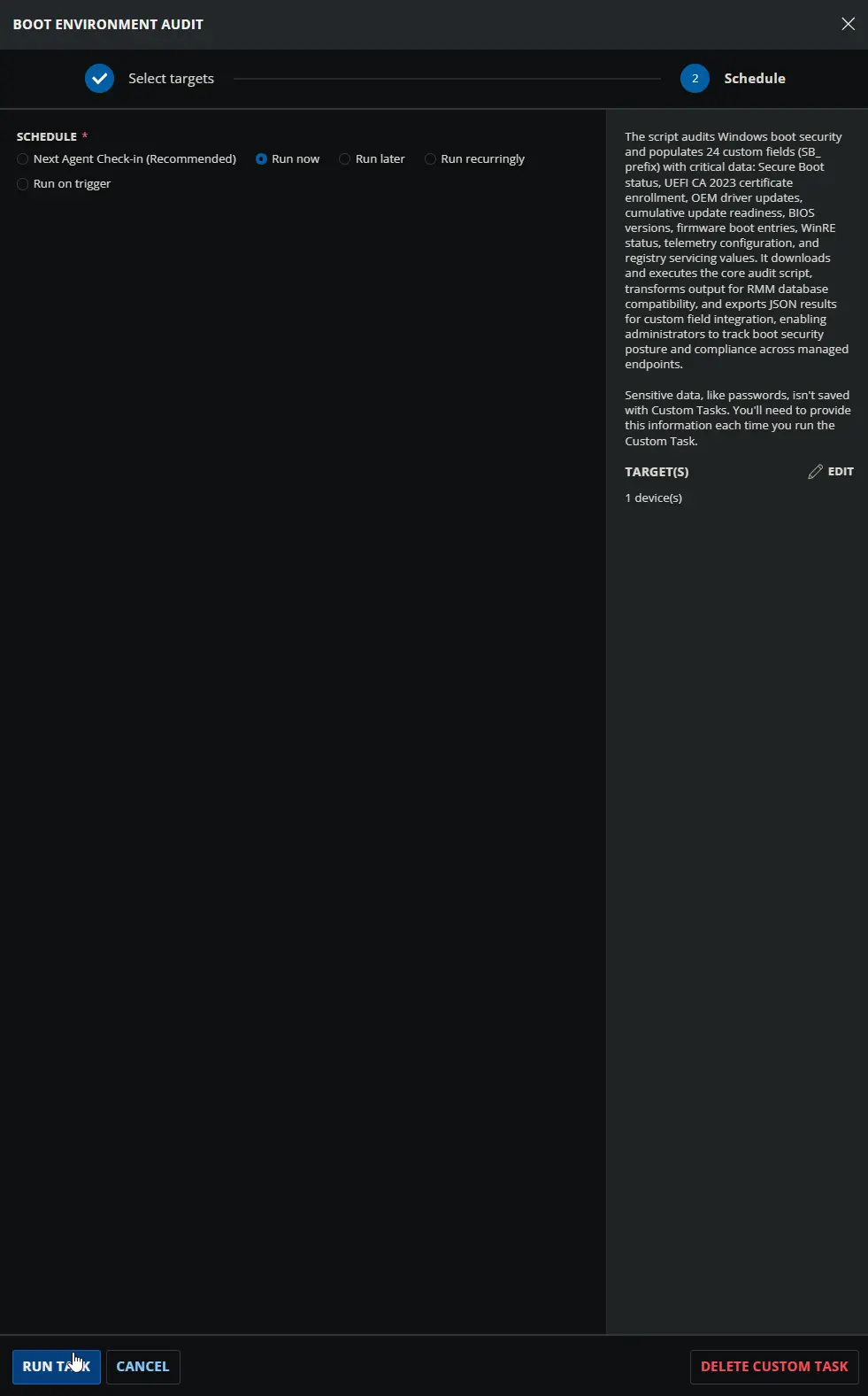
Dependencies
- Custom Field: SB_OEM_Updates_Count
- Custom Field: SB_SecureBoot_Status
- Custom Field: SB_Telemetry_Status
- Custom Field: SB_DB_Certificate_Status
- Custom Field: SB_KEK_Certificate_Status
- Custom Field: SB_DBDefault_Certificate_Status
- Custom Field: SB_Current_Cumulative_Update
- Custom Field: SB_Nov_2025_CU_Installed
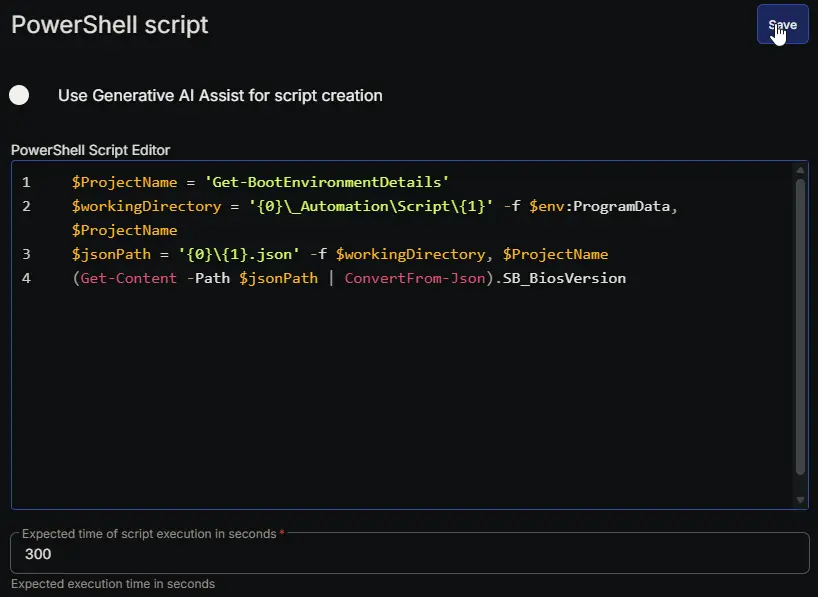
- Custom Field: SB_BiosVersion
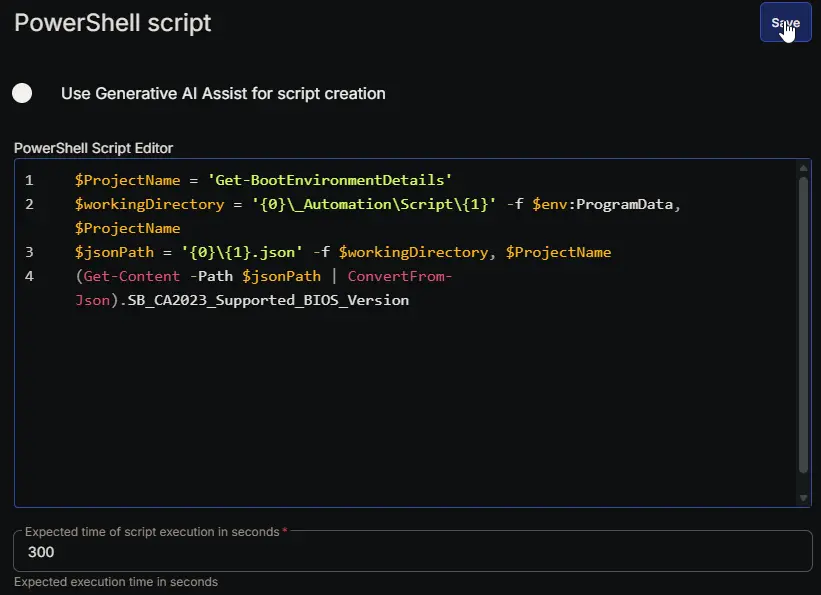
- Custom Field: SB_CA2023_Supported_BIOS_Version
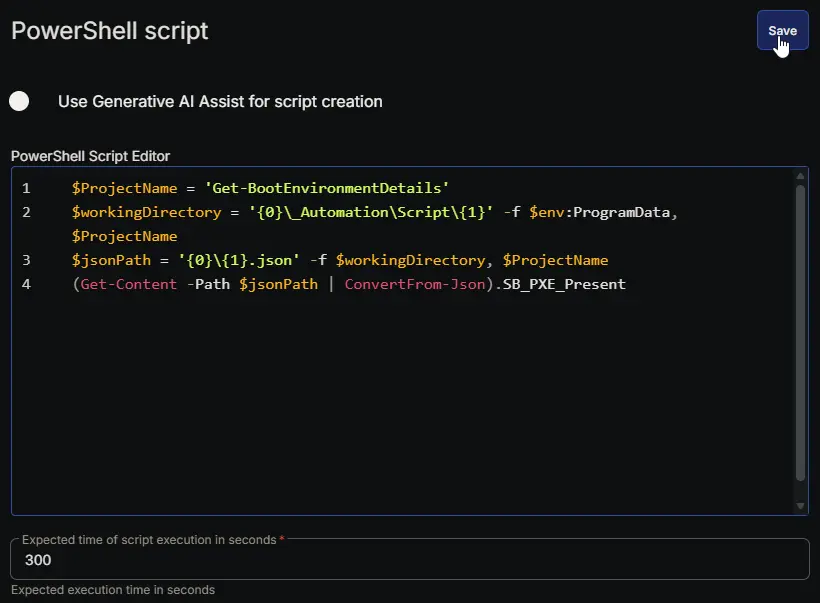
- Custom Field: SB_PXE_Present
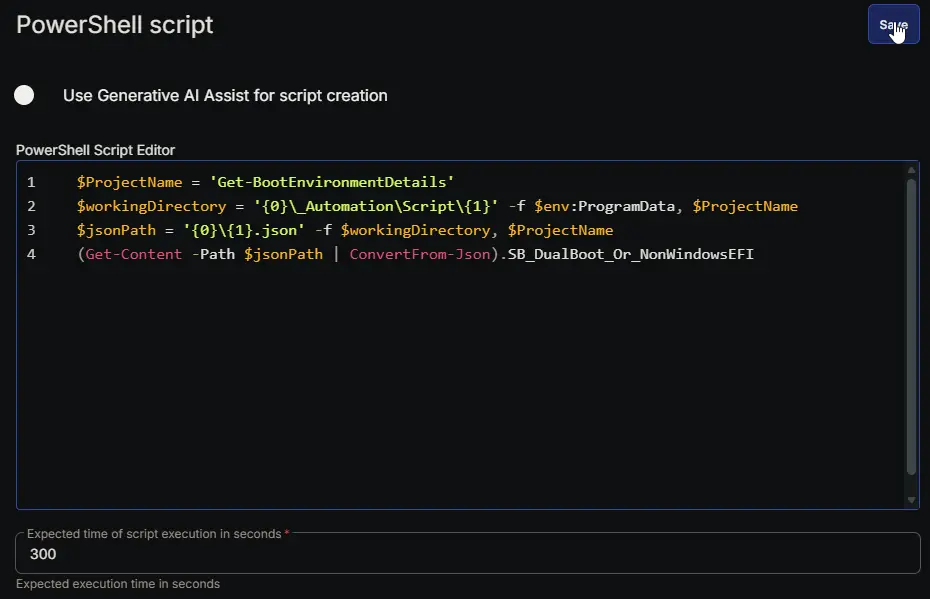
- Custom Field: SB_DualBoot_Or_NonWindowsEFI
- Custom Field: SB_WinRE_Enabled
- Custom Field: SB_Present_Conditions
- Custom Field: SB_PXE_Evidence
- Custom Field: SB_DualBoot_Evidence
- Custom Field: SB_Available_Updates
- Custom Field: SB_UEFICA2023_Status
- Custom Field: SB_UEFICA2023_Error
- Custom Field: SB_WindowsUEFICA2023_Capable
- Custom Field: SB_Confidence_Level
- Custom Field: SB_Confidence_Update_Type
- Custom Field: SB_BucketHash
- Custom Field: SB_Data_Collection_Time
- Custom Field: Boot Environment Audit
- Initialize-DellCommandUpdate
- Initialize-HPImageAssistant
- Install-LenovoUpdates
- Install-WindowsUpdates
- Get-LatestInstalledCU
- Solution: Boot Environment Audit
Custom Fields
| Name | Example | Level | Type | Editable | Description |
|---|---|---|---|---|---|
| SB_OEM_Updates_Count | 3 | Endpoint | Text Box | No | Number of available drivers, Firmware, BIOS updates from the OEM (Dell Command Update, HP Image Assistant, Lenovo Updates, or Windows Update). |
| SB_SecureBoot_Status | Enabled | Endpoint | Text Box | No | Current Secure Boot state: Enabled, Disabled, or Unknown. |
| SB_Telemetry_Status | Disabled | Endpoint | Text Box | No | Windows telemetry setting: Enabled or Disabled (based on registry and DiagTrack service). |
| SB_DB_Certificate_Status | Updated | Endpoint | Text Box | No | UEFI db certificate status: Updated (CA 2023), Out of date, or Not present. |
| SB_KEK_Certificate_Status | Updated | Endpoint | Text Box | No | UEFI KEK certificate status: Updated (Microsoft KEK 2K CA 2023), Out of date, or Not present. |
| SB_DBDefault_Certificate_Status | Out of date | Endpoint | Text Box | No | Default db certificate status: Updated (CA 2023), Out of date, or Not present. |
| SB_Current_Cumulative_Update | KB5012345 | Endpoint | Text Box | No | Latest installed Windows cumulative update identifier. |
| SB_Nov_2025_CU_Installed | True | Endpoint | Text Box | No | True if the November 2025 or newer cumulative update is installed; False otherwise. |
| SB_BiosVersion | 1.15.2 | Endpoint | Text Box | No | BIOS/firmware version string collected from the system. |
| SB_CA2023_Supported_BIOS_Version | 1.16.0 | Endpoint | Text Box | No | Minimum BIOS version required for CA 2023 Secure Boot support per the OEM; 'Not listed' if the model is not found in the lookup. |
| SB_PXE_Present | False | Endpoint | Text Box | No | True if firmware boot entries include PXE/network boot options; False otherwise. |
| SB_DualBoot_Or_NonWindowsEFI | False | Endpoint | Text Box | No | True if non-Windows EFI boot entries are detected (Ubuntu, Debian, GRUB, rEFInd, etc.); False otherwise. |
| SB_WinRE_Enabled | True | Endpoint | Text Box | No | True if the Windows Recovery Environment is enabled; False otherwise. |
| SB_Present_Conditions | WinREEnabled | Endpoint | Text Box | No | Comma-separated summary of detected boot conditions (e.g., 'PXE, DualBoot/NonWindowsEFI, WinREEnabled'). |
| SB_PXE_Evidence | IPv4 Network | Endpoint | Text Box | No | Detailed boot firmware entries indicating PXE/network boot (extracted from system data). |
| SB_DualBoot_Evidence | EFI\ubuntu\grubx64.efi | Endpoint | Text Box | No | Detailed boot firmware entries indicating non-Windows EFI loaders (extracted from system data). |
| SB_Available_Updates | Not exist | Endpoint | Text Box | No | Secure Boot registry value for available UEFI updates; 'Not exist' if the key is not present. |
| SB_UEFICA2023_Status | Not exist | Endpoint | Text Box | No | Secure Boot servicing registry value indicating CA 2023 enrollment status; 'Not exist' if the key is not present. |
| SB_UEFICA2023_Error | Not exist | Endpoint | Text Box | No | Secure Boot servicing registry value showing CA 2023 enrollment errors; 'Not exist' if the key is not present. |
| SB_WindowsUEFICA2023_Capable | Not exist | Endpoint | Text Box | No | Secure Boot servicing registry value indicating device hardware CA 2023 capability; 'Not exist' if the key is not present. |
| SB_Confidence_Level | Not exist | Endpoint | Text Box | No | Secure Boot servicing registry confidence level for CA 2023 enrollment; 'Not exist' if the key is not present. |
| SB_Confidence_Update_Type | Not exist | Endpoint | Text Box | No | Secure Boot servicing registry update type for CA 2023; 'Not exist' if the key is not present. |
| SB_BucketHash | Not exist | Endpoint | Text Box | No | Secure Boot servicing registry bucket hash for troubleshooting; 'Not exist' if the key is not present. |
| SB_Data_Collection_Time | 2026-05-14 17:51:24 | Endpoint | Text Box | No | Timestamp (yyyy-MM-dd HH:mm:ss) when the data was collected. |
| Boot Environment Audit | 1 | Endpoint | Text Box | Yes | Sets this custom field to 1 when the script runs successfully, indicating that the boot environment has been audited and data is available in the other custom fields. |
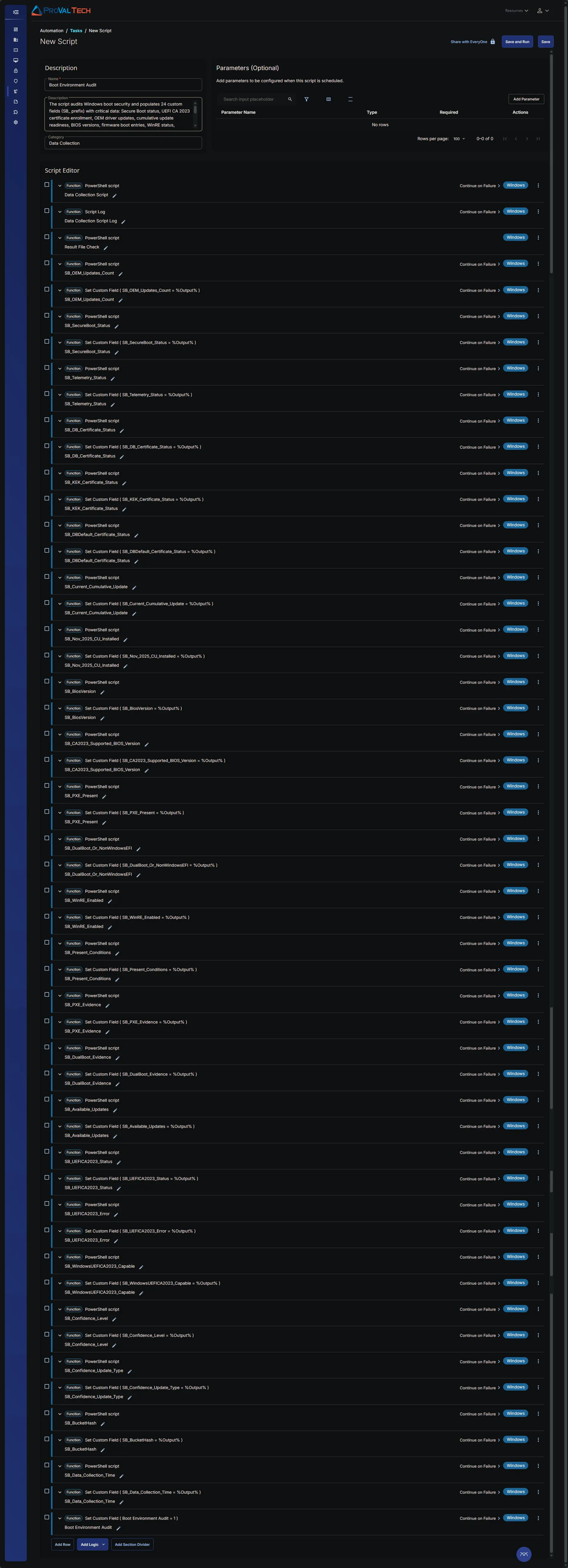
Task Setup Path
- Tasks Path:
AUTOMATION➞Tasks - Task Type:
Script Editor
Task Creation
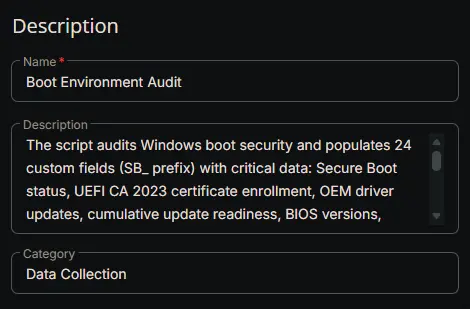
Description
- Name:
Boot Environment Audit - Description:
The script audits Windows boot security and populates 24 custom fields (SB_ prefix) with critical data: Secure Boot status, UEFI CA 2023 certificate enrollment, OEM driver updates, cumulative update readiness, BIOS versions, firmware boot entries, WinRE status, telemetry configuration, and registry servicing values. It downloads and executes the core audit script, transforms output for RMM database compatibility, and exports JSON results for custom field integration, enabling administrators to track boot security posture and compliance across managed endpoints. - Category:
Data Collection
Script Editor
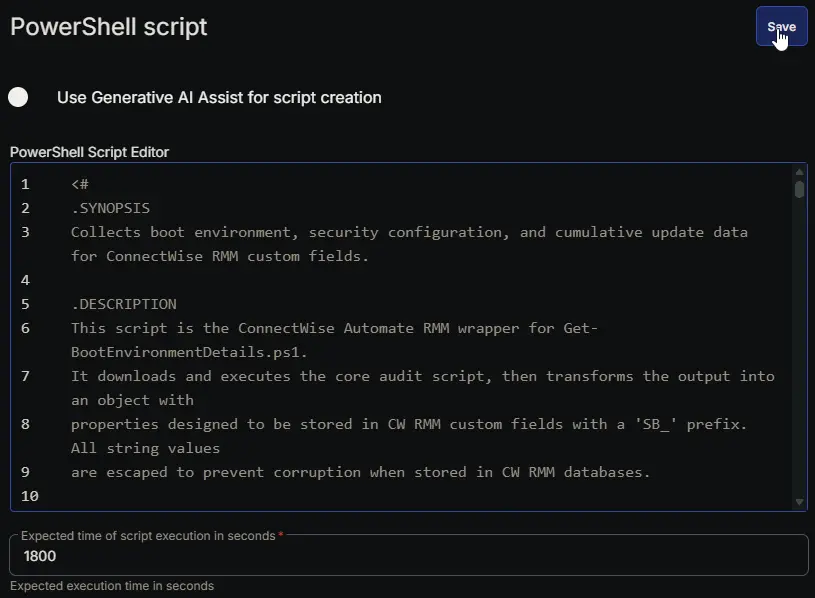
Row 1: PowerShell script
- Notes:
Data Collection Script - Use Generative AI Assist for script creation:
False - Expected time of script execution in seconds:
1800 - Continue on Failure:
True - Run As:
System - Operating System:
Windows - PowerShell Script Editor:
Row 2: Script Log
- Notes:
Data Collection Script Log - Continue on Failure:
True - Operating System:
Windows - Script Log Message:
%Output%

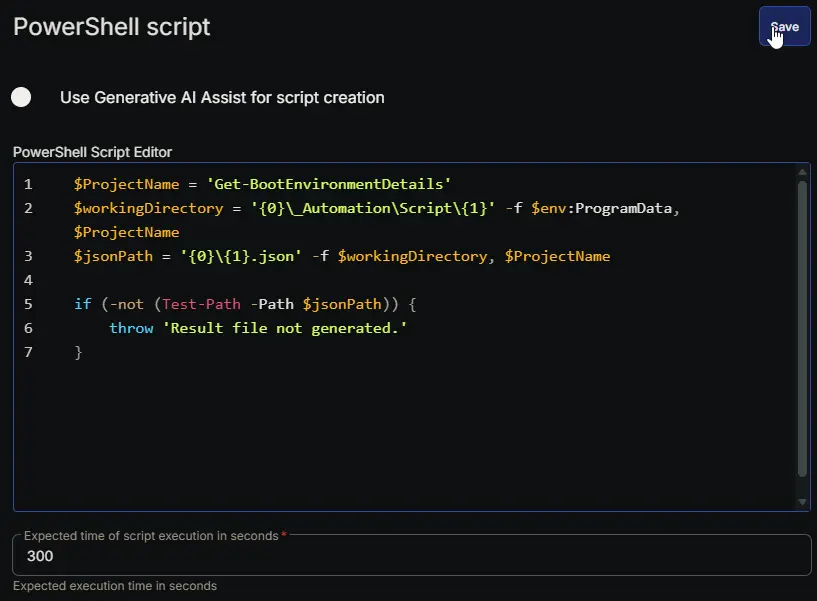
Row 3: PowerShell script
- Notes:
Result File Check - Use Generative AI Assist for script creation:
False - Expected time of script execution in seconds:
300 - Continue on Failure:
False - Run As:
System - Operating System:
Windows - PowerShell Script Editor:
Row 4: PowerShell script
- Notes:
SB_OEM_Updates_Count - Use Generative AI Assist for script creation:
False - Expected time of script execution in seconds:
300 - Continue on Failure:
True - Run As:
System - Operating System:
Windows - PowerShell Script Editor:
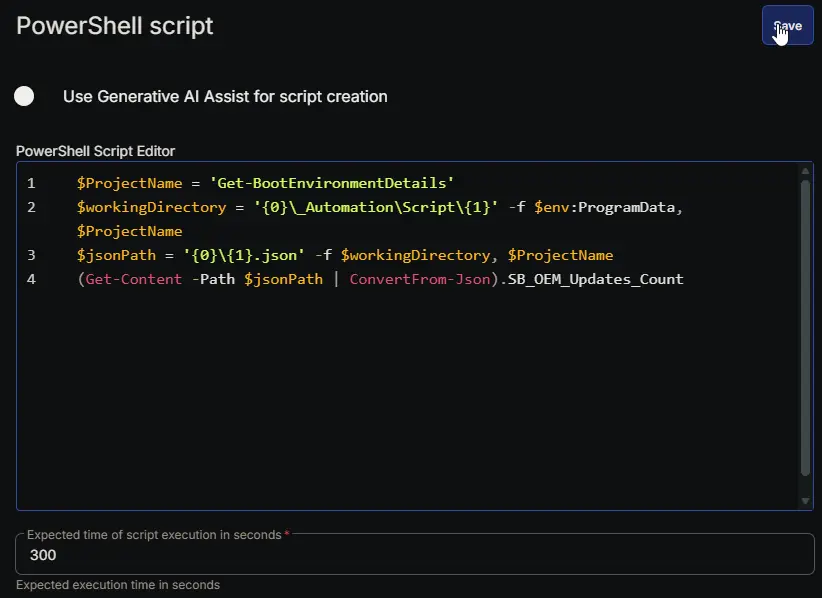
Row 5: Set Custom Field ( SB_OEM_Updates_Count = %Output% )
- Notes:
SB_OEM_Updates_Count - Custom Field:
SB_OEM_Updates_Count - Value:
%Output% - Continue on Failure:
True - Operating System:
Windows

Row 6: PowerShell script
- Notes:
SB_SecureBoot_Status - Use Generative AI Assist for script creation:
False - Expected time of script execution in seconds:
300 - Continue on Failure:
True - Run As:
System - Operating System:
Windows - PowerShell Script Editor:
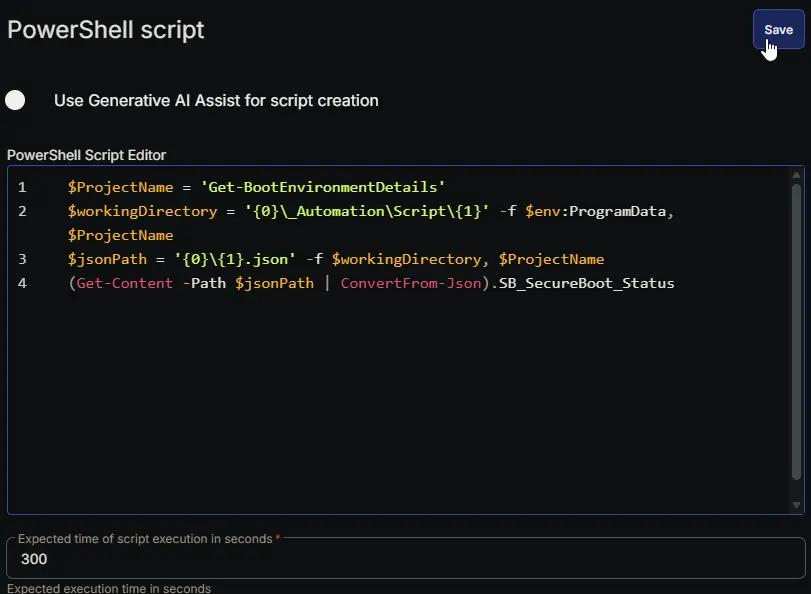
Row 7: Set Custom Field ( SB_SecureBoot_Status = %Output% )
- Notes:
SB_SecureBoot_Status - Custom Field:
SB_SecureBoot_Status - Value:
%Output% - Continue on Failure:
True - Operating System:
Windows

Row 8: PowerShell script
- Notes:
SB_Telemetry_Status - Use Generative AI Assist for script creation:
False - Expected time of script execution in seconds:
300 - Continue on Failure:
True - Run As:
System - Operating System:
Windows - PowerShell Script Editor:
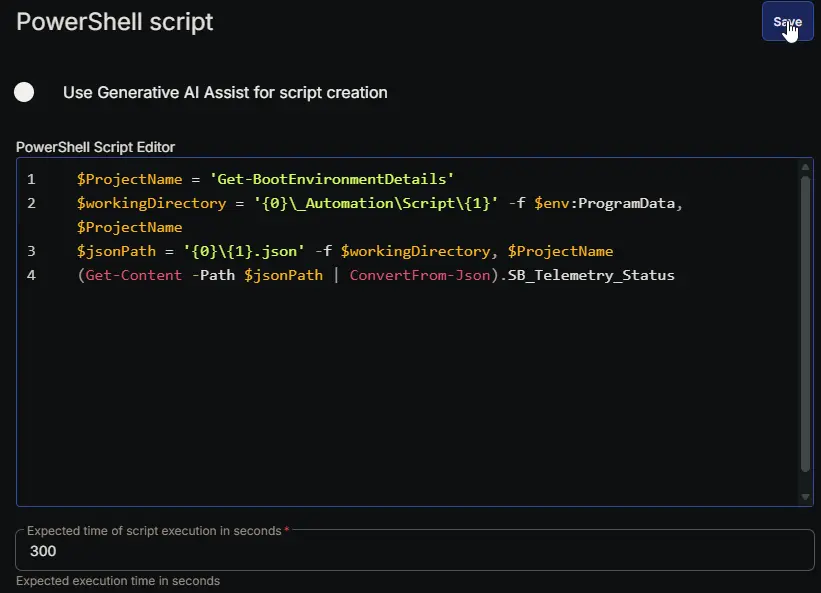
Row 9: Set Custom Field ( SB_Telemetry_Status = %Output% )
- Notes:
SB_Telemetry_Status - Custom Field:
SB_Telemetry_Status - Value:
%Output% - Continue on Failure:
True - Operating System:
Windows

Row 10: PowerShell script
- Notes:
SB_DB_Certificate_Status - Use Generative AI Assist for script creation:
False - Expected time of script execution in seconds:
300 - Continue on Failure:
True - Run As:
System - Operating System:
Windows - PowerShell Script Editor:
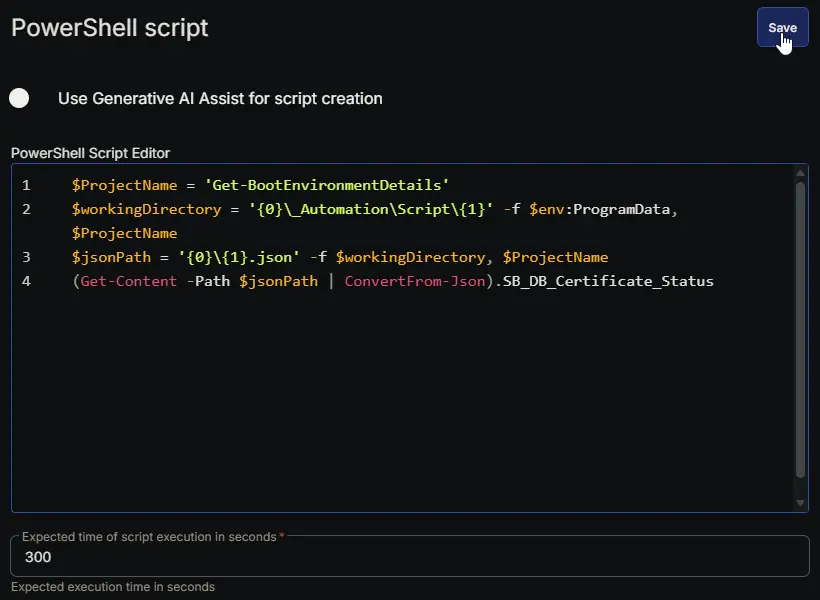
Row 11: Set Custom Field ( SB_DB_Certificate_Status = %Output% )
- Notes:
SB_DB_Certificate_Status - Custom Field:
SB_DB_Certificate_Status - Value:
%Output% - Continue on Failure:
True - Operating System:
Windows

Row 12: PowerShell script
- Notes:
SB_KEK_Certificate_Status - Use Generative AI Assist for script creation:
False - Expected time of script execution in seconds:
300 - Continue on Failure:
True - Run As:
System - Operating System:
Windows - PowerShell Script Editor:
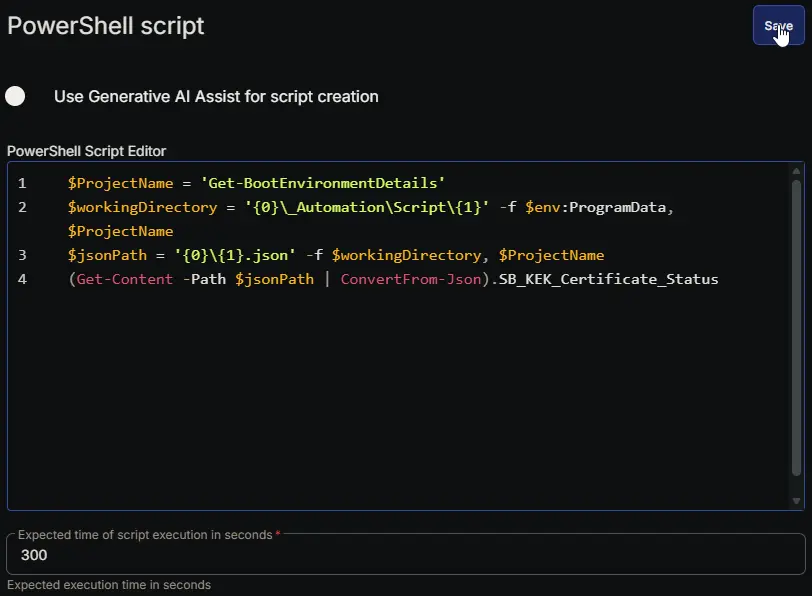
Row 13: Set Custom Field ( SB_KEK_Certificate_Status = %Output% )
- Notes:
SB_KEK_Certificate_Status - Custom Field:
SB_KEK_Certificate_Status - Value:
%Output% - Continue on Failure:
True - Operating System:
Windows

Row 14: PowerShell script
- Notes:
SB_DBDefault_Certificate_Status - Use Generative AI Assist for script creation:
False - Expected time of script execution in seconds:
300 - Continue on Failure:
True - Run As:
System - Operating System:
Windows - PowerShell Script Editor:
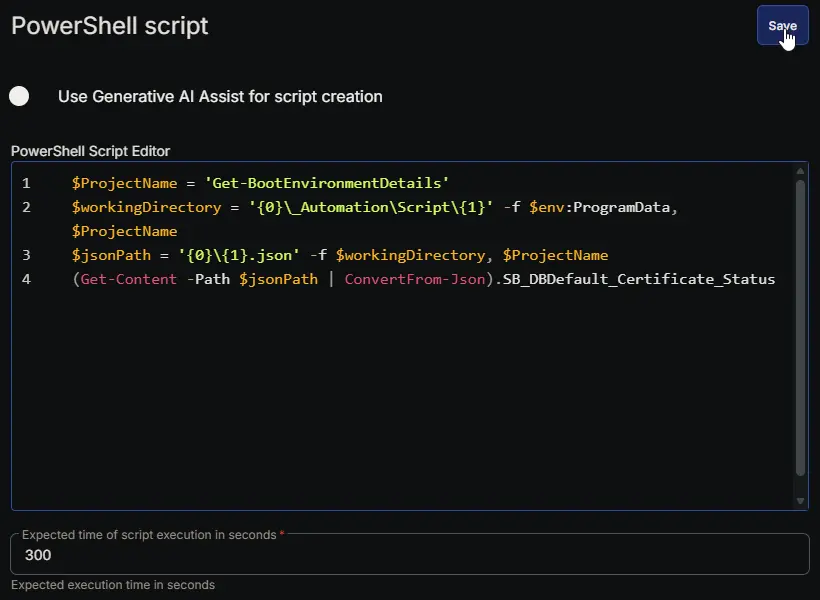
Row 15: Set Custom Field ( SB_DBDefault_Certificate_Status = %Output% )
- Notes:
SB_DBDefault_Certificate_Status - Custom Field:
SB_DBDefault_Certificate_Status - Value:
%Output% - Continue on Failure:
True - Operating System:
Windows

Row 16: PowerShell script
- Notes:
SB_Current_Cumulative_Update - Use Generative AI Assist for script creation:
False - Expected time of script execution in seconds:
300 - Continue on Failure:
True - Run As:
System - Operating System:
Windows - PowerShell Script Editor:
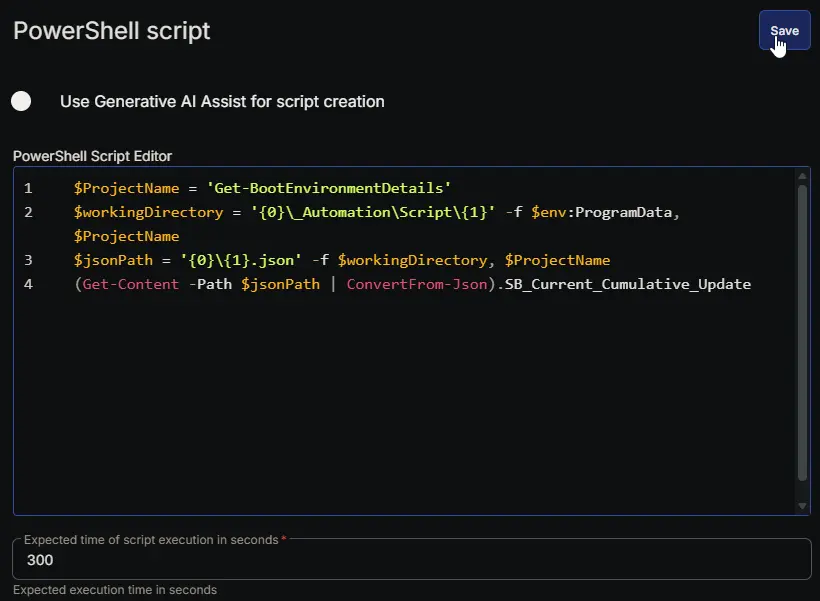
Row 17: Set Custom Field ( SB_Current_Cumulative_Update = %Output% )
- Notes:
SB_Current_Cumulative_Update - Custom Field:
SB_Current_Cumulative_Update - Value:
%Output% - Continue on Failure:
True - Operating System:
Windows

Row 18: PowerShell script
- Notes:
SB_Nov_2025_CU_Installed - Use Generative AI Assist for script creation:
False - Expected time of script execution in seconds:
300 - Continue on Failure:
True - Run As:
System - Operating System:
Windows - PowerShell Script Editor:
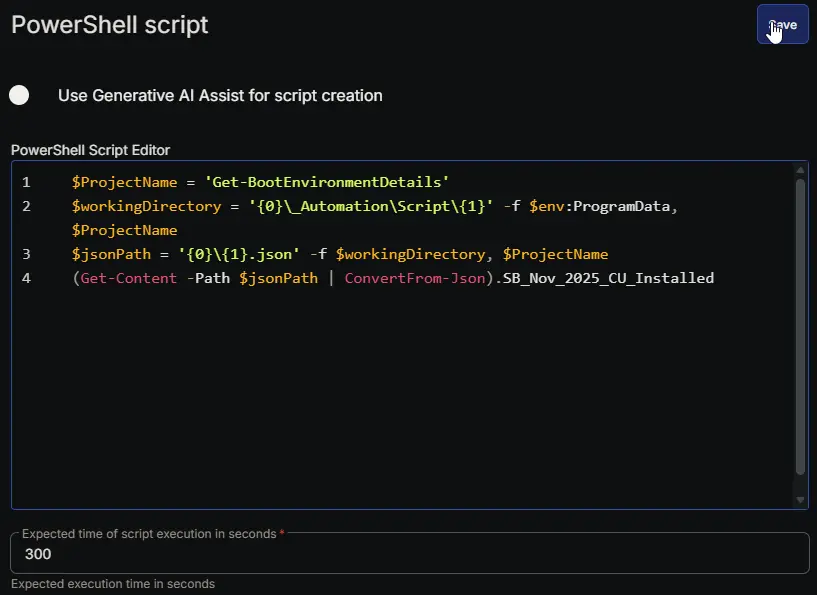
Row 19: Set Custom Field ( SB_Nov_2025_CU_Installed = %Output% )
- Notes:
SB_Nov_2025_CU_Installed - Custom Field:
SB_Nov_2025_CU_Installed - Value:
%Output% - Continue on Failure:
True - Operating System:
Windows

Row 20: PowerShell script
- Notes:
SB_BiosVersion - Use Generative AI Assist for script creation:
False - Expected time of script execution in seconds:
300 - Continue on Failure:
True - Run As:
System - Operating System:
Windows - PowerShell Script Editor:
Row 21: Set Custom Field ( SB_BiosVersion = %Output% )
- Notes:
SB_BiosVersion - Custom Field:
SB_BiosVersion - Value:
%Output% - Continue on Failure:
True - Operating System:
Windows

Row 22: PowerShell script
- Notes:
SB_CA2023_Supported_BIOS_Version - Use Generative AI Assist for script creation:
False - Expected time of script execution in seconds:
300 - Continue on Failure:
True - Run As:
System - Operating System:
Windows - PowerShell Script Editor:
Row 23: Set Custom Field ( SB_CA2023_Supported_BIOS_Version = %Output% )
- Notes:
SB_CA2023_Supported_BIOS_Version - Custom Field:
SB_CA2023_Supported_BIOS_Version - Value:
%Output% - Continue on Failure:
True - Operating System:
Windows

Row 24: PowerShell script
- Notes:
SB_PXE_Present - Use Generative AI Assist for script creation:
False - Expected time of script execution in seconds:
300 - Continue on Failure:
True - Run As:
System - Operating System:
Windows - PowerShell Script Editor:
Row 25: Set Custom Field ( SB_PXE_Present = %Output% )
- Notes:
SB_PXE_Present - Custom Field:
SB_PXE_Present - Value:
%Output% - Continue on Failure:
True - Operating System:
Windows

Row 26: PowerShell script
- Notes:
SB_DualBoot_Or_NonWindowsEFI - Use Generative AI Assist for script creation:
False - Expected time of script execution in seconds:
300 - Continue on Failure:
True - Run As:
System - Operating System:
Windows - PowerShell Script Editor:
Row 27: Set Custom Field ( SB_DualBoot_Or_NonWindowsEFI = %Output% )
- Notes:
SB_DualBoot_Or_NonWindowsEFI - Custom Field:
SB_DualBoot_Or_NonWindowsEFI - Value:
%Output% - Continue on Failure:
True - Operating System:
Windows

Row 28: PowerShell script
- Notes:
SB_WinRE_Enabled - Use Generative AI Assist for script creation:
False - Expected time of script execution in seconds:
300 - Continue on Failure:
True - Run As:
System - Operating System:
Windows - PowerShell Script Editor:
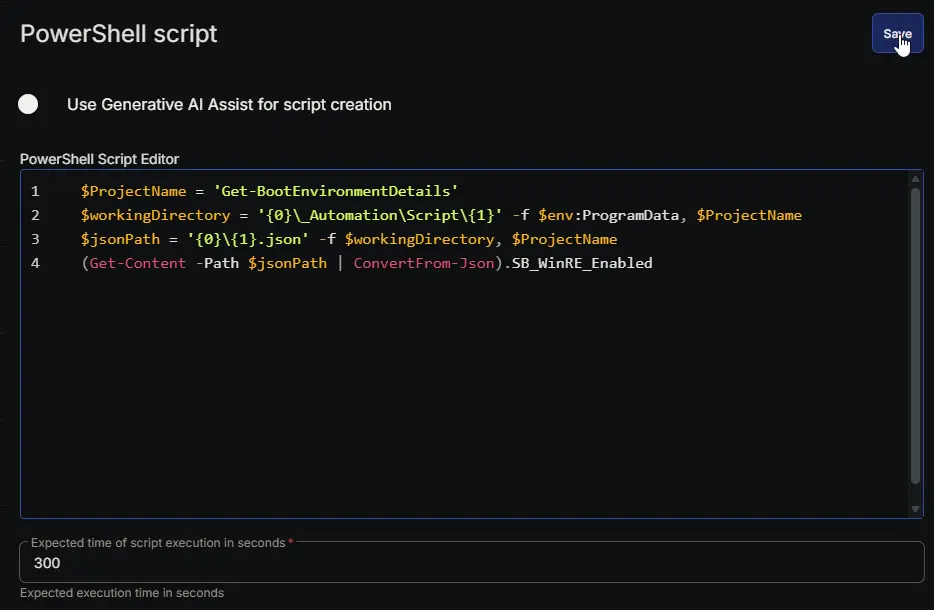
Row 29: Set Custom Field ( SB_WinRE_Enabled = %Output% )
- Notes:
SB_WinRE_Enabled - Custom Field:
SB_WinRE_Enabled - Value:
%Output% - Continue on Failure:
True - Operating System:
Windows

Row 30: PowerShell script
- Notes:
SB_Present_Conditions - Use Generative AI Assist for script creation:
False - Expected time of script execution in seconds:
300 - Continue on Failure:
True - Run As:
System - Operating System:
Windows - PowerShell Script Editor:
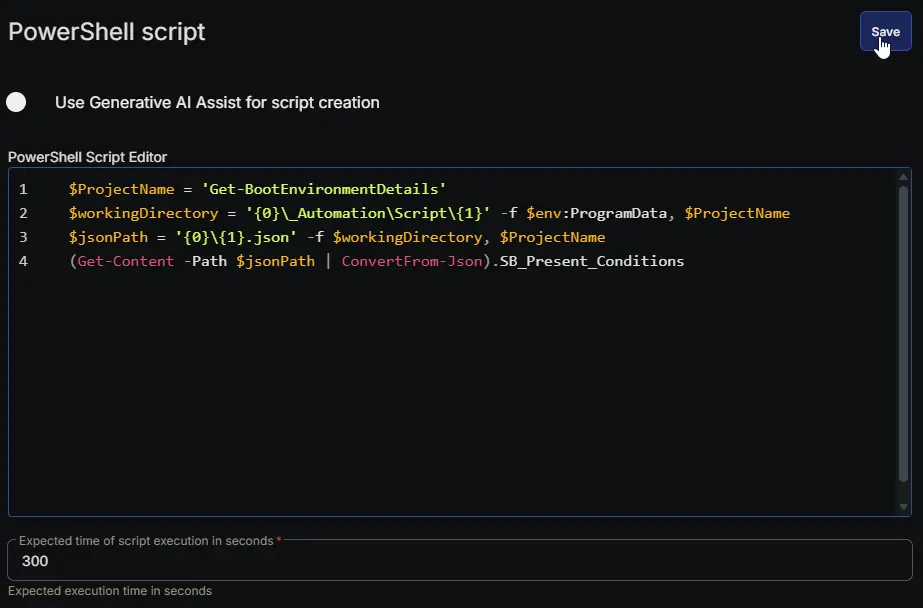
Row 31: Set Custom Field ( SB_Present_Conditions = %Output% )
- Notes:
SB_Present_Conditions - Custom Field:
SB_Present_Conditions - Value:
%Output% - Continue on Failure:
True - Operating System:
Windows

Row 32: PowerShell script
- Notes:
SB_PXE_Evidence - Use Generative AI Assist for script creation:
False - Expected time of script execution in seconds:
300 - Continue on Failure:
True - Run As:
System - Operating System:
Windows - PowerShell Script Editor:
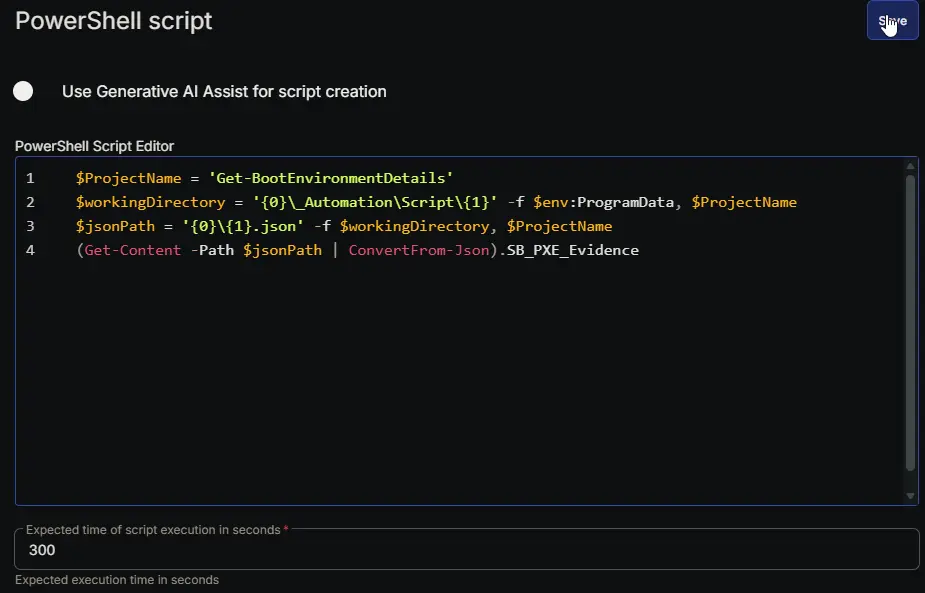
Row 33: Set Custom Field ( SB_PXE_Evidence = %Output% )
- Notes:
SB_PXE_Evidence - Custom Field:
SB_PXE_Evidence - Value:
%Output% - Continue on Failure:
True - Operating System:
Windows

Row 34: PowerShell script
- Notes:
SB_DualBoot_Evidence - Use Generative AI Assist for script creation:
False - Expected time of script execution in seconds:
300 - Continue on Failure:
True - Run As:
System - Operating System:
Windows - PowerShell Script Editor:
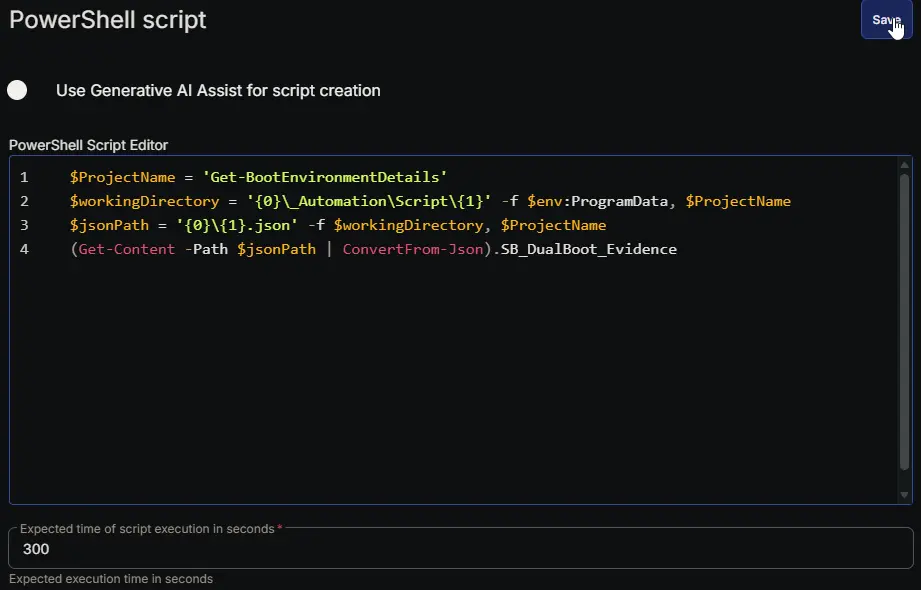
Row 35: Set Custom Field ( SB_DualBoot_Evidence = %Output% )
- Notes:
SB_DualBoot_Evidence - Custom Field:
SB_DualBoot_Evidence - Value:
%Output% - Continue on Failure:
True - Operating System:
Windows

Row 36: PowerShell script
- Notes:
SB_Available_Updates - Use Generative AI Assist for script creation:
False - Expected time of script execution in seconds:
300 - Continue on Failure:
True - Run As:
System - Operating System:
Windows - PowerShell Script Editor:
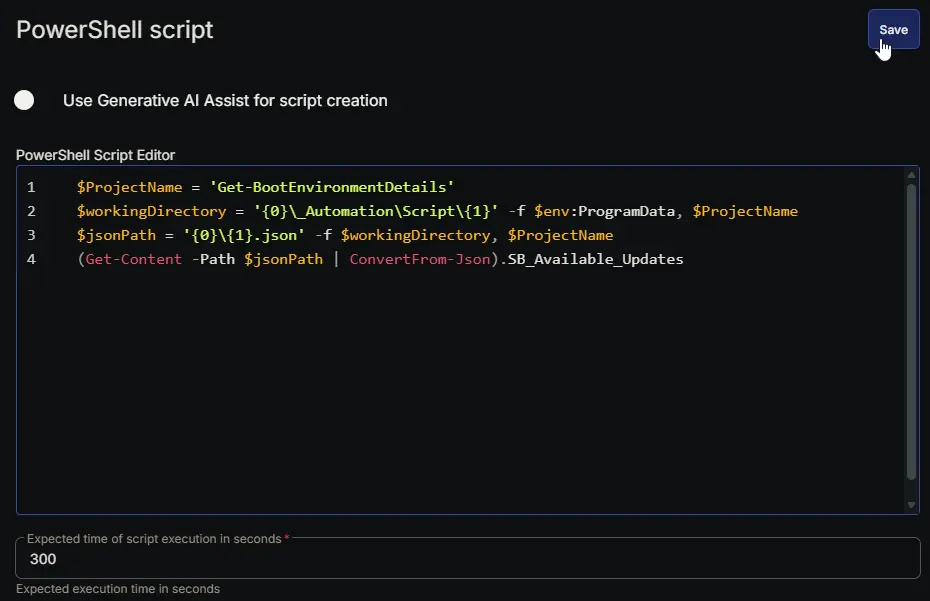
Row 37: Set Custom Field ( SB_Available_Updates = %Output% )
- Notes:
SB_Available_Updates - Custom Field:
SB_Available_Updates - Value:
%Output% - Continue on Failure:
True - Operating System:
Windows

Row 38: PowerShell script
- Notes:
SB_UEFICA2023_Status - Use Generative AI Assist for script creation:
False - Expected time of script execution in seconds:
300 - Continue on Failure:
True - Run As:
System - Operating System:
Windows - PowerShell Script Editor:
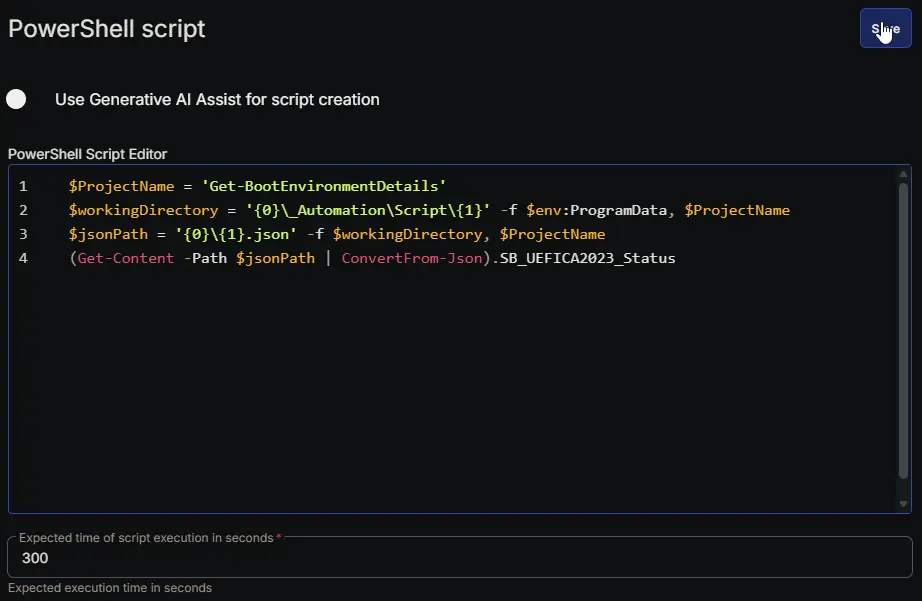
Row 39: Set Custom Field ( SB_UEFICA2023_Status = %Output% )
- Notes:
SB_UEFICA2023_Status - Custom Field:
SB_UEFICA2023_Status - Value:
%Output% - Continue on Failure:
True - Operating System:
Windows

Row 40: PowerShell script
- Notes:
SB_UEFICA2023_Error - Use Generative AI Assist for script creation:
False - Expected time of script execution in seconds:
300 - Continue on Failure:
True - Run As:
System - Operating System:
Windows - PowerShell Script Editor:
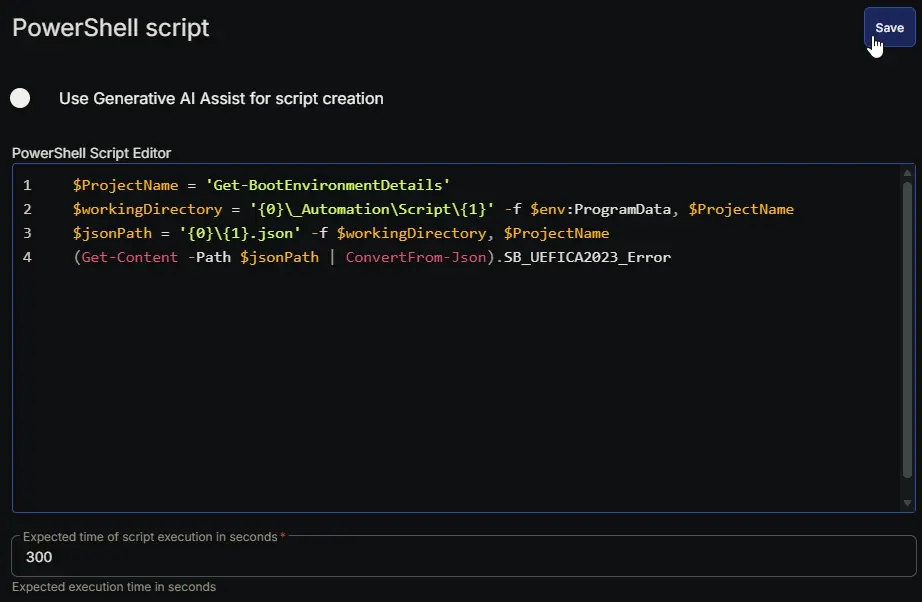
Row 41: Set Custom Field ( SB_UEFICA2023_Error = %Output% )
- Notes:
SB_UEFICA2023_Error - Custom Field:
SB_UEFICA2023_Error - Value:
%Output% - Continue on Failure:
True - Operating System:
Windows

Row 42: PowerShell script
- Notes:
SB_WindowsUEFICA2023_Capable - Use Generative AI Assist for script creation:
False - Expected time of script execution in seconds:
300 - Continue on Failure:
True - Run As:
System - Operating System:
Windows - PowerShell Script Editor:
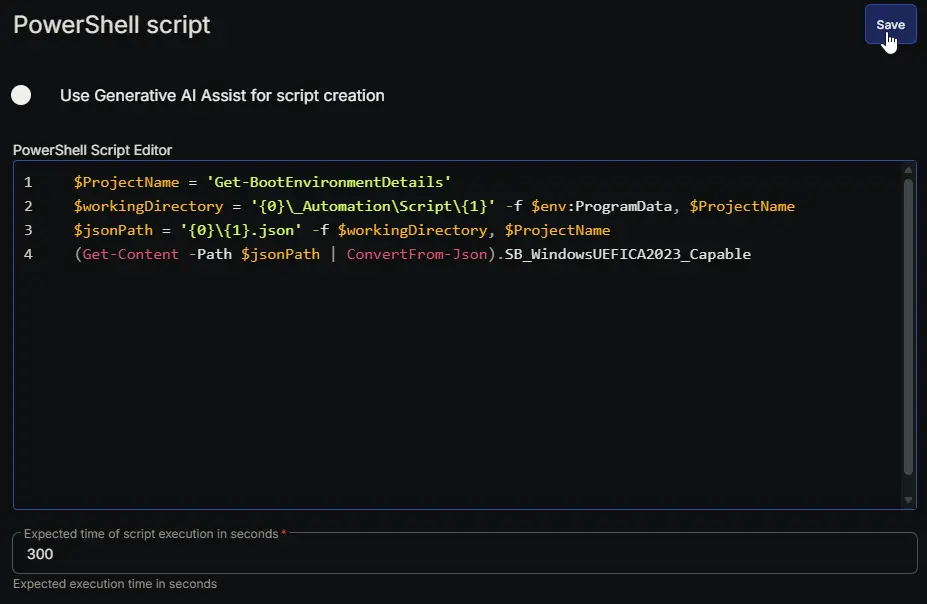
Row 43: Set Custom Field ( SB_WindowsUEFICA2023_Capable = %Output% )
- Notes:
SB_WindowsUEFICA2023_Capable - Custom Field:
SB_WindowsUEFICA2023_Capable - Value:
%Output% - Continue on Failure:
True - Operating System:
Windows

Row 44: PowerShell script
- Notes:
SB_Confidence_Level - Use Generative AI Assist for script creation:
False - Expected time of script execution in seconds:
300 - Continue on Failure:
True - Run As:
System - Operating System:
Windows - PowerShell Script Editor:
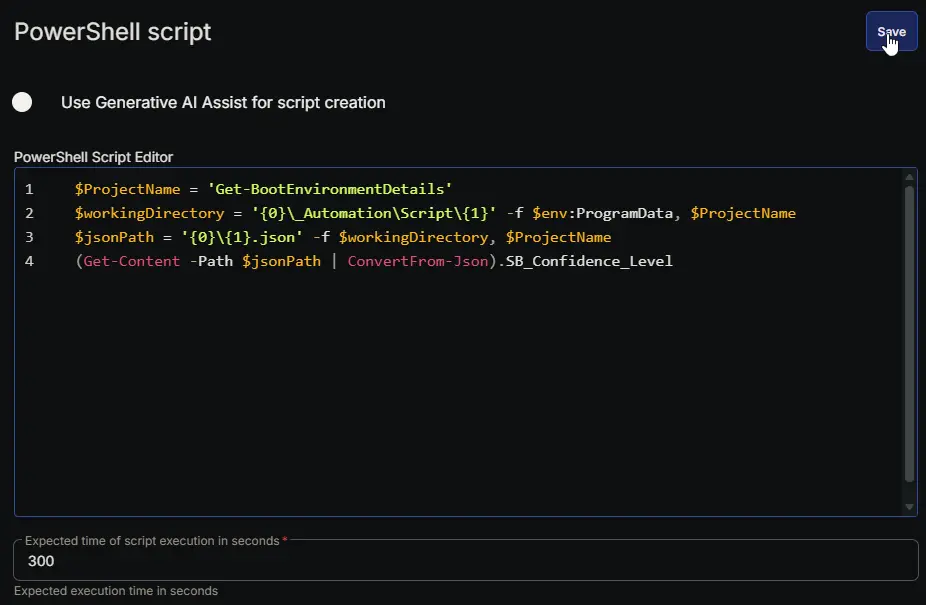
Row 45: Set Custom Field ( SB_Confidence_Level = %Output% )
- Notes:
SB_Confidence_Level - Custom Field:
SB_Confidence_Level - Value:
%Output% - Continue on Failure:
True - Operating System:
Windows

Row 46: PowerShell script
- Notes:
SB_Confidence_Update_Type - Use Generative AI Assist for script creation:
False - Expected time of script execution in seconds:
300 - Continue on Failure:
True - Run As:
System - Operating System:
Windows - PowerShell Script Editor:
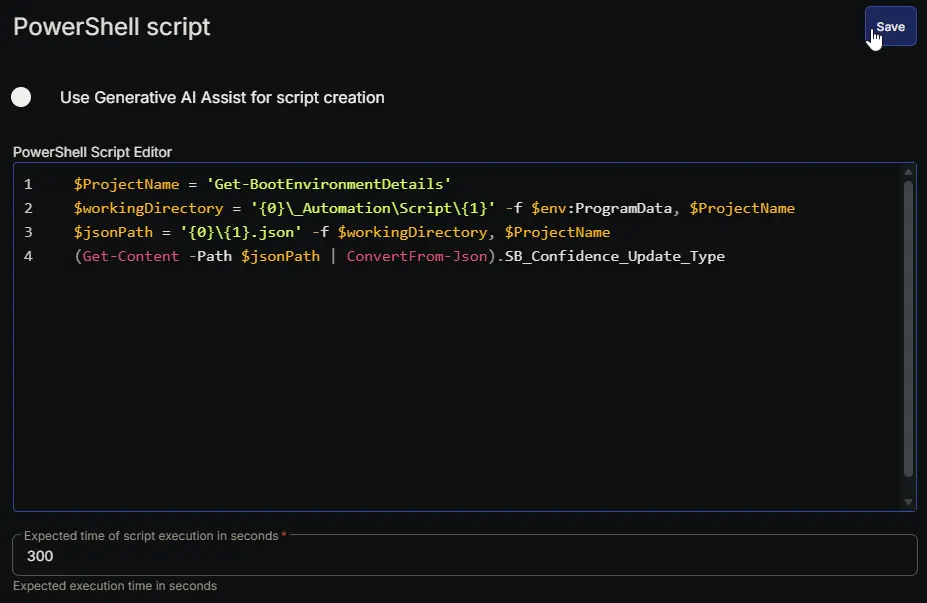
Row 47: Set Custom Field ( SB_Confidence_Update_Type = %Output% )
- Notes:
SB_Confidence_Update_Type - Custom Field:
SB_Confidence_Update_Type - Value:
%Output% - Continue on Failure:
True - Operating System:
Windows

Row 48: PowerShell script
- Notes:
SB_BucketHash - Use Generative AI Assist for script creation:
False - Expected time of script execution in seconds:
300 - Continue on Failure:
True - Run As:
System - Operating System:
Windows - PowerShell Script Editor:
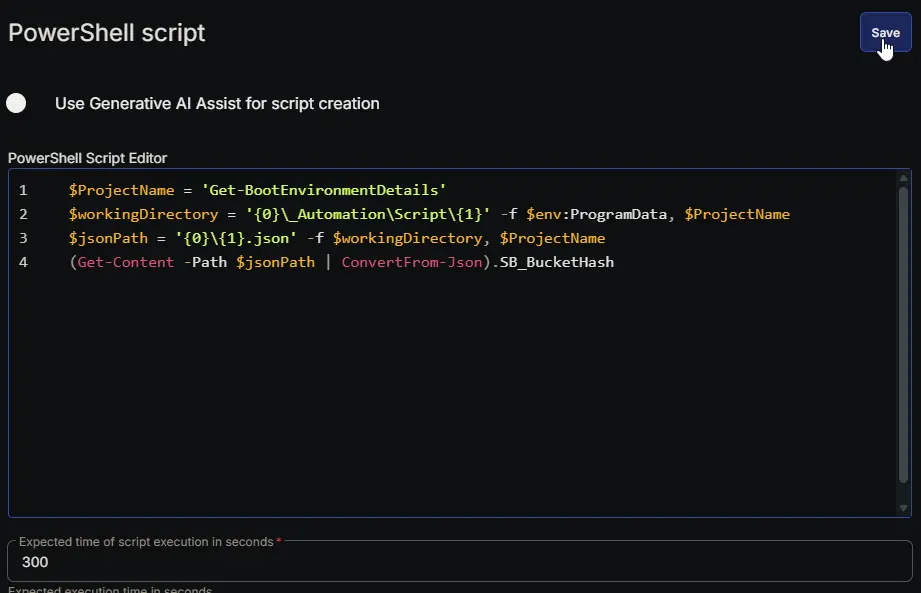
Row 49: Set Custom Field ( SB_BucketHash = %Output% )
- Notes:
SB_BucketHash - Custom Field:
SB_BucketHash - Value:
%Output% - Continue on Failure:
True - Operating System:
Windows

Row 50: PowerShell script
- Notes:
SB_Data_Collection_Time - Use Generative AI Assist for script creation:
False - Expected time of script execution in seconds:
300 - Continue on Failure:
True - Run As:
System - Operating System:
Windows - PowerShell Script Editor:
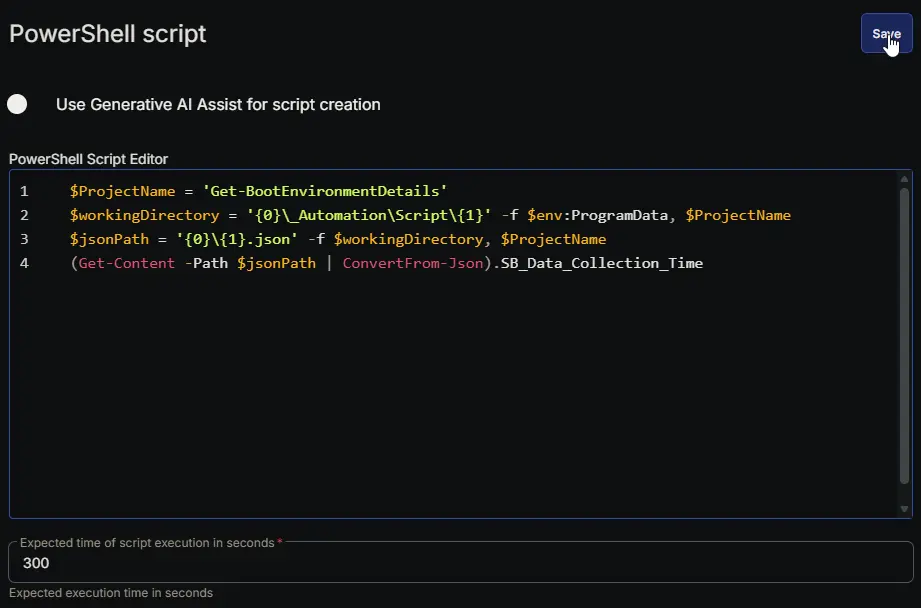
Row 51: Set Custom Field ( SB_Data_Collection_Time = %Output% )
- Notes:
SB_Data_Collection_Time - Custom Field:
SB_Data_Collection_Time - Value:
%Output% - Continue on Failure:
True - Operating System:
Windows

Row 52: Set Custom Field ( Boot Environment Audit = 1 )
- Notes:
Boot Environment Audit - Custom Field:
Boot Environment Audit - Value:
1 - Continue on Failure:
True - Operating System:
Windows

Completed Script
Output
- Script Log
- Custom Fields
Changelog
2026-05-14
- Initial version of the document