Manage - Windows Installer Cache
Overview
The script performs a quarantine operation with force parameter to identify and isolate orphaned Windows Installer cache files, generates a manifest of the quarantined items, and then executes a deletion operation using the generated manifest. This staged approach provides a controlled and auditable remediation process while minimizing risk.
The implementation is designed for automated deployment, supports secure content delivery through code-signature validation, and helps reclaim disk space by safely removing orphaned Windows Installer cache files.
Dependencies
Implementation
-
Download the component
Manage - Windows Installer Cachefrom the attachments. -
After downloading the attached file, click on the
Importbutton -
Select the component just downloaded and add it to the Datto RMM interface.

Sample Run
To execute the Manage - Windows Installer Cache over a specific machine, follow these steps:
-
Select the machine you want to run the
Manage - Windows Installer Cacheon from the Datto RMM. -
Click on the
Quick Jobbutton.

-
Search the component
Manage - Windows Installer Cache

-
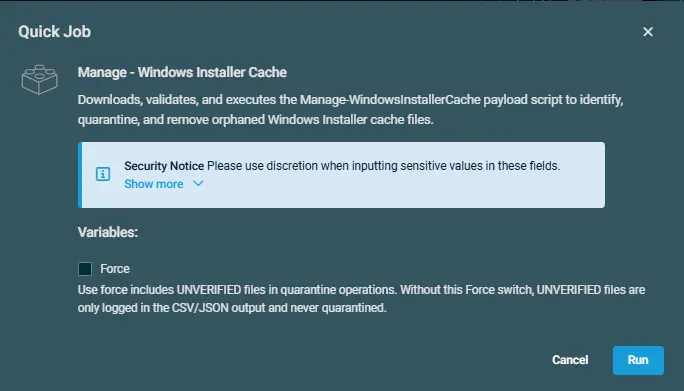
Click on
Selectand thenRun
Datto Variables
| Variable Name | Type | Default | Description |
|---|---|---|---|
Force | Boolean | False | Use force includes UNVERIFIED files in quarantine operations. Without this Force switch, UNVERIFIED files are only logged in the CSV/JSON output and never quarantined. |
Output
- Activity log
- C:\ProgramData_automation\script\Manage-WindowsInstallerCache-log.txt
- C:\ProgramData_automation\script\Manage-WindowsInstallerCache-error.txt
Attachments
Changelog
2026-07-03
- Updated powershell script to use the
Forceparameter. - Added variable for
Forceparameter.
2026-06-15
- Initial version of the document