Threatlocker Agent Deployment
Summary
This script installs the ThreatLocker agent on Windows and Mac operating systems.
EDF Configuration
For Windows Deployment:
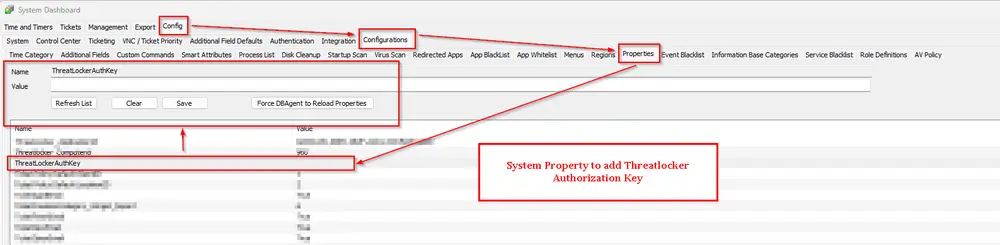
- Enter the Threatlocker Authorization key in System Properties under system property
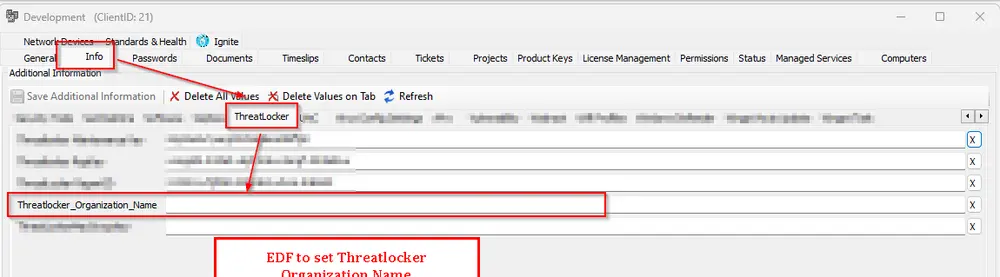
ThreatLockerAuthKeyorThreatlocker_Unique_Identifierin the client-level EDF. Check Tips - Enter the Organization name in Client EDF
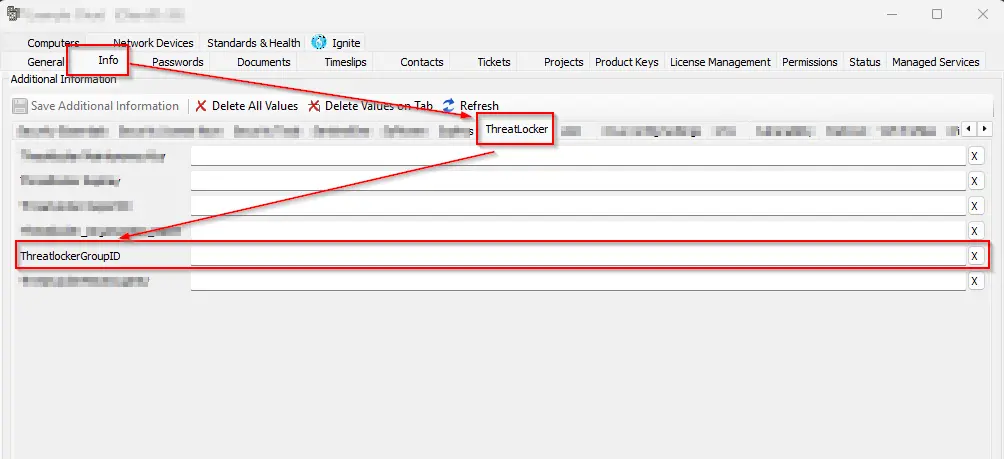
Threatlocker_Organization_Name - Enter the Threatlocker Group ID in Client EDF
ThreatlockerGroupID
For MAC Deployment:
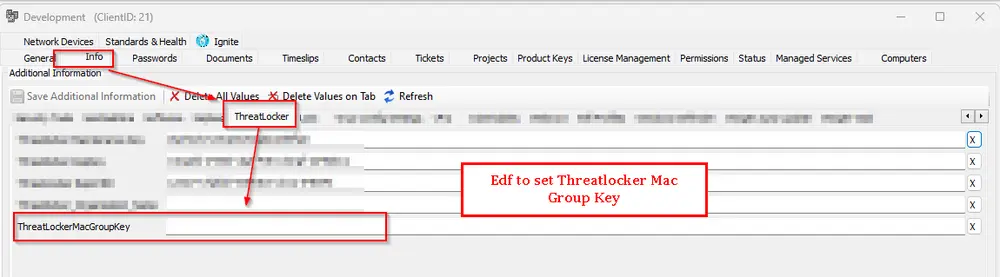
- Enter Threatlocker Mac in Client EDF
ThreatLockerMacGroupKey
Sample Run
First Run:
Set 'Set_Environment' to 1 to create system properties needed for the script.

General Execution:

Dependencies
Global Parameters
| Name | Example | Required | Description |
|---|---|---|---|
| Ticketing | 1 | False | Set it to '1' to enable ticketing. Leave it blank or '0' to disable it. |
User Parameters
| Name | Example | Required | Description |
|---|---|---|---|
| Set_Environment | 1 | Need to set to 1 for first-time implementation | Running the script with the user parameter 'Set_Environment' as 1 will import System Properties and EDF's needed for the script. |
System Properties
| Name | Example | Required | Description |
|---|---|---|---|
| ThreatLockerAuthKey | 322b9e5f-18d7-4acb-b333-ba1ab466f184 | True (For Windows Deployment) | The assigned ThreatLocker authorization key for Windows machines. Follow the instructions to get the group key for the desired machine. Getting your Unique Identifier from ThreatLocker | ThreatLocker Help Center |
Client-Level EDF
| Name | Type | Example | Section | Required | Description |
|---|---|---|---|---|---|
| Threatlocker_Organization_Name | Text | Proval | Threatlocker | True (For Windows Deployment) | Organization Name to be used for Threatlocker deployment. If deploying to an existing organization, that name must match the organization's name in the ThreatLocker portal. |
| Threatlocker_Unique_Identifier | Text | 565507f1-6451-4fa3-8cfb-8ac7d3f5a205 | Threatlocker | True (For Windows Deployment) | Unique Identifier of the direct parent organization. To override the value stored in ThreatLockerAuthKey Property. |
| ThreatLockerMacGroupKey | Text | d976b4e1-7373-4032-8427-56fedfb35963 | Threatlocker | True (For MAC Deployment) | Stores the Threatlocker Group key for Macintosh Machines. Follow the instructions to get the group key for the desired machine. MAC Agent Group Key Location | ThreatLocker Help Center (kb.help) |
| ThreatlockerGroupID | Text | 78fd02a7-6190-4516-987d-11f3d79d7f51 | Threatlocker | True (For AMD Processors) | Stores the ThreatLocker GroupID. This EDF was introduced to address deployment issues on AMD processors, as ThreatLocker does not get installed on them unless the GroupID is explicitly defined. |
Location-Level EDF
| Name | Type | Section | Required | Description |
|---|---|---|---|---|
| Exclude Threatlocker | Checkbox | Threatlocker | False | Mark this EDF to exclude the Location from Threatlocker Deployment |
Computer-Level EDF
| Name | Type | Section | Required | Description |
|---|---|---|---|---|
| Exclude Threatlocker | Checkbox | Threatlocker | False | Mark this EDF to exclude the agent from Threatlocker |
Tips
When to use ThreatLockerAuthKey (system property) vs Threatlocker_Unique_Identifier (client EDF)
-
ThreatLockerAuthKey (system property)
- Set this to the Unique Identifier of the top-level/main organization when the client you are deploying is a direct child of that main organization.
- This is the default/global value the installer will use.
-
Threatlocker_Unique_Identifier (client EDF)
- Use this to override the system property for a specific client when that client belongs under an intermediate/sub-parent organization.
- Set the EDF to the Unique Identifier of the sub-parent (the direct parent of the client) so the agent registers under the correct sub-organization.
Example (fictionalized for documentation)
-
Main organization: Main (Unique Identifier: 9ed8c128-3cfb-4d2c-b352-5ced87622807)
- Direct child: MainCorp Azure
- Direct child: MainCorp Ops
-
Sub-parent: Sub Group (Unique Identifier: 3472f4e4-31b4-45a6-9588-0e5b07924e9b)
- Clients under this sub-parent:
- Abc Services
- Xyz LLC
- Pqr Insurance
- Clients under this sub-parent:
How to apply:
- If the target client is MainCorp Azure (direct child of MainCorp), save MainCorp's Unique Identifier in the
ThreatLockerAuthKeysystem property. - If the target client is Abc Services (falls under the Sub Group sub-parent), set the client EDF
Threatlocker_Unique_Identifierto the Sub Group Unique Identifier (3472f4e4-31b4-45a6-9588-0e5b07924e9b). Do not change the global ThreatLockerAuthKey unless you want to change the default for all direct children.
Summary rule:
- If the organization for which you want to deploy falls directly under a sub-parent, save the sub-parent's Unique Identifier to the client EDF (
Threatlocker_Unique_Identifier). - If it falls directly under the main/top-level organization, save the main organization's Unique Identifier to theThreatLockerAuthKeysystem property.
Ticketing
Subject: Threatlocker Deployment Failed for %ClientName%\%ComputerName% at %LocationName%
Ticket Body for Download Failure:
For 32-bit:
Failed to download Threatlocker installer.
Please ensure that the following download URL is reachable from the computer:
https://api.threatlocker.com/updates/installers/ThreatLockerStubX86.exe
For 64-bit:
Failed to download Threatlocker installer.
Please ensure that the following download URL is reachable from the computer: https://api.threatlocker.com/updates/installers/ThreatLockerStubX64.exe
Ticket Body for Installation Failure:
Failed to install Threatlocker
Command Result: %shellresult%
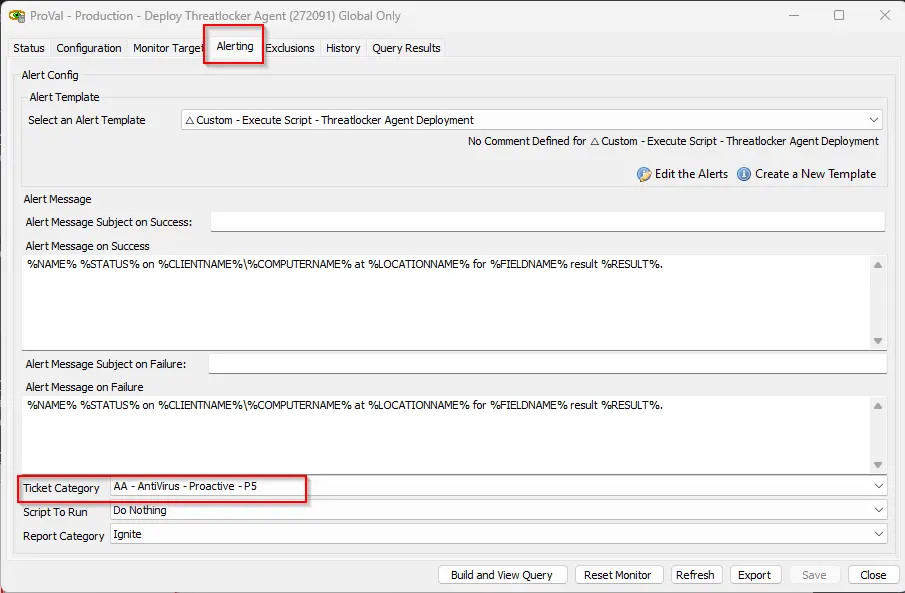
Ticketing parameter should be set to '1' in the Global Parameters of the script to enable the ticket creation feature.

TicketCreationCategory can be set from the alerting tab of the Internal Monitor Deploy Threatlocker Agent.
Changelog
2025-11-26
- Introduced a new client level EDF Threatlocker_Unique_Identifier to override the value stored in the system property ThreatlockerAuthKey. This is helpful when a client belongs under a sub-parent structure. This ensures the agent registers under the correct sub-organization instead of the top-level organization.
2025-07-22
- Updated Threatlocker agent deployment script to support AMD processors. AMD processors requires GroupID for threatlocker deployment. Introduced a new EDF to define it and do the installation for AMD computers
2025-06-27
- Initial version of the document