Repair Windows Update
Overview
This automated procedure repairs corrupted Windows Update components, resolves common update errors, and optionally runs deep system health checks (DISM and SFC). Regular maintenance of the Windows Update agent ensures that security patches and feature updates install reliably without getting stuck or failing.
To minimize manual intervention, this procedure securely downloads and executes a pre-approved repair script, automatically handling service restarts, cache clearing, and system file validation based on your selected configuration in Datto RMM.
How It Works
-
Environment Configuration: When the job runs, Datto RMM passes the selected repair options (such as running SFC, DISM, or skipping the update reset) as environment variables to the wrapper script.
-
Secure Download & Validation: The wrapper script securely downloads the agnostic repair payload from the content repository. It strictly validates the digital signature of the downloaded script against trusted ProVal thumbprints before execution.
-
Smart Execution: The wrapper reads the environment variables, converts them to boolean values, and passes them as switches to the agnostic script. If the variables are missing or invalid, the script automatically falls back to its default behavior (resetting Windows Update components without running SFC/DISM).
-
Component Repair & Reset: The agnostic script takes over. It safely stops services, clears out old backup folders to prevent disk bloat, runs DISM and SFC in the correct order (if requested), resets the Windows Update agent, and pulls a fresh update inventory.
Key Benefits & Behaviors
- Optimized Repair Order: When both DISM and SFC are selected, the script automatically runs DISM first to repair the underlying Windows image, ensuring SFC has a healthy source to pull from when fixing system files.
- Disk Space Management: Automatically detects and removes old, leftover Windows Update backup folders (like 'SoftwareDistribution.bak' and 'Catroot2.bak') that accumulate over time and consume valuable disk space.
- Secure & Verified: All downloads are forced over TLS 1.2/1.3, and execution is blocked if the script signature is invalid, missing, or untrusted.
- Fallback Safe: If the environment variables are accidentally left blank or contain invalid strings, the script will not fail; it will simply execute the standard Windows Update reset.
Dependencies
Implementation
- Download the component Repair Windows Update from the attachments.
- After downloading the attached file, click on the 'Import' button in the Datto RMM interface.
- Select the component just downloaded and add it to your Datto RMM account.

Sample Run
To execute the Repair Windows Update over a specific machine, follow these steps:
- Select the machine you want to run the
Repair Windows Updateon from the Datto RMM. - Click on the 'Quick Job' button.
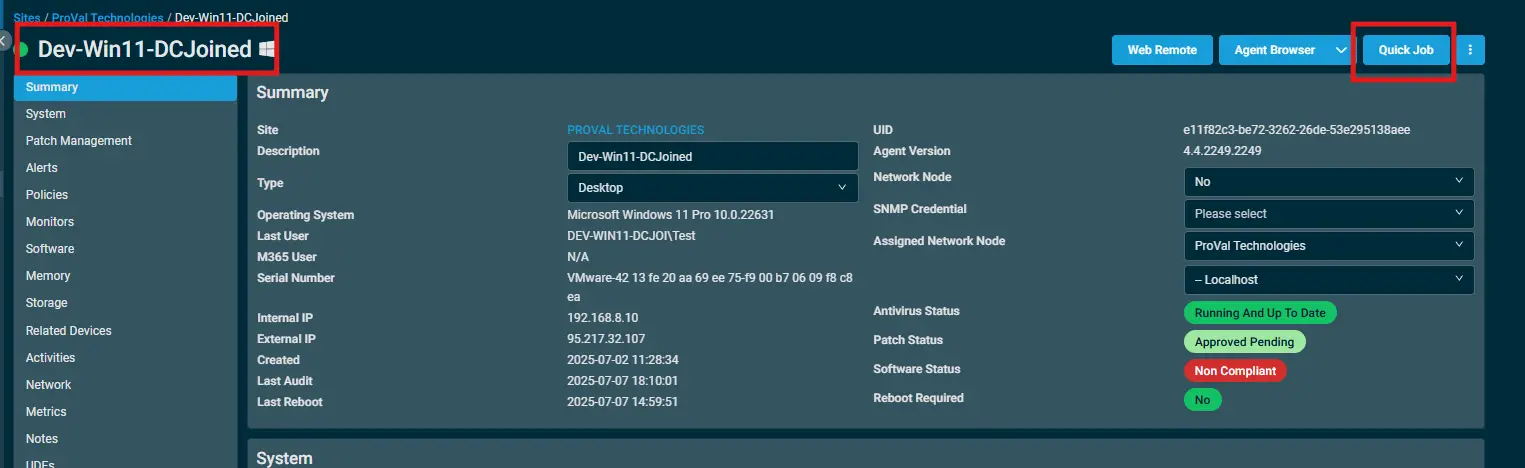
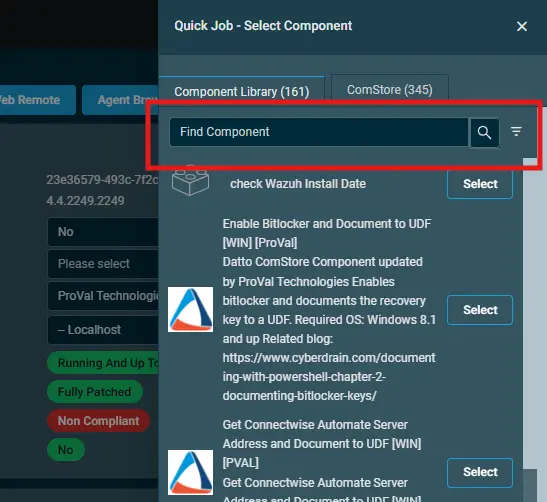
- Search the component
Repair Windows Updateand click onSelect.
- Configure the desired environment variables and click Run.
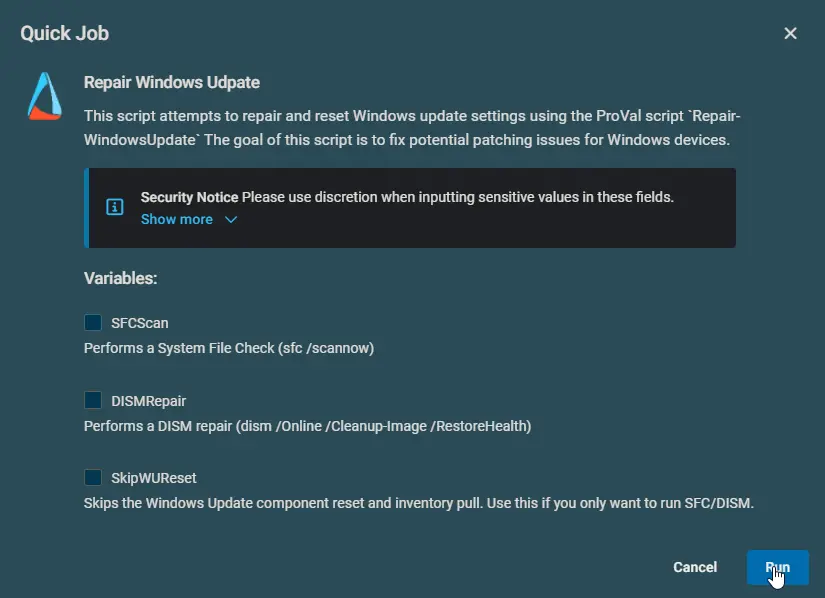
Configuring the Variables
Repair Options:
- Set
DISMRepairtoTrueto repair the Windows component store before checking system files. - Set
SFCScantoTrueto scan and repair corrupted Windows system files. - Set
SkipWUResettoTrueif you only want to run system health checks (DISM/SFC) without resetting the Windows Update services and caches.
Variables
| Variable | Type | Default | Description |
|---|---|---|---|
DISMRepair | String | 'False' | Enable to run the DISM RestoreHealth command. This repairs the underlying Windows image and should be run before SFC. |
SFCScan | String | 'False' | Enable to run the System File Checker ('sfc /scannow'). This scans and repairs corrupted Windows system files. |
SkipWUReset | String | 'False' | Enable to skip the Windows Update component reset and inventory pull. Use this if you only want to perform system health checks without touching update services. |
Real-Life Scenarios
Scenario 1: Standard Update Reset (Default)
Settings: All variables left at default ('False' or empty).
What happens:
- The script skips DISM and SFC to save time.
- It stops Windows Update services, deletes old '.bak' cache folders, and renames the active 'SoftwareDistribution' and 'Catroot2' folders.
- It restarts the services and pulls a fresh inventory of available updates.
- Best for: Machines where updates are stuck at 'Checking for updates' or failing to download.
Scenario 2: Comprehensive System & Update Repair
Settings:
DISMRepair=TrueSFCScan=True
What happens:
- The script first runs DISM to ensure the Windows component store is healthy.
- It then runs SFC to repair any corrupted system files using the healthy component store.
- Finally, it performs the full Windows Update reset and pulls a new inventory.
- Best for: Machines experiencing repeated update installation failures (e.g., error 0x800f081f) or general OS instability.
Scenario 3: System Health Check Only
Settings:
DISMRepair=TrueSFCScan=TrueSkipWUReset=True
What happens:
- The script runs DISM and SFC to repair the OS image and system files.
- It completely skips the Windows Update service resets and cache clearing.
- Best for: Post-patching validation or troubleshooting general Windows errors without disrupting the current Windows Update agent state.
Scenario 4: Missing or Invalid Environment Variables
Settings: The RMM agent fails to pass the environment variables or passes invalid strings due to a configuration glitch.
What happens:
- The wrapper script evaluates the variables against the accepted regex pattern.
- Since the values do not match, it defaults all switches to 'False'.
- Instead of failing, it gracefully falls back to the default behavior and executes the standard Windows Update reset (Scenario 1).
- Best for: Ensuring the procedure never fails silently and always attempts a baseline repair.
Output
- Script execution log (managed via the Strapper module and written to
ProgramData\_Automation\Script\Repair-WindowsUpdate\) - Standard Windows Update logs (
C:\Windows\Logs\CBS\CBS.logandC:\Windows\Logs\DISM\dism.log) if DISM/SFC are executed.
Attachments
Changelog
2026-08-19
- Updated documentation structure to align with standard implementation templates.
- Added
SkipWUResetparameter to allow skipping the Windows Update component reset. - Detailed real-life scenarios and environment variable configurations for Datto RMM.
2026-06-22
- Initial version of the document.