Deploy Perch Log Shipper
Summary
This script deploys the Perch Log Shipper on Windows machines where it is not already installed. The client-level EDF Deploy Perch Log Shipper must be checked, and either the client-level EDF Perch Client Install Code or the location-level EDF Perch Location Install Code must be populated to enable the deployment of the Perch Log Shipper on the client machines.
Script Target
Windows Machines
Dependencies
Sample Run
It must be run with the Agents Missing PerchLogShipper monitor but can also be run individually.

Extra Data Fields
| EDF Name | Level | Type | Description |
|---|---|---|---|
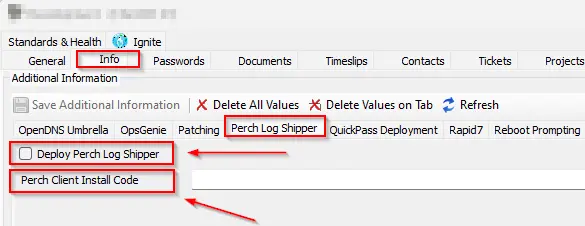
| Deploy Perch Log Shipper | Client | CheckBox | Check it if you would like to enable the client for Perch Log Shipper deployment. |
| Perch Client Install Code | Client | TextField | Populate it with a client-based installation code. |
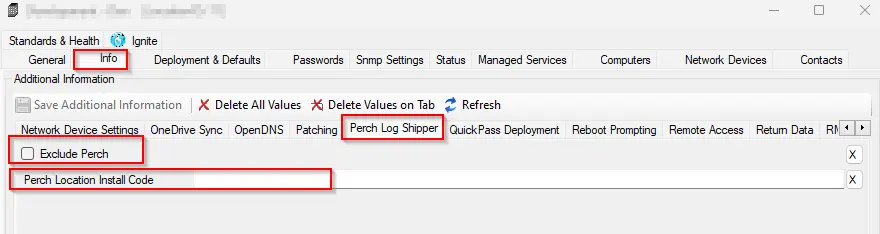
| Perch Location Install Code | Location | TextField | Populate it with a location-based installation code. If nothing is mentioned at Perch Client Install Code, the script will check for the location-level installation code mentioned at Perch Location Install Code. |
| Exclude Perch | Location | CheckBox | Check it if you would like to exclude a location from Perch Log Shipper deployment. |
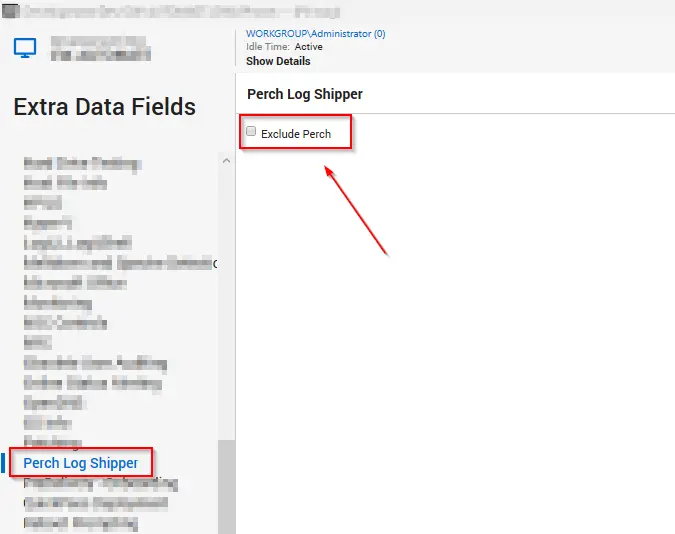
| Exclude Perch | Computer | CheckBox | Check it if you would like to exclude a computer from Perch Log Shipper deployment. |
Client-level EDFs to select Perch Log Shipper deployment and to populate the installation token.
Location-level EDF to exclude a location from Perch Log Shipper deployment and to populate the installation token.
Computer-level EDF to exclude a computer from Perch Log Shipper deployment.
Output
- Script log
- Tickets
Ticketing
The tickets will only be generated if the ticket category is defined on a global monitor.
Ticket Subject: Perch Log Shipper Installation Failed on %ComputerName%(%ComputerID%)
Ticket Body:
Failed to install Perch Log Shipper on %computername% at %clientname%. Here are the script attempt results: @psout@
@ErrorLog@
The PC information is outlined below:
PC Name: %computername%
Last Login: %lastuser%
PC Model: @biosname@
OS: %os%
S/N OF PC: @biosver@
Ticket Category
The ticket category for the tickets generated by the script can be set from the alerting tab of the monitor.
- The ticket category can be selected at the monitor set (
ProVal - Production - Deploy Perch Log Shipper) as shown below:
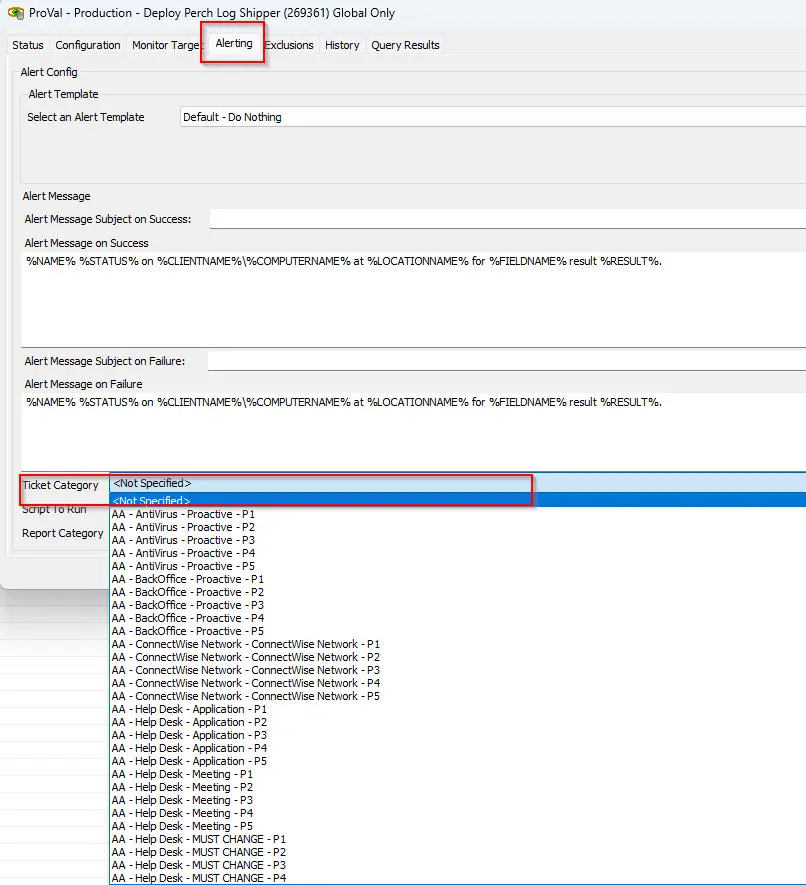
- If no ticket category is defined at the global monitor, the script will not generate any tickets.
Changelog
2025-04-10
- Initial version of the document