Install - Ninja Agent
Summary
This script deploys the NinjaRMM Agent to Windows and Mac OS.
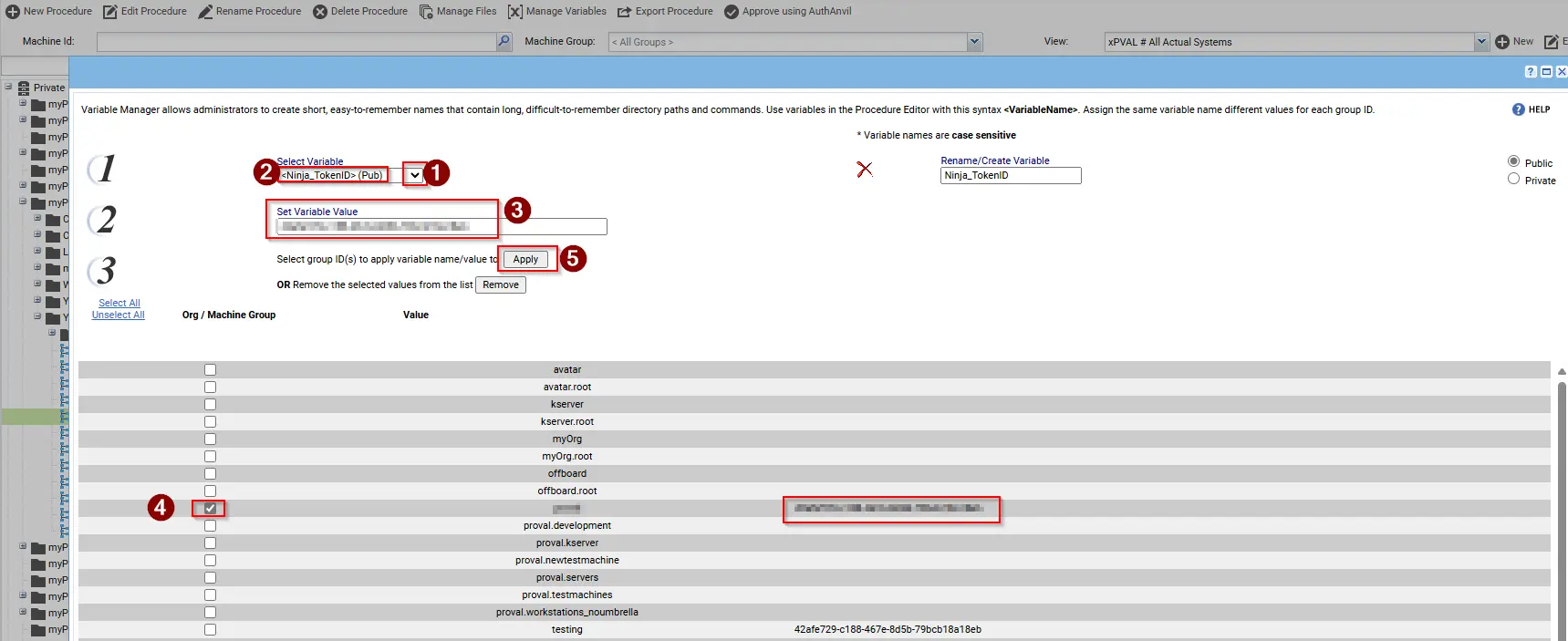
It requires an Authorization token which needs to be stored under the managed variable "Ninja_TokenID".
Sample Run
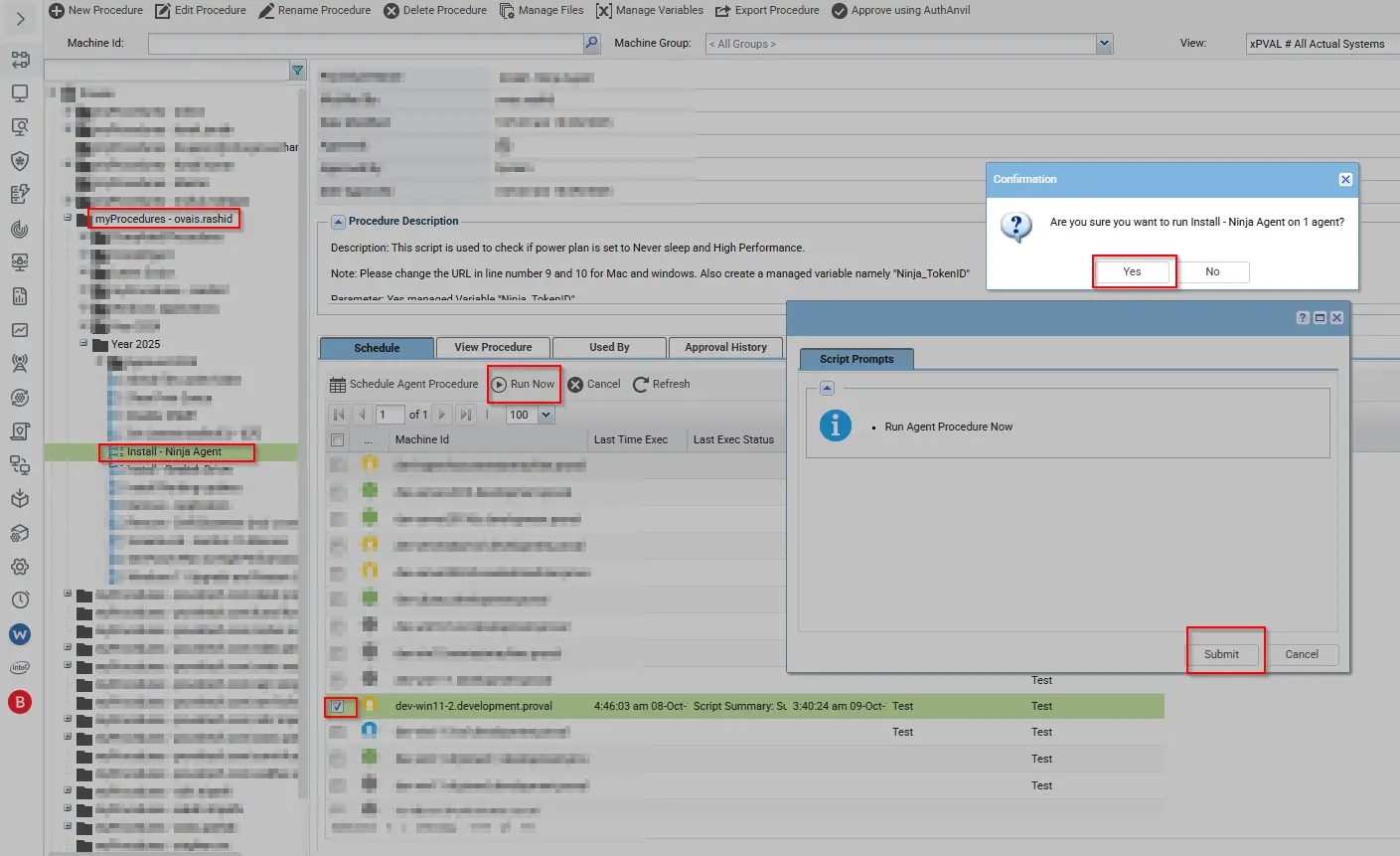
To run the script, first fill the managed variable with the appropriate token which can be obtained from the Ninja Portal. The managed variable name is "Ninja_TokenID". To run the script, use the method below.
Dependencies
- Managed Variable:
Ninja_TokenID - Download URL for both Mac and Windows.
Variables
| Name | Description |
|---|---|
| Dir for MAC | /Library/Kaseya/_automation/AgentProcedure/NinjaInstallation |
| Dir for Windows | %ProgramData%_automation\AgentProcedure\NinjaInstallation |
| Ninja_TokenID | This stores the Token required during the Ninja Agent installation. |
| #global:cmdresults# | Stores command results to check progress or errors. |
Managed Files
None
Output
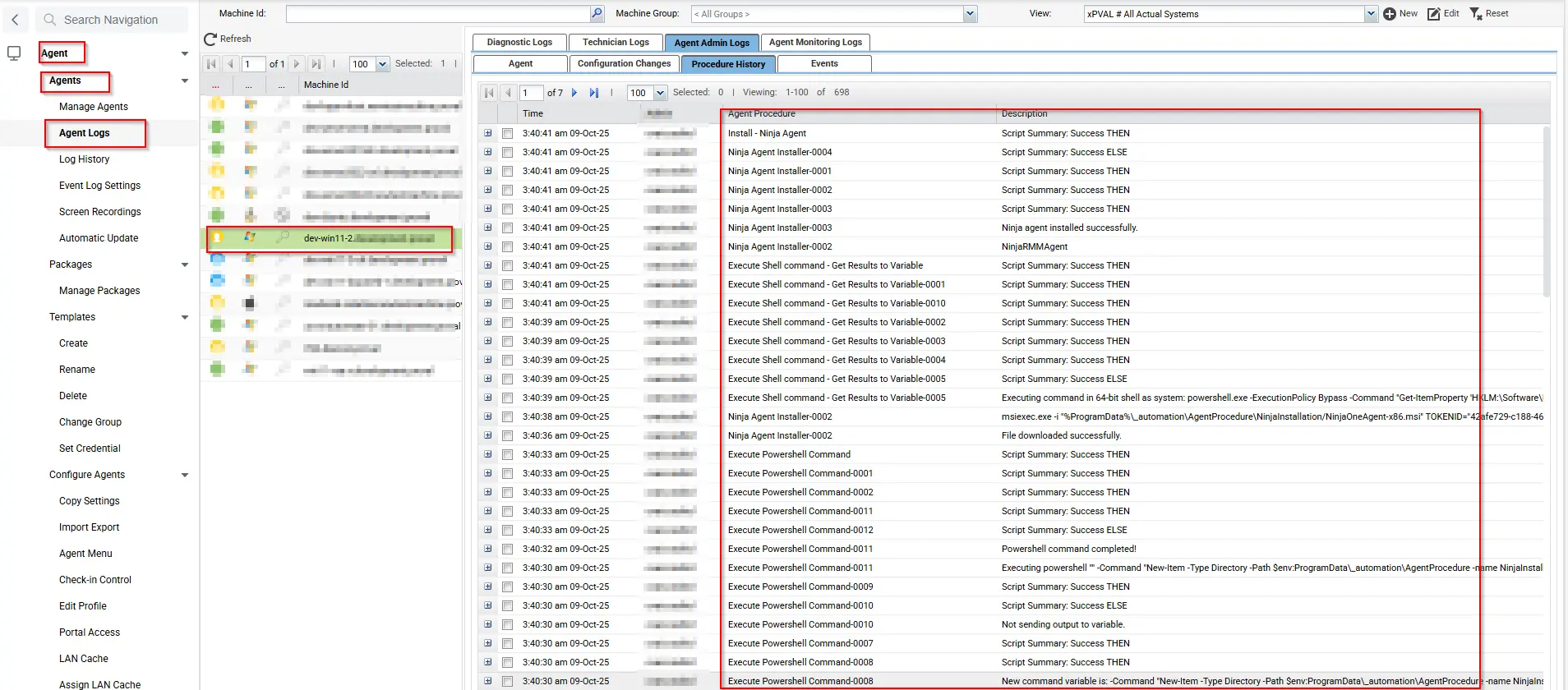
| Time | Procedure | Status | User |
|---|---|---|---|
| 3:40:41 am 9-Oct-25 | Install - Ninja Agent | Success THEN | ProNoc |
| 3:40:41 am 9-Oct-25 | Ninja Agent Installer-0004 | Success ELSE | ProNoc |
| 3:40:41 am 9-Oct-25 | Ninja Agent Installer-0001 | Success THEN | ProNoc |
| 3:40:41 am 9-Oct-25 | Ninja Agent Installer-0002 | Success THEN | ProNoc |
| 3:40:41 am 9-Oct-25 | Ninja Agent Installer-0003 | Success THEN | ProNoc |
| 3:40:41 am 9-Oct-25 | Ninja Agent Installer-0003 | Ninja agent installed successfully. | ProNoc |
| 3:40:41 am 9-Oct-25 | Ninja Agent Installer-0002 | NinjaRMMAgent | ProNoc |
| 3:40:41 am 9-Oct-25 | Execute Shell command - Get Results to Variable | Success THEN | ProNoc |
| 3:40:41 am 9-Oct-25 | Execute Shell command - Get Results to Variable-0001 | Success THEN | ProNoc |
| 3:40:41 am 9-Oct-25 | Execute Shell command - Get Results to Variable-0010 | Success THEN | ProNoc |
| 3:40:39 am 9-Oct-25 | Execute Shell command - Get Results to Variable-0002 | Success THEN | ProNoc |
| 3:40:39 am 9-Oct-25 | Execute Shell command - Get Results to Variable-0003 | Success THEN | ProNoc |
| 3:40:39 am 9-Oct-25 | Execute Shell command - Get Results to Variable-0004 | Success THEN | ProNoc |
| 3:40:39 am 9-Oct-25 | Execute Shell command - Get Results to Variable-0005 | Success ELSE | ProNoc |
| 3:40:39 am 9-Oct-25 | Execute Shell command - Get Results to Variable-0005 | Executing command in 64-bit shell as system: powershell.exe -ExecutionPolicy Bypass -Command "Get-ItemProperty 'HKLM:\Software\Microsoft\Windows\CurrentVersion\Uninstall\*','HKLM:\Software\WOW6432Node\Microsoft\Windows\CurrentVersion\Uninstall\*' -ErrorAction SilentlyContinue | Where-Object { "$_.DisplayName -eq 'NinjaRMMAgent'" } | Select-Object -ExpandProperty DisplayName -ErrorAction SilentlyContinue" >"c:\kworking\commandresults-1636964856.txt" 2>&1 | ProNoc |
| 3:40:38 am 9-Oct-25 | Ninja Agent Installer-0002 | msiexec.exe -i "%ProgramData%_automation\AgentProcedure\NinjaInstallation/NinjaOneAgent-x86.msi" TOKENID="N122315212122" | ProNoc |
| 3:40:36 am 9-Oct-25 | Ninja Agent Installer-0002 | File downloaded successfully. | ProNoc |
| 3:40:33 am 9-Oct-25 | Execute Powershell Command | Success THEN | ProNoc |
| 3:40:33 am 9-Oct-25 | Execute Powershell Command-0001 | Success THEN | ProNoc |
| 3:40:33 am 9-Oct-25 | Execute Powershell Command-0002 | Success THEN | ProNoc |
| 3:40:33 am 9-Oct-25 | Execute Powershell Command-0011 | Success THEN | ProNoc |
| 3:40:33 am 9-Oct-25 | Execute Powershell Command-0012 | Success ELSE | ProNoc |
| 3:40:32 am 9-Oct-25 | Execute Powershell Command-0011 | Powershell command completed! | ProNoc |
| 3:40:30 am 9-Oct-25 | Execute Powershell Command-0011 | New-Item -Type Directory -Path $env:ProgramData_automation\AgentProcedure -Name NinjaInstallation | ProNoc |
| 3:40:30 am 9-Oct-25 | Execute Powershell Command-0009 | Success THEN | ProNoc |
| 3:40:30 am 9-Oct-25 | Execute Powershell Command-0010 | Success ELSE | ProNoc |
| 3:40:30 am 9-Oct-25 | Execute Powershell Command-0010 | Not sending output to variable. | ProNoc |
| 3:40:30 am 9-Oct-25 | Execute Powershell Command-0007 | Success THEN | ProNoc |
| 3:40:30 am 9-Oct-25 | Execute Powershell Command-0008 | Success THEN | ProNoc |
| 3:40:30 am 9-Oct-25 | Execute Powershell Command-0008 | New command variable: New-Item -Type Directory -Path $env:ProgramData_automation\AgentProcedure -Name NinjaInstallation | ProNoc |
| 3:40:30 am 9-Oct-25 | Execute Powershell Command-0008 | Custom commands detected as New-Item -Type Directory -Path $env:ProgramData_automation\AgentProcedure -Name NinjaInstallation | ProNoc |
| 3:40:30 am 9-Oct-25 | Execute Powershell Command-0003 | Success THEN | ProNoc |
| 3:40:30 am 9-Oct-25 | Execute Powershell Command-0004 | Success ELSE | ProNoc |
| 3:40:27 am 9-Oct-25 | Execute Powershell Command-0002 | Powershell is present. | ProNoc |
| 3:40:26 am 9-Oct-25 | Install - Ninja Agent | OS is 1 | ProNoc |
| 3:40:26 am 9-Oct-25 | Install - Ninja Agent | Informational: Get Variable task in THEN step 4 was ignored because the client machine is running Win11, which does not meet the Mac OS X OS type criteria. (Line 13) | ProNoc |
| 3:40:26 am 9-Oct-25 | Install - Ninja Agent | Informational: Get Variable task in THEN step 2 was ignored because the client machine is running Win11, which does not meet the Mac OS X OS type criteria. (Line 10) | ProNoc |
| 3:40:19 am 9-Oct-25 | Run Now - Install - Ninja Agent | Admin ProNoc scheduled procedure Run Now - Install - Ninja Agent to run at Oct 9 2025 3:40AM | ProNoc |
Log
Script Logs
Changelog
2025-10-09
- Initial version of the document