Install Claude Desktop [Windows]
Overview
This script automates the deployment of Claude Desktop for all users on a Windows endpoint and configures the system prerequisites required for the Claude Cowork feature.
Implementation
-
Download the component
Install Claude Desktop [Windows]from the attachments. -
After downloading the attached file, click on the
Importbutton -
Select the component just downloaded and add it to the Datto RMM interface.

Sample Run
To execute the Install Claude Desktop [Windows] over a specific machine, follow these steps:
-
Select the machine you want to run the
Install Claude Desktop [Windows]on from the Datto RMM. -
Click on the
Quick Jobbutton.

-
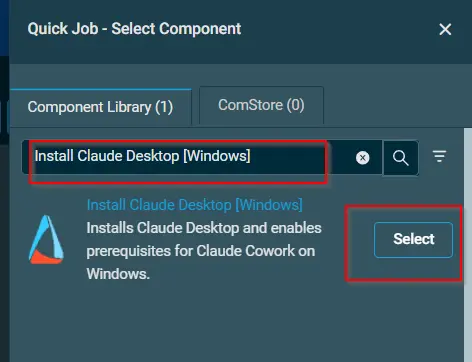
Search the component
Install Claude Desktop [Windows]and click onSelect
Output
Activity logs
Attachments
Install Claude Desktop - Windows
Changelog
2026-06-24
- Initial version of the document