CPU Temperature Monitor - Manage
Summary
This client script manages the remote monitors created by the CPU Temperature Monitor - Create script. It compares the installed monitor sets with the configuration in the EDF and System properties.
If the script detects that a machine is excluded from monitoring and the monitor set exists on that machine, it removes the monitor set from the computer and executes a command to remove the dependent files from the machine.
If the script finds that the configuration of the installed monitor set on the machine differs from the configured EDF or system properties, it executes the CPU Temperature Monitor - Create script on the machine to recreate the monitor set with the correct configuration.
The script can also be used to update the monitor set installed on the machines after making any configuration changes. For instance, if a configuration change is made in a client-level EDF, this script can be run against that client, and the changes will be reflected in the end machine's remote monitor after some time.
Important OS Requirement Note: Recently, the underlying LibreHardwareMonitor utility migrated its hardware access driver from Winring0 to PawnIO. Because PawnIO is not supported on older operating systems, this script has been updated to automatically exclude legacy machines. It now requires a minimum of Windows 10 (Build 17763) or Windows Server 2019 to run and manage monitors.
Configuration Drift Note: The script parses both the
-Offsetand-MinimumMaxAllowedarguments from the installed monitor's command line and compares them against the configured values. Monitors created before the introduction of the-MinimumMaxAllowedargument are detected as configuration drift and are automatically recreated by the Create script on the next run.
System Properties
| Name | Example | Required | Description |
|---|---|---|---|
| CPUTempMon_Enable_Servers | 1 | True | To enable or disable server monitoring, use 1 or 0 respectively. By default, the setting is 1 (enabled). |
| CPUTempMon_Enable_Workstations | 1 | True | To enable or disable workstation monitoring, use 1 or 0 respectively. By default, the setting is 1 (enabled). |
| CPUTempMon_Interval_Seconds | 300 | True | Run time interval in seconds of the monitor set. Default value is 300. |
| CPUTempMon_Offset | 10 | True | This number represents the number of Celsius degrees to subtract from the maximum temperature allowed by the vendor for a sensor, in order to calculate the monitoring threshold or permissible limit. If the property is missing or set to 0, the value 0 is used, meaning no offset is subtracted. |
| CPUTempMon_MinimumMaxAllowed | 60 | True | This number represents the minimum vendor-permitted maximum temperature a sensor must report before the offset is applied. Sensors reporting a maximum below this value are compared against their raw vendor maximum without any offset subtraction. Default value is 60. If the property is missing or set to 0, the value 0 is used, which disables the floor and applies the offset to every sensor. |
| CPUTempMon_AlertTemplate_Servers | 172 | True | This refers to the ID of the alert template that will be applied to the remote monitor for servers. By default, the script will attempt to set the ID of the △ Custom - Ticket Creation - Computer alert template. |
| CPUTempMon_AlertTemplate_Workstations | 172 | True | This refers to the ID of the alert template that will be applied to the remote monitor for workstations. By default, the script will attempt to set the ID of the △ Custom - Ticket Creation - Computer alert template. |
| CPUTempMon_TicketCategory_Servers | 124 | False | This refers to the ID of the ticket category that will be applied to the remote monitor for servers. Default value is 0 (<Not Specified>). Navigate to System Dashboard --> Config --> Information Base Categories to find the required ID. |
| CPUTempMon_TicketCategory_Workstations | 125 | False | This refers to the ID of the ticket category that will be applied to the remote monitor for workstations. Default value is 0 (<Not Specified>). Navigate to System Dashboard --> Config --> Information Base Categories to find the required ID. |
| CPUTempMon_AlertStyle | 1 | True | Controls how often alert actions run when the remote monitor fails. This value is numeric: 0=Continuous, 1=Once (default), 2=Second, 3=Third, 4=Fourth, 5=Fifth, 6=Sixth, 7=Seventh, 8=Eighth, 9=Ninth, 10=Tenth. Continuous runs actions on every failed check (ticket action creates one ticket until it is resolved/deleted). Once runs one time until a success is recorded. Second through Tenth run on that consecutive fail count and reset after a success. Non-continuous styles do not take effect until the monitor succeeds at least once; monitors created in a failed state fail immediately. |
Client-Level EDF
| Name | Example | Type | Description |
|---|---|---|---|
| CPUTempMon_Exclude_Servers | Marked or Unmarked | Check-Box | Mark this EDF if you want to exclude the servers of the client from the CPU Temperature monitoring solution. |
| CPUTempMon_Exclude_Workstations | Marked or Unmarked | Check-Box | Mark this EDF if you want to exclude the workstations of the client from the CPU Temperature monitoring solution. |
| CPUTempMon_Offset | 20 | Text | This can be used to override the value stored in the system property CPUTempMon_Offset for a specific client’s machine. A value of 0 (or an empty value) defers to the system property. |
| CPUTempMon_MinimumMaxAllowed | 80 | Text | This can be used to override the value stored in the system property CPUTempMon_MinimumMaxAllowed for a specific client’s machine. A value of 0 (or an empty value) defers to the system property. |
| CPUTempMon_AlertTemplate_Servers | 1 | Text | This can be used to override the value stored in the system property CPUTempMon_AlertTemplate_Servers for a specific client’s machine. Best use case scenario is to disable the alerting for a specific client's servers. |
| CPUTempMon_AlertTemplate_Workstations | 1 | Text | This can be used to override the value stored in the system property CPUTempMon_AlertTemplate_Workstations for a specific client’s machine. Best use case scenario is to disable the alerting for a specific client's workstations. |
| CPUTempMon_TicketCategory_Servers | 124 | Text | This can be used to override the value stored in the system property CPUTempMon_TicketCategory_Servers for a specific client's servers. Use the ticket category ID from System Dashboard --> Config --> Information Base Categories. |
| CPUTempMon_TicketCategory_Workstations | 125 | Text | This can be used to override the value stored in the system property CPUTempMon_TicketCategory_Workstations for a specific client's workstations. Use the ticket category ID from System Dashboard --> Config --> Information Base Categories. |
| CPUTempMon_AlertStyle | 1 | Text | This can be used to override the value stored in the system property CPUTempMon_AlertStyle for a specific client. The value must be numeric: 0=Continuous, 1=Once (default), 2=Second, 3=Third, 4=Fourth, 5=Fifth, 6=Sixth, 7=Seventh, 8=Eighth, 9=Ninth, 10=Tenth. |
Sample Run
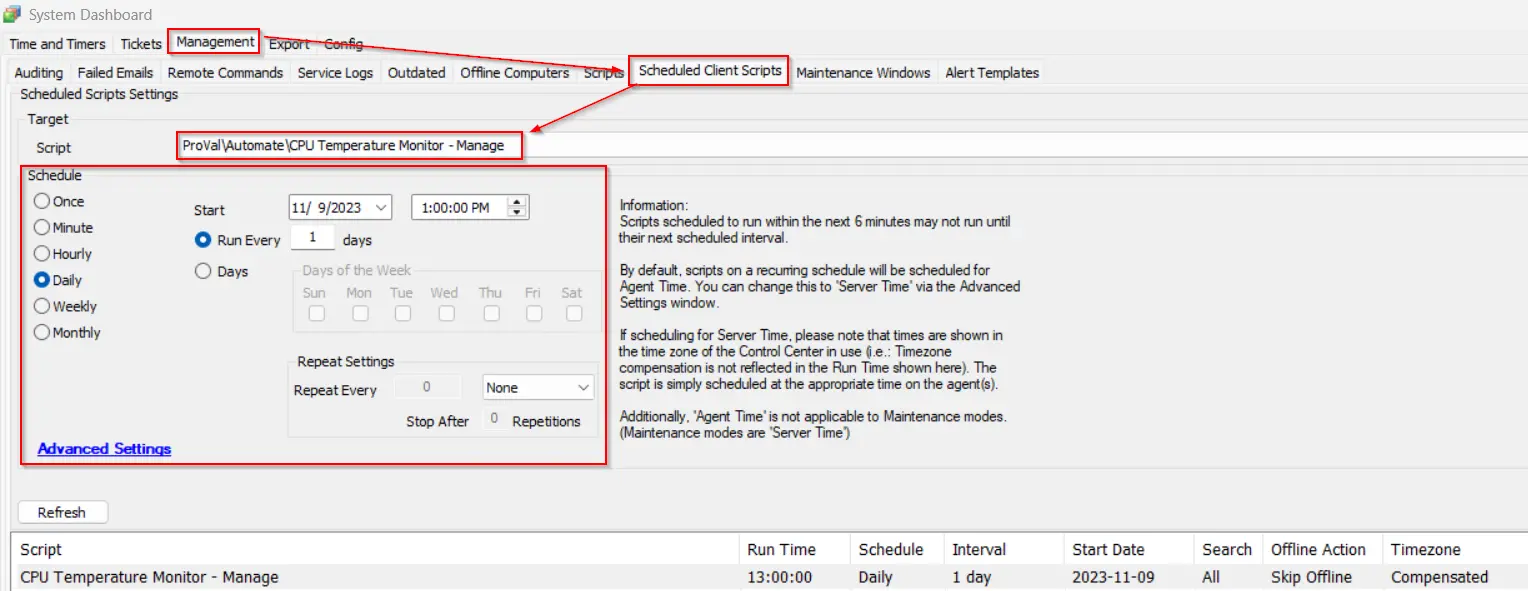
For optimal results and to keep the CPU Temperature Monitoring solution up-to-date, it is recommended to schedule the script to run once per day.
Dependencies
- Script - CPU Temperature Monitor - Create
- Remote Monitor - CPU Temperature Monitoring Process
- Solution - CPU Temperature Monitoring
Changelog
2026-08-13
- Added
CPUTempMon_MinimumMaxAllowedsystem property (default 60) and client-level EDF override. It defines the minimum vendor-permitted maximum temperature a sensor must report before the offset is subtracted; sensors below the floor are compared against their raw vendor maximum. - Updated monitor drift detection to parse and compare both the
-Offsetand-MinimumMaxAllowedarguments from the remote monitor's command line. Monitors created before the introduction of the-MinimumMaxAllowedargument are detected as drifted and recreated automatically. - Configuration resolution now passes 0 (instead of a hard-coded substitute) when a value is unset or set to 0, keeping the Create and Manage scripts consistent.
2026-06-08
- Modified script targeting logic to exclude legacy operating systems, enforcing a minimum requirement of Windows 10 (Build 17763) or Windows Server 2019.
- Added missing
TicketCategoryandAlertStylesystem properties. - Added missing client-level EDFs for
TicketCategoryandAlertStyleoverrides.
2026-04-02
- Optimized and Formatted SQL query
2025-04-10
- Initial version of the document