Simple Notification App [Param]
Summary
This script is designed to deliver a one-time, customized message to the partner, featuring your company's branding through an optional image URL. For branding purposes, using a PNG or JPEG image URL is recommended, though not mandatory. Once executed, the script will display the message on the logged-in user's screen within one minute.
Sample Run
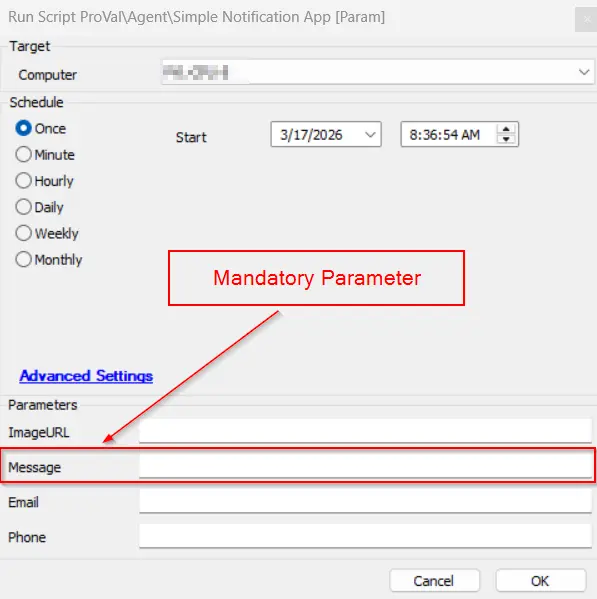
The message parameter is mandatory to display the message to the user. All other parameters are optional; however, if no image is specified, it will result in a blank popup with only the message, which may cause trust issues with users.
Dependencies
Requirements
- Windows Operating System
- .NET 4.5
Variables
| Name | Value |
|---|---|
| ProjectName | Run-SimpleNotification |
| AppName | SimpleNotification |
| WorkingDirectory | C:\ProgramData_Automation\Script\Run-SimpleNotification |
| ScriptPath | C:\ProgramData_Automation\Script\Run-SimpleNotification\Run-SimpleNotification.ps1 |
| AppPath | C:\ProgramData_Automation\Script\Run-SimpleNotification\SimpleNotification.exe |
| ConfigFile | C:\ProgramData_Automation\Script\Run-SimpleNotification\Config.toml |
User Parameters
| Name | Example | Required | Description |
|---|---|---|---|
| Message | This is a test message | True | The message is displayed to the end user. (Maximum 888 characters). |
| ImageURL | http://p.favim.com/orig/2018/08/24/cute-beautiful-couple-avatar-Favim.com-6224738.jpg | False | The URL for the image to display instead of the default. |
| someone@testing.com | False | The support e-mail address is displayed to the user. | |
| Phone | 000-000-0000 | False | The support phone number is displayed to the user. |
Example
Parameters
| Name | Value |
|---|---|
| ImageURL | https://labtech.provaltech.com/labtech/transfer/images/alogo.jpg |
| Message | They said it's a secret mission, but I say it's a fashion emergency—Bond and I am armed with style and suspicious sunglasses! |
ram.kishor@provaltech.com | |
| Phone | 1234565432 |
Notification
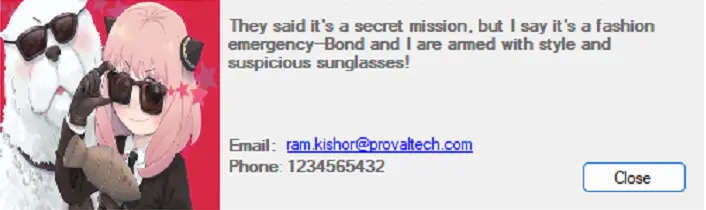
Output
- Script Log
- Popup Message on User's desktop
Changelog
2026-03-10
- Implemented dynamic UI resizing for the notification prompt based on the length of the incoming message.
- Added three responsive layout tiers: Small (less than equal 300 characters), Medium (between 301-500 characters), and Large (greater than 500 characters).
- Established a maximum character limit of 888 characters for the Large layout; exceeding text will not be displayed.
- Preserved the base 500x150 layout in the visual designer, utilizing code-behind logic to handle all dynamic resizing at runtime.
- Signed the PS1 script
2025-04-10
- Initial version of the document