DUO Auth for Windows Login Installed
Summary
This group contains the list of agents where the DUO Auth for Windows Login is already installed via the script "DUO Install & Upgrade - Latest Version." It is built for auditing purposes.
Dependencies
CW RMM Custom Fields - Duo Authentication for Windows Logon Deployment
Details
| Field Name | Type of Field (Machine or Organization) | Description |
|---|---|---|
| DUO Auth for Windows Login Installed | Dynamic | This group contains the list of agents where the DUO Auth for Windows Login is already installed via the script "DUO Install & Upgrade - Latest Version." |
Group Creation
-
Navigate to
Devices>Device Groups.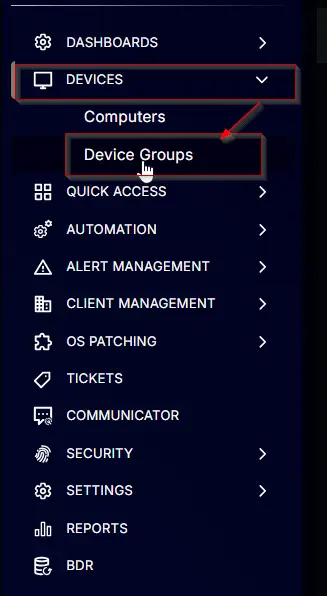
-
Create a new dynamic group by clicking the
Dynamic Groupbutton.

This page will appear after clicking on theDynamic Groupbutton:

-
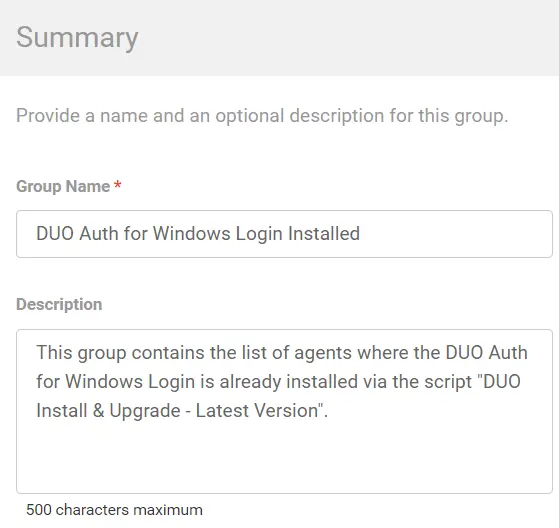
Set the group name to
DUO Auth for Windows Login Installed.
Description:This group contains the list of agents where the DUO Auth for Windows Login is already installed via the script "DUO Install & Upgrade - Latest Version."
-
Click the
+ Add Criteriain theCriteriasection of the group.

This search box will appear.

-
- Search and select the
Duo Deployment Resultcustom field from the search box. - Set
Successin the comparison condition.

Condition:Duo Deployment ResultContain any ofSuccess
- Search and select the
Changelog
2025-04-10
- Initial version of the document