Enable Defender
Overview
Enables / repairs Microsoft Defender Antivirus when Webroot or another active AV is not present.
Sample Run
- Navigate to Automation > Script
- Search for
Enable Defender - Click the
Enable Defenderafter search result - Click Run
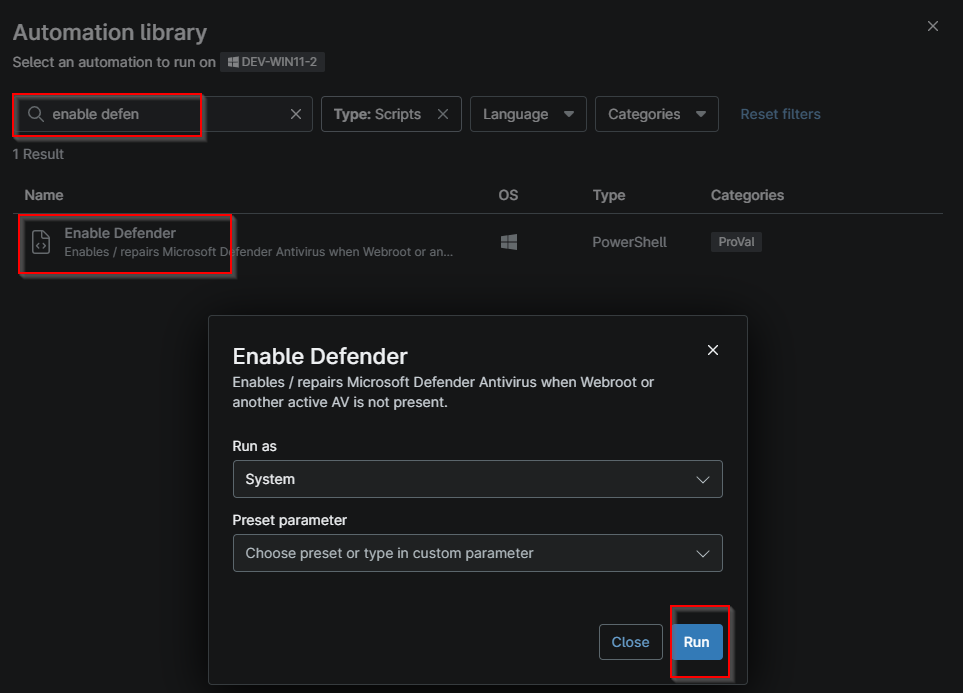
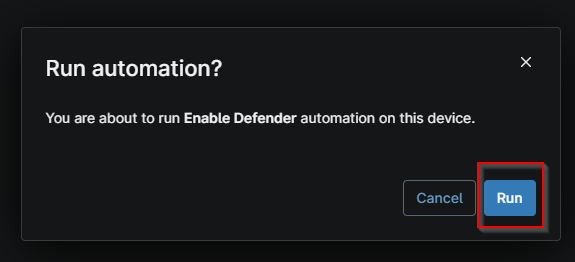
- Click Run again to execute the script
Dependencies
Custom Fields
| Field Name | Type | Mandatory | Scope | Description |
|---|---|---|---|---|
| cPVAL Enable Defender Only | Drop-down | false | Organization, Location, Device | This custom field is required to be set to enable defender only without ticket creation on failure. |
| cPVAL Enable Defender With Ticket On Failure | Drop-down | false | Organization, Location, Device | This custom field requires enabling Defender with ticket creation on failure. |
| cPVAL Defender Enable Status | Text | true | Device | This custom field stores the success or failure of the Enable Defender automation. |
Automation Setup/Import
Output
- Activity Details
- Custom Field
Changelog
2026-10-12
- Initial version of the document