Install DNSFilter Agent [Windows]
Overview
The script securely deploys the DNSFilter Windows Roaming Client. It first checks for an existing installation by looking for DNSFilter-related services or uninstall registry entries to prevent conflicts. If the agent is already present, the script exits unless the force variable is supplied.
When installation proceeds, the script downloads the latest MSI, installs it silently using the site secret key, and then verifies the installation by again checking for the agent service or registry entry. The implementation is designed for automated deployment and helps ensure endpoints are onboarded to the DNSFilter platform without causing agent conflicts.
Dependencies
- Internet connectivity to download the latest DNSFilter agent package.
- A valid DNSFilter Site Secret Key.
Implementation
-
Download the component
Install DNSFilter Agent [Windows]from the attachments. -
After downloading the attached file, click on the
Importbutton -
Select the component just downloaded and add it to the Datto RMM interface.

-
After Importing the component to the Datto RMM, make sure to add the component to the
ProvalGroup always.- Steps to Add the component under
ProvalGroup.
i. Click onDrop Down Icon.
ii. Click onAdd to Group.

iii. Select the group asProval
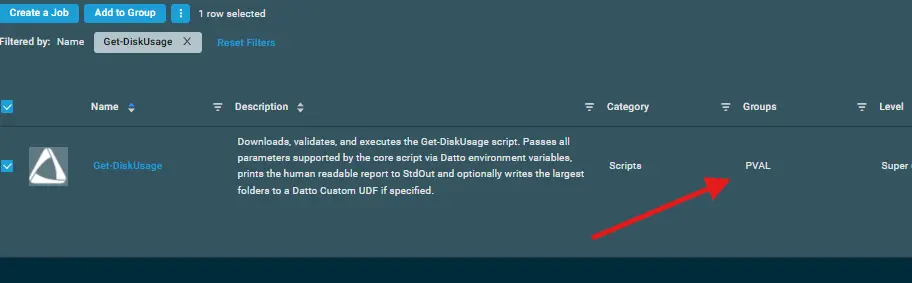
- Steps to Add the component under
-
Create the Site Variables mentioned in the document.
Site Variables
- Go to
Site>All Sites>Select the site>Settings>Variables>Add Variable - Create the below Site Variable
| Name | Example | Description |
|---|---|---|
| DNSFilterSiteKey | a1b2c3d4e5f6g7h8i9j0 | The unique Site Secret Key required to register the DNSFilter Roaming Client to your portal. |
Datto Variables
| Variable Name | Type | Default | Description |
|---|---|---|---|
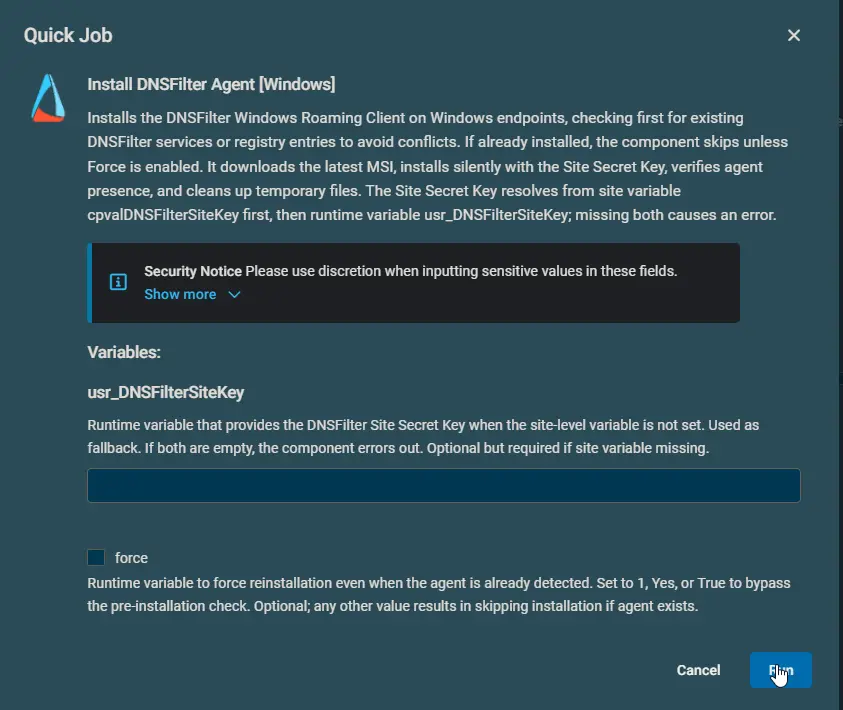
| usr_DNSFilterSiteKey | String | (Empty) | Fallback runtime variable for the DNSFilter Site Secret Key. Used only if the DNSFilterSiteKey Site Variable is not populated. |
| force | String / Boolean | False | Bypasses the pre-installation check and forces reinstallation even if the DNSFilter agent is already detected. Accepts 1, Yes, or True. |
Sample Run
Output
- Activity log indicating
[PASS],[INFO], or[FAIL]statuses. - Success message:
Success: DNSFilter Agent installed and verified successfully.orSuccess: DNSFilter Agent already installed. No action taken. - stdout
- stderr
Attachments
Install DNSFilter Agent [Windows]
Changelog
2026-08-14
- Initial version of the document