Sync Datto RMM Sites [VSA 9 Migration]
Summary
Prepares VSA 9 for the move to Datto RMM. The agent procedure:
- Creates a Datto RMM site for every VSA 9 machine group that does not have one yet.
- Stores the Datto RMM site UID of each agent in cPVALDattoRmmSiteUid.
- Stores the Datto RMM agent download address in cPVALDattoRmmAgentUrl.
- Creates the three custom fields of the solution in VSA 9 when they are missing.
The Install Datto RMM Agent [VSA 9 Migration] agent procedure then uses these fields to install the agent into the correct site.
Run this agent procedure once, against a single Windows machine. It works on the whole VSA 9 tenant and Datto RMM account through their APIs, so running it on more machines only repeats the same work. Do not schedule it against all machines.
Dependencies
- Solution: VSA 9 to Datto RMM Migration
- Custom Field: cPVALDattoRmmSiteUid
- Custom Field: cPVALDattoRmmAgentUrl
- Custom Field: cPVALDattoRmmDeployStatus
- A VSA 9 personal access token. See Create a VSA 9 Personal Access Token.
- Datto RMM API keys. See Create the Datto RMM API Keys.
Implementation
-
Export the agent procedure from ProVal's VSA RMM instance.
Name:Sync Datto RMM Sites [VSA 9 Migration]The export will download the necessary XML file.
-
Import this XML file into the partner's VSA RMM instance.
-
Export the
Sync-DattoRmmSite.ps1from ProVal's Internal VSA. This is also placed under the below path:
Manage Files>Shared Files>PVAL>Sync-DattoRmmSite.ps1

-
Map the
Sync-DattoRmmSite.ps1into the procedure's writeFile step (Step 30) in the client's environment.

Sample Run
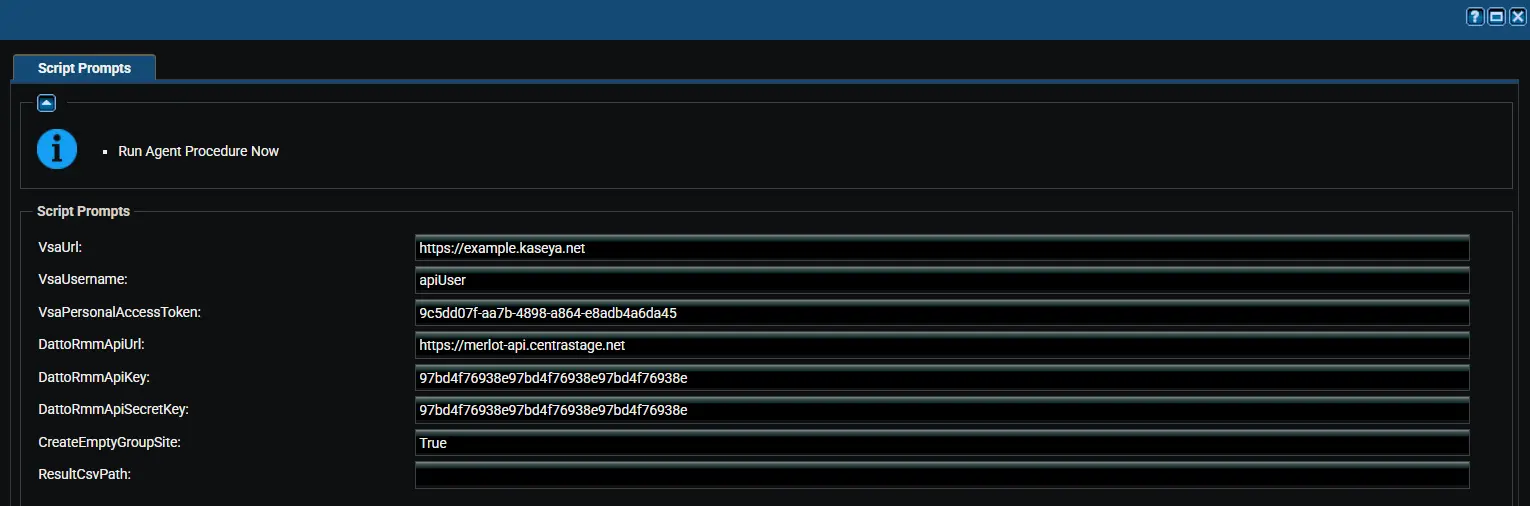
Variables
| Variable | Type | Default | Description |
|---|---|---|---|
VsaUrl | String | (required) | Web address used to sign in to VSA 9, for example https://example.kaseya.net. |
VsaUsername | String | (required) | VSA 9 user that owns the personal access token. Letter case matters. |
VsaPersonalAccessToken | String | (required) | VSA 9 personal access token with the REST API (Read, Write) scope. |
DattoRmmApiUrl | String | (required) | Datto RMM API URL from your user record, for example https://merlot-api.centrastage.net. |
DattoRmmApiKey | String | (required) | Datto RMM API key. |
DattoRmmApiSecretKey | String | (required) | Datto RMM API secret key. |
CreateEmptyGroupSite | String | False | Also creates sites for machine groups that have no agents. Accepted values: 1, Yes, True |
ResultCsvPath | String | C:\ProgramData\_Automation\Script\Sync-DattoRmmSite\Sync-DattoRmmSite.csv | Full path of the result CSV. |
Avoid apostrophes (single quotes) in variable values. An apostrophe breaks the command that saves the values on the device.
The values are saved to a temporary file on the device for the run only. The procedure deletes the file as soon as the script finishes, because it holds the credentials.
Site Naming
| VSA 9 setup | Datto RMM site name | Example |
|---|---|---|
| Organization with only its root machine group | Organization name | Contoso |
| Any other machine group | Organization name - group name | Contoso - branch |
The group name is the part of the machine group name after the first dot. A Datto RMM site that already has the name is reused, ignoring letter case.
Results by Agent
The result CSV has one row per VSA 9 agent.
| Result | Meaning |
|---|---|
Updated | The site UID and download address were saved on the agent. |
NoDattoRmmSite | No Datto RMM site exists for the agent, usually because creating its site failed. Fix the cause and run again. |
Failed | VSA 9 rejected the update. The Detail column shows the reason. |
The procedure reports a failure when any site could not be created or any agent could not be updated. Running it again is safe: existing sites are reused and the custom fields are overwritten. Run it again whenever agents or machine groups are added to VSA 9.
Enter the Datto RMM API URL exactly as shown on your Datto RMM user record. When it does not have the form https://servername-api.centrastage.net, the download address is not saved and the agent install fails.
Output
- Agent Procedure Log
- New sites in Datto RMM
- Custom fields on each VSA 9 agent
- Result CSV on the device:
C:\ProgramData\_Automation\Script\Sync-DattoRmmSite\Sync-DattoRmmSite.csv
Changelog
2026-10-16
- Initial version of the document.