Microsoft 365 - Repair
Summary
This is a CW Automate implementation of the agnostic script Invoke-Office365Repair.
This script repairs the Microsoft 365 / Office 365 Click-to-Run apps on the local machine. It wraps Microsoft's own supported OfficeClickToRun.exe repair command line so that a Quick Repair or a Full (online) Repair can be triggered unattended from an RMM, with no user session and no prompts.
Dependencies
Sample Run
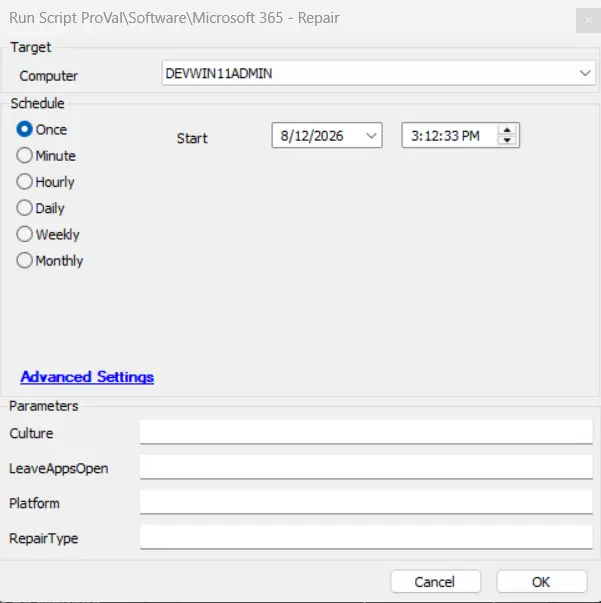
Run the script without any parameter to run a QuickRepair for the detected installed version of O365, closing all the office applications that are opened.
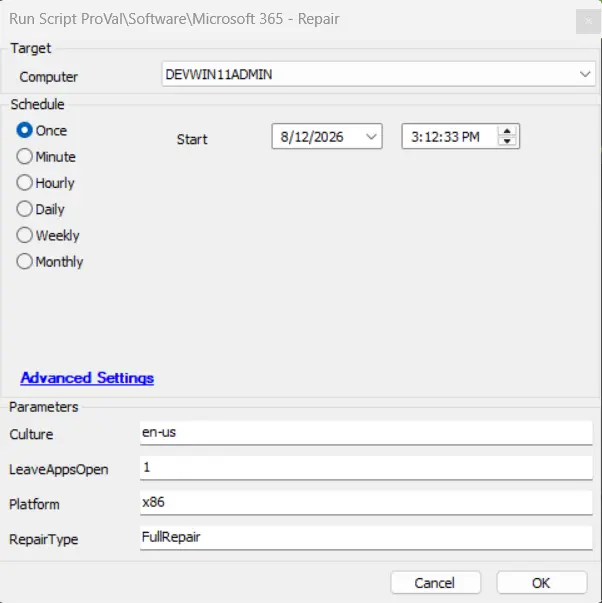
Run with shown parameters to perform a full repair on 32-bit Office with english language package installed.
User Parameters
| Name | Required | Default | Example | Description |
|---|---|---|---|---|
| RepairType | True | QuickRepair | QuickRepair, FullRepair | This provides option to quick (short) or full (complete) repair for the Office 365. |
| Platform | False | Currently Installed | <Blank>, x86, x64, arm64 | This provides the option to select the platform that Office 365 uses. |
| Culture | False | Currently Installed | en-us | The language code used to validate the existing installation binaries in the input language. |
| LeaveAppsOpen | True | False | 0, 1, True, False | If 1 or true, then the office apps will not be forcibly closed. By default, the repair will close all opened office apps. |
Output
- Script Log
- C:\ProgramData_Automation\Script\Invoke-Office365Repair\Invoke-Office365Repair-Log.txt
- C:\ProgramData_Automation\Script\Invoke-Office365Repair\Invoke-Office365Repair-error.txt
Changelog
2026-08-12
- Initial version of the document