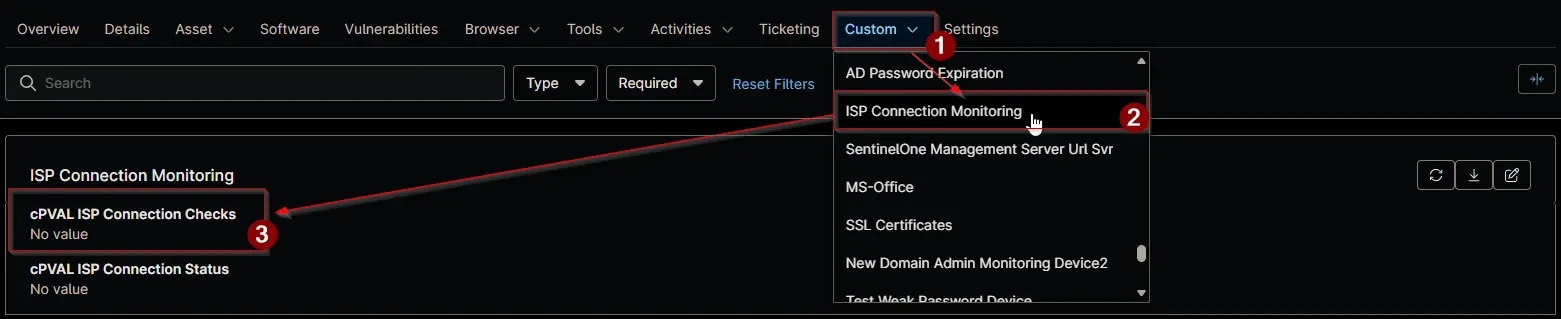
cPVAL ISP Connection Checks
Summary
Holds the ISP line checks that the ISP Connection Monitoring solution runs on the device. Enter one check per line in the format Name|URL|ExpectedText:
- Name appears in the ticket, so name the ISP and the line, for example
Primary ISP Fibre Connection Monitor. It can't contain|or;. - URL is a public IP lookup site that the site's firewall routes out that ISP line. It must start with
http://orhttps://. - ExpectedText is the line's public IP, for example
203.0.113.10, or the start of it, for example203.0.113.
A device is monitored only while this field holds a check. Clear the field to stop monitoring the device. The field is on the ISP Connection Monitoring tab of Windows devices.
Details
| Label | Field Name | Example | Definition Scope | Type | Required | Default Value | Dropdown Options | Editable | Custom Field Tab |
|---|---|---|---|---|---|---|---|---|---|
| cPVAL ISP Connection Checks | cpvalIspConnectionChecks | Primary ISP Connection Monitor|https://myexternalip.com/raw|203.0.113.10 | Device | Multi-line | No | Yes | ISP Connection Monitoring |
Dependencies
- Automation: ISP Connection Monitor
- Compound Condition: ISP Connection Monitoring
- Solution: ISP Connection Monitoring
Custom Field Creation
Sample Screenshot
Changelog
2026-11-06
- Initial version of the document