AutoElevate Agent Deployment
Overview
This script automates the deployment and update of the AutoElevate on windows machines by downloading the latest installer, running the installation silently, and validating that the agent has been successfully installed.
Sample Run
Play Button > Run Automation > Script
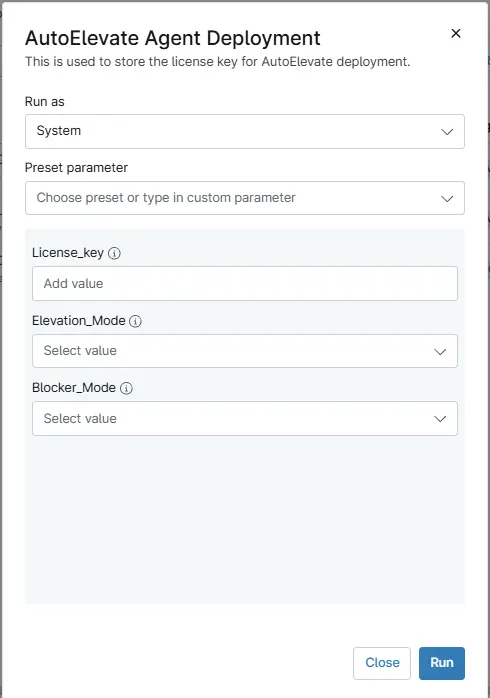
Parameters
Note: If the value is present under the custom field then variables do not need to be put during the script execution. As the script get the data from either Custom field or variables.
| Name | Description | Type | Mandatory | Default | Options |
|---|---|---|---|---|---|
| License_key | Stores the AutoElevate License Key required for activating the agent during installation. | String/text | Partial | — | — |
| Elevation_Mode | Defines how AutoElevate handles privilege elevation requests during deployment (Live, Audit, or Policy mode). | Drop-Down | Partial | Audit | Live, Audit, Policy |
| Blocker_Mode | Determines how AutoElevate responds to blocked or unauthorized elevation attempts (Disabled, Audit, or Live). | Drop-Down | Partial | Disabled | Disabled, Audit, Live |
Dependencies
Automation Setup/Import
Output
- Activity Details
Changelog
2025-11-27
- Initial version of the document