Duo Deployment - Windows
Overview
This script will install or update DUO if the currently installed instance is older than the latest released version. It matches the hash of the installer from the official website before deploying it.
Parameters Reference: Duo Silent Install
Sample Run
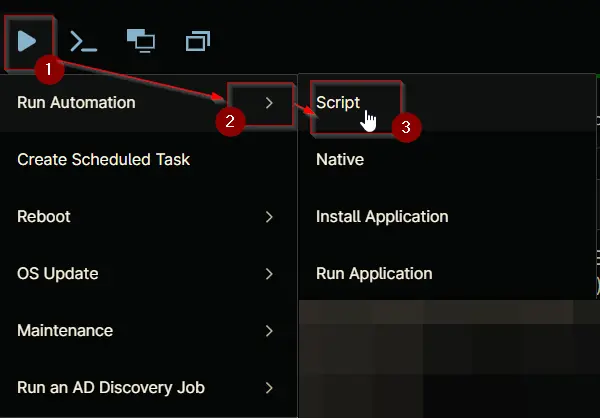
Play Button > Run Automation > Script
Search and select Duo Deployment - Windows
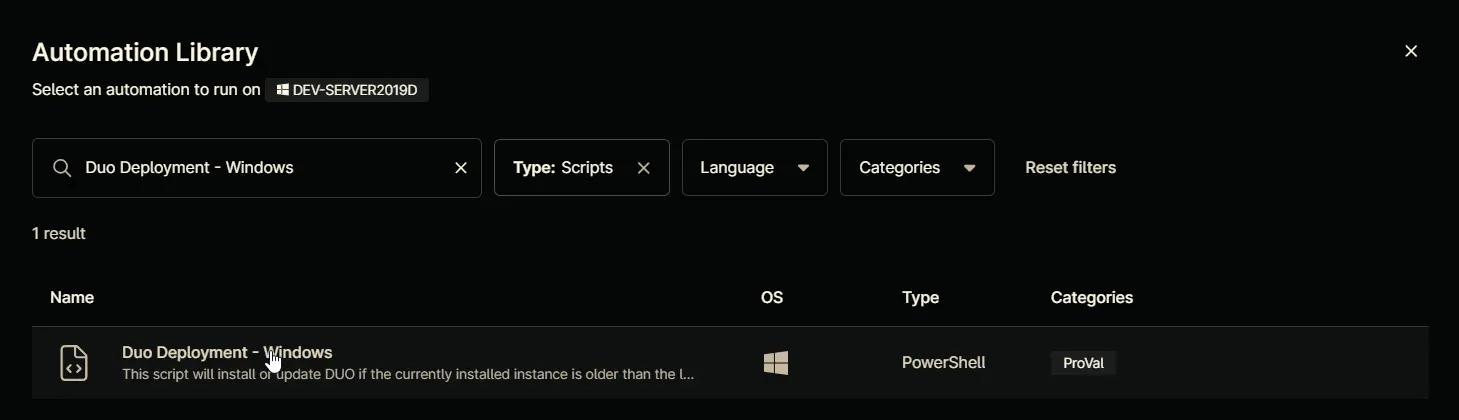
Set the required arguments and click the Run button to run the script.
Run As: System
Preset Parameter: <Leave it Blank>

Run Automation: Yes

Dependencies
- Solution - Duo Deployment
- cPVAL DUO IKEY
- cPVAL DUO SKEY
- cPVAL DUO HKEY
- cPVAL DUO AUTOPUSH
- cPVAL DUO FAILOPEN
- cPVAL DUO SMARTCARD
- cPVAL DUO ENABLEOFFLINE
- cPVAL DUO RDPONLY
- cPVAL DUO WRAPSMARTCARD
- cPVAL DUO USERNAMEFORMAT
- cPVAL DUO UAC_PROTECTMODE
- cPVAL DUO UAC_OFFLINE
- cPVAL DUO UAC_OFFLINE_ENROLL
Automation Setup/Import
Output
- Activity Details
Changelog
2025-07-23
- The script was using script variables, which were taking priority over the Custom Field values. Since these variables always have a value by default, any changes made to the Custom Fields weren’t getting picked up during deployment. As a resolution, script variables were removed and only custom fields will be used for deployment.
2025-04-14
- Initial version of the document