Windows - TLS - Enable/Disable
Summary
The script will be used to enable or disable any versions of TLS (v1.0, v1.1, v1.2, v1.3) simultaneously by updating the registry.
Learn more about enabling TLS 1.2
File Hash
- File Path:
C:/ProgramData/_Automation/Script/Set-TLS/Set-TLS.ps1 - SHA256:
F23026F65794709EBF98E4E78653D0605FAF577943524DED7423654CBA8227E5 - MD5:
25240999C55600A35293FCA3EEC73BD8
Sample Run
To disable TLS 1.0 and TLS 1.1, and to enable TLS 1.2 and TLS 1.3 along with strong crypto for .NET.
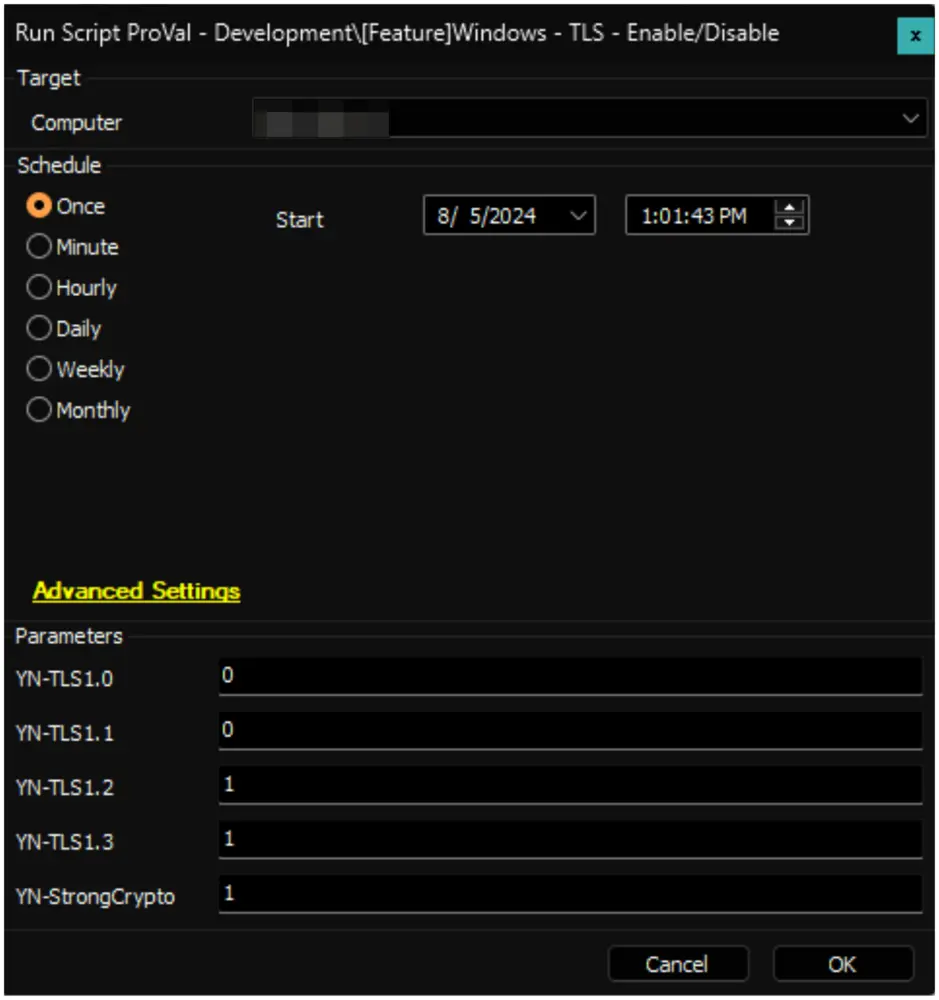
User Parameters
| Name | Example | Required | Description |
|---|---|---|---|
| YN-TLS1.0 | 0 | 1 or 0 or blank | To enable TLSv1.0, enter 1; to disable it, enter 0, or leave blank. |
| YN-TLS1.1 | 0 | 1 or 0 or blank | To enable TLSv1.1, enter 1; to disable it, enter 0, or leave blank. |
| YN-TLS1.2 | 1 | 1 or 0 or blank | To enable TLSv1.2, enter 1; to disable it, enter 0, or leave blank. |
| YN-TLS1.3 | 1 | 1 or 0 or blank | To enable TLSv1.3, enter 1; to disable it, enter 0, or leave blank. |
| YN-StrongCrypto | 1 | 1 or 0 or blank | To enable Strong Crypto for .NET, enter 1; to disable it, enter 0, or leave blank. |
Output
- Script log
Changelog
2025-04-10
- Initial version of the document