Windows - Local Admin - Create/Update
Overview
Automates local administrator account management, password rotation, and NinjaRMM Custom Field synchronization.
This script creates a local admin account using values from custom fields or runtime variables provided during execution.
Dependencies
- Custom Field: cPVAL Local Admin Password Rotation Days
- Custom Field: cPVAL Local Admin Username
- Custom Field: cPVAL Local Admin Password
- Custom Field: cPVAL Local Admin Default Password
- Custom Field: cPVAL Local Admin Display Name
- Custom Field: cPVAL Local Admin Minimum Password Length
- Custom Field: cPVAL Local Admin Maximum Password Length
- Custom Field: cPVAL Local Admin Password Never Expires
- Custom Field: cPVAL Local Admin Password Update Date
- Solution: Windows - Local Admin - Process
Sample Run
Scenario 1: Automated Maintenance (Standard Use)
Goal: Automatically manage the admin account defined in Custom Fields and rotate the password every 90 days.
Configuration:
- "cPVAL Local Admin Username" is set to "AdminUser"
- "cPVAL Local Admin Password Rotation Dayss" is set to 90
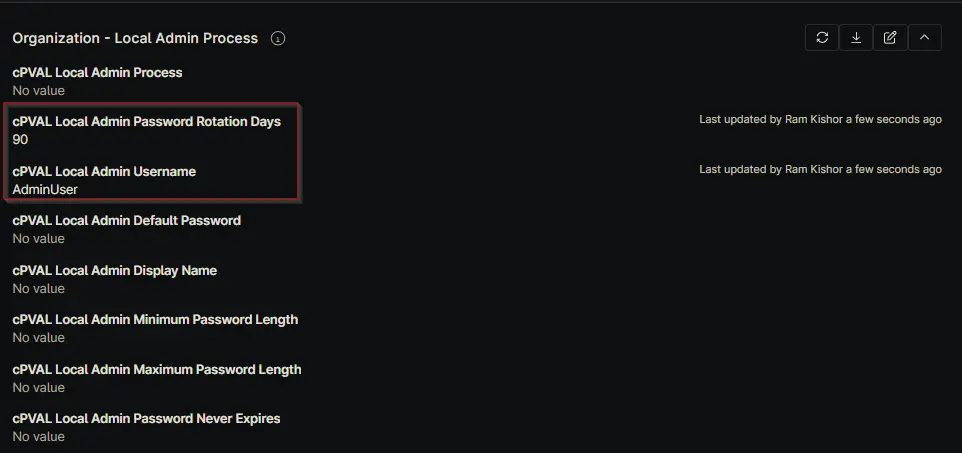
- Script Variables (Runtime) are left empty
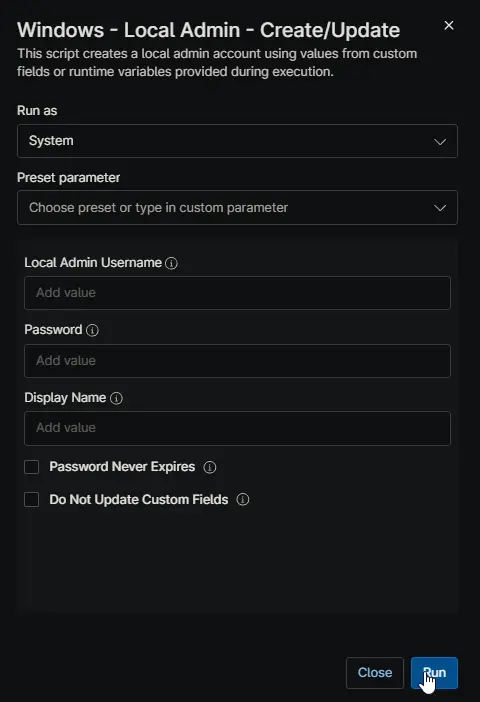
Result:
- The script checks "cPVAL Local Admin Password Update Date "
- If more than 90 days have passed, it generates a new random password
- It updates the password on the local machine
- It saves the new password back to "cPVAL Local Admin Password" and updates the date
Scenario 2: Manual Override (Forcing a Credential)
Goal: Force the password to "SpecificPass123!" for a specific user, regardless of what is stored in Custom Fields.
Configuration:
- Script Variable "Local Admin Username" = "AdminUser"
- Script Variable "Password" = "SpecificPass123!"
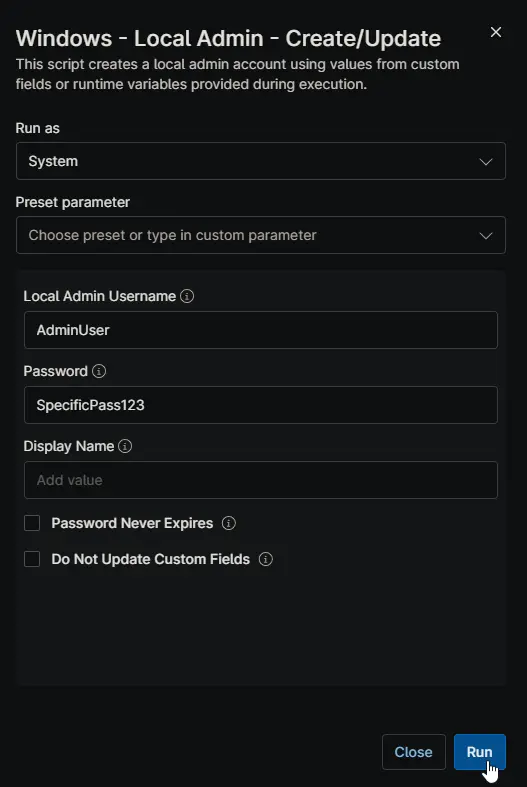
Result:
- The script ignores the "cPVAL Local Admin Username" field
- It sets the machine password to "SpecificPass123!"
- Because "Do Not Update Custom Fields" was not set, the script overwrites "cPVAL Local Admin Password" with "SpecificPass123!"
Scenario 3: Temporary Access (No Save)
Goal: Temporarily change the password for troubleshooting without overwriting the stored password in Ninja.
Configuration:
- Script Variable "Local Admin Username" = "AdminUser"
- Script Variable "Password" = "TempPass123!"
- Script Variable "Do Not Update Custom Fields" = "True"
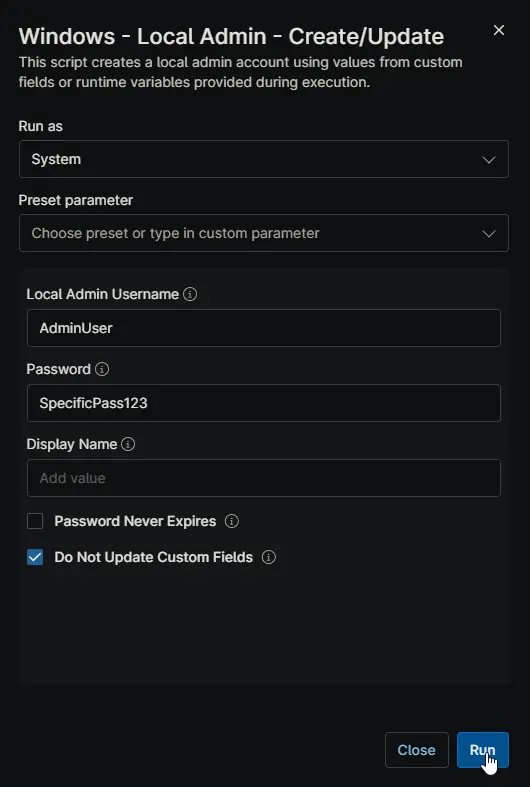
Result:
- The script sets the machine password to "TempPass123!"
- The script does not update "cPVAL Local Admin Password Rotation Days"
- Ninja continues to show the old password, allowing you to revert later or keep official records clean
Parameters
| Name | Example | Accepted Values | Required | Default | Type | Description |
|---|---|---|---|---|---|---|
| Local Admin Username | AdminUser | Any valid Windows username | No | From Custom Field | String | Override the username for creating the local admin account via runtime variable |
| Password | SpecificPass123! | Any valid password string | No | Auto-generated | String | Override the password for the local admin account via runtime variable |
| Display Name | Local Administrator | Any display name string | No | Matches username | String | Display name for the local admin account (runtime variable only) |
| Password Never Expires | True/False | True, False | No | False | Boolean | Set the local admin password to never expire (runtime variable only) |
| Do Not Update Custom Fields | True/False | True, False | No | False | Boolean | Prevent writing data back to NinjaRMM custom fields |
Custom Fields
| Name | Purpose |
|---|---|
| cPVAL Local Admin Username | Enter the username for the local admin account to be created |
| cPVAL Local Admin Password | Stores the password for the local admin account (automatically updated by script) |
| cPVAL Local Admin Password Rotation Days | Set the number of days for automatic password rotation (0 or blank = no rotation) |
| cPVAL Local Admin Password Update Date | Tracks the last date a new password was set (automatically updated by script) |
| cPVAL Local Admin Default Password | Set a default password to use during account creation instead of generating a random one |
| cPVAL Local Admin Display Name | Enter the display name for the local admin account (defaults to username if blank) |
| cPVAL Local Admin Minimum Password Length | Set the minimum password length for auto-rotation (Default: 14 characters) |
| cPVAL Local Admin Maximum Password Length | Set the maximum password length for auto-rotation (Default: minimum + 5 characters) |
| cPVAL Local Admin Password Never Expires | Enable to set the local admin password to never expire |
| cPVAL Local Admin Password Update Date | Select the operating system to enable the solution |
Automation Setup/Import
Output
- Activity Details
- Custom Field
Changelog
2025-12-05
- Initial version of the document