Enhanced Drive Space Monitoring [Workflow]
Summary
The Enhanced Drive Space Monitoring [Workflow] monitor continuously checks the free space of local drives on Windows endpoints against the thresholds and drive lists defined in the configuration file generated by the Enhanced Drive Space Monitoring Configuration Writer task. It does not read custom fields directly; it relies on the pre‑built JSON configuration — which also carries the ticketing webhook URL (TicketWebhookUrl) — to know which drives to monitor, what limits to enforce, and where to send ticket actions.
This is the workflow‑based variant of the monitor. Unlike the original Enhanced Drive Space Monitoring set, which relies on the monitor's built‑in ticketing, this variant manages the entire ticket lifecycle itself: it tracks ticket state locally and fires webhooks to the CWRMM Ticket Management for Monitors workflow to create a ticket when a drive first breaches its threshold and close it when the drive recovers. The result is a clean ticket with a controlled subject and body, no per‑detection comment spam, and automatic closure on recovery — with no duplicate tickets and no manual intervention.
How It Works
-
Configuration File
At each scheduled run (hourly, as configured), the monitor reads:
C:\ProgramData\_Automation\Script\EnhancedDriveSpaceMonitoring\EnhancedDriveSpaceMonitoring.json.
This file contains:- Thresholds – an array of capacity buckets (16–300 GB, 300–1024 GB, 1024–4096 GB, 4096+ GB), each with a numeric limit and a unit (%, MB, or GB).
- IncludeDrives – which drive letters to monitor (
All,None, or a sequence likeCDEF). - ExcludeDrives – which drive letters to ignore (
None,All, or specific letters likeZ). - TicketWebhookUrl – the workflow webhook URL that ticket actions are POSTed to.
If the file is missing or cannot be parsed, the monitor returns a failure message and skips the run without changing any state or firing any webhooks.
-
Drive Discovery and Filtering
The monitor enumerates all local fixed drives (Win32_LogicalDisk,DriveType=3) and filters them by the IncludeDrives / ExcludeDrives settings. If drive enumeration fails or returns nothing, the monitor returns early without modifying any ticket state — a safeguard so a transient WMI hiccup never accidentally closes open tickets. -
Capacity Bucket Assignment
Each drive's total capacity is calculated and assigned to a bucket (16–300 GB, 300–1024 GB, 1024–4096 GB, or 4096+ GB). Drives smaller than 16 GB, or with no readable size, are skipped. -
Threshold Comparison
The monitor looks up the threshold for the drive's bucket; a threshold of0disables that bucket. It compares current free space (converted to the configured unit) against the limit. For every drive that falls below its threshold, it builds a ticket subject (Enhanced Drive Space Monitoring - <Letter> - <ComputerName> - <Threshold>) and a body detailing total, used, and free space plus the breached threshold, and marks the drive as "detected low" for this run. -
Ticket State Machine (duplicate prevention)
This is the core of the variant. The monitor maintains three local state files alongside the config:Drives_To_Create_Ticket.jsonDrives_With_Existing_Ticket.jsonDrives_To_Close_Ticket.json
For every drive letter (detected this run plus any letter already tracked), it applies the following transitions:
Drive this run Previous state Transition Webhook Low not tracked Added to Create CreatefiresLow Create Moved to Existing none Low Existing Kept in Existing none Healthy Create or Existing Moved to Close (subject kept, body replaced with a recovery message) ClosefiresHealthy Close Cleared from Close none Healthy not tracked No record none Because a freshly detected drive fires
Createonly on the run it first appears and is then promoted to Existing, a sustained breach (e.g., a drive sitting at 95% full for hours) produces exactly one ticket, no matter how many hourly runs occur. On recovery,Closefires once and the record is then cleared, so it never fires twice. -
Webhook Execution
For each drive newly in the Create list, the monitor POSTsAction = Create; for each drive newly in the Close list, it POSTsAction = Close. Each payload carriesAction,TicketSubject,TicketBody, andDeviceId(read from the endpoint's registry). The webhook URL is theTicketWebhookUrlvalue from the config file. The CWRMM Ticket Management for Monitors workflow receives the payload and performs the actual ticket creation or closure in ConnectWise. This monitor uses only theCreateandCloseactions; it does not sendComment. -
Reporting and Alert Signal
If anyCreateorClosewebhook fired, the monitor returnsAction detected - N drive(s) for ticket creation and M drive(s) for ticket closure; otherwise it returnsDrive space monitoring state evaluated successfully. The monitor's success criteria is configured as Script Output containsAction detected, so CW RMM only flags the monitor on runs where a ticket action actually occurred. Because RMM's own ticketing is set to Do not Generate Ticket, Escalate ticket on script failure = Disabled, and Automatically Resolve = Disabled, that flag is purely informational — the real ticket lives in ConnectWise and is owned by the workflow, not by RMM. -
Failure Handling
- Missing/invalid config → run skipped, no state change, no webhooks.
- Drive enumeration failure → early return that preserves existing ticket state.
- Webhook failure → logged, the run is reported as
Failure, but remaining drives are still processed. - Note: state files are written before the webhooks fire, so a failed
CreateorCloseis not automatically retried on the next run — the drive must change state again (re‑breach or re‑recover) for a new webhook to be sent.
Scenario – Alert Triggered (Create)
A server has a 500 GB D: drive (bucket 300–1024 GB) with a 30GB threshold. Free space drops to 22 GB. On the next run the drive is detected low for the first time, so it is added to the Create list and a Create webhook fires. The workflow creates a ticket such as "Enhanced Drive Space Monitoring - D - SERVER01 - 30 GB" with the total/used/free/threshold details in the body.
Scenario – Sustained Breach (No Duplicate)
An hour later the D: drive is still at 22 GB. It is now found in the Create list, so it is promoted to Existing and no webhook fires. It remains in Existing on every subsequent low run, so only the single original ticket exists — no duplicates, no repeated comments.
Scenario – Healthy (No Action)
A drive that has 45 GB free against a 30 GB threshold is not detected as low. If it has no tracked state, nothing happens: no webhook fires, the output is "Drive space monitoring state evaluated successfully," and CW RMM raises no alert.
Scenario – Automatic Resolution (Close)
After a technician frees up space, the D: drive rises to 60 GB. It is no longer low but is still in Existing, so it is moved to the Close list — keeping the original ticket subject (so the workflow can match the open ticket) but replacing the body with "Drive space has recovered and is now above the threshold. The ticket can be closed." A Close webhook fires and the workflow closes the ticket. On the following run the record is cleared from Close, so no further webhook is sent.
This design produces clean, workflow‑managed tickets — one per incident, no comment spam, and self‑closing on recovery — without any native RMM ticketing tasks. It does depend on a valid TicketWebhookUrl in the configuration file (set via the Ticket_Mgmt_Webhook_Url custom field) and on the CWRMM Ticket Management for Monitors workflow being installed and reachable; if the URL is missing or invalid, webhooks fail and tickets will not be created or closed.
Dependencies
- Group: Enhanced Drive Space Monitoring
- Task: Enhanced Drive Space Monitoring Configuration Writer
- Triggers: CWRMM Ticket Management for Monitors
- Workflow: CWRMM Ticket Management for Monitors
- Solution: Enhanced Drive Space Monitoring
Monitor Setup Location
Monitors Path: ENDPOINTS ➞ Alerts ➞ Monitors
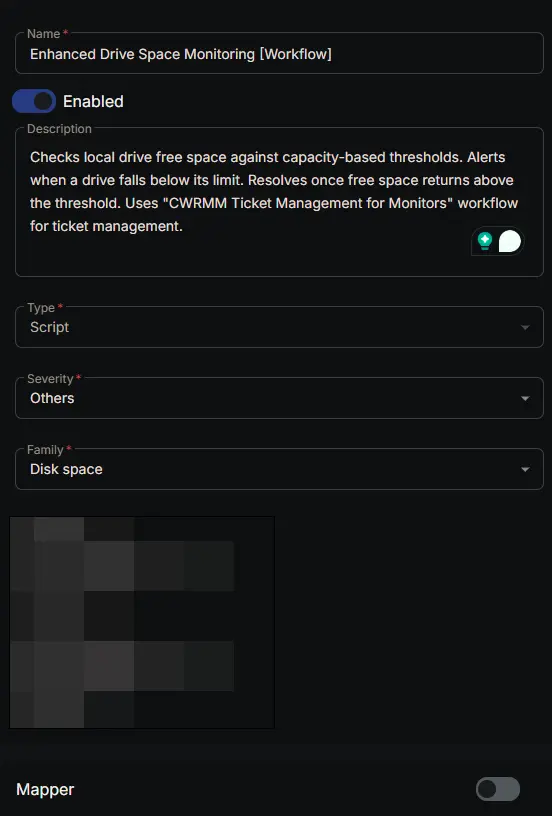
Monitor Summary
- Name:
Enhanced Drive Space Monitoring [Workflow] - Description:
Checks local drive free space against capacity-based thresholds. Alerts when a drive falls below its limit. Resolves once free space returns above the threshold. Uses "CWRMM Ticket Management for Monitors" workflow for ticket management. - Type:
Script - Severity:
Others - Family:
Disk Space
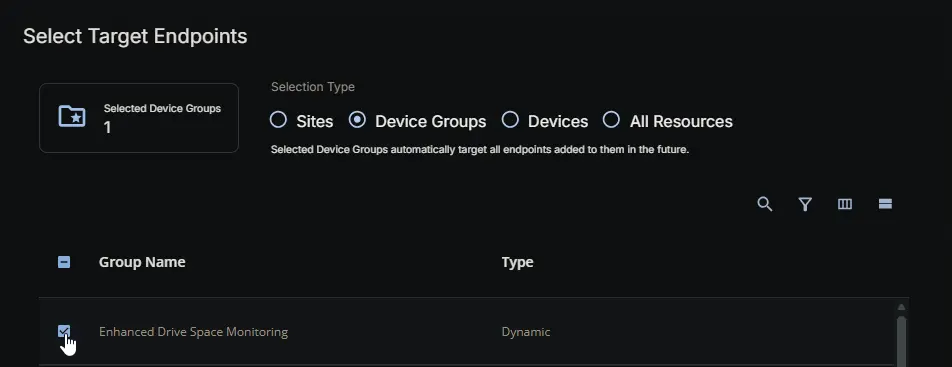
Targeted Resources
- Target Type:
Device Groups - Group Name:
Enhanced Drive Space Monitoring
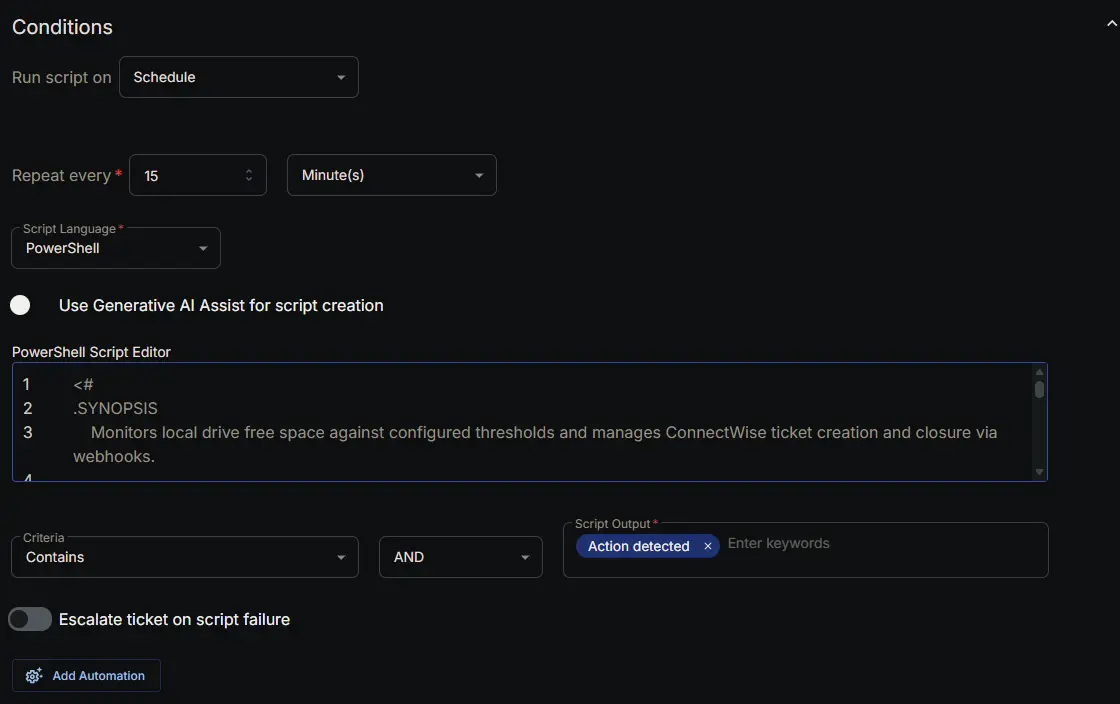
Conditions
-
Run script on:
Schedule -
Repeat every:
1Hour(s) -
Script Language:
PowerShell -
Use Generative AI Assist for script creation:
False -
PowerShell Script Editor:
- Criteria:
Contains - Operator:
AND - Script Output:
Action detected - Escalate ticket on script failure:
Disabled - Add Automation:
<Leave it untouched>
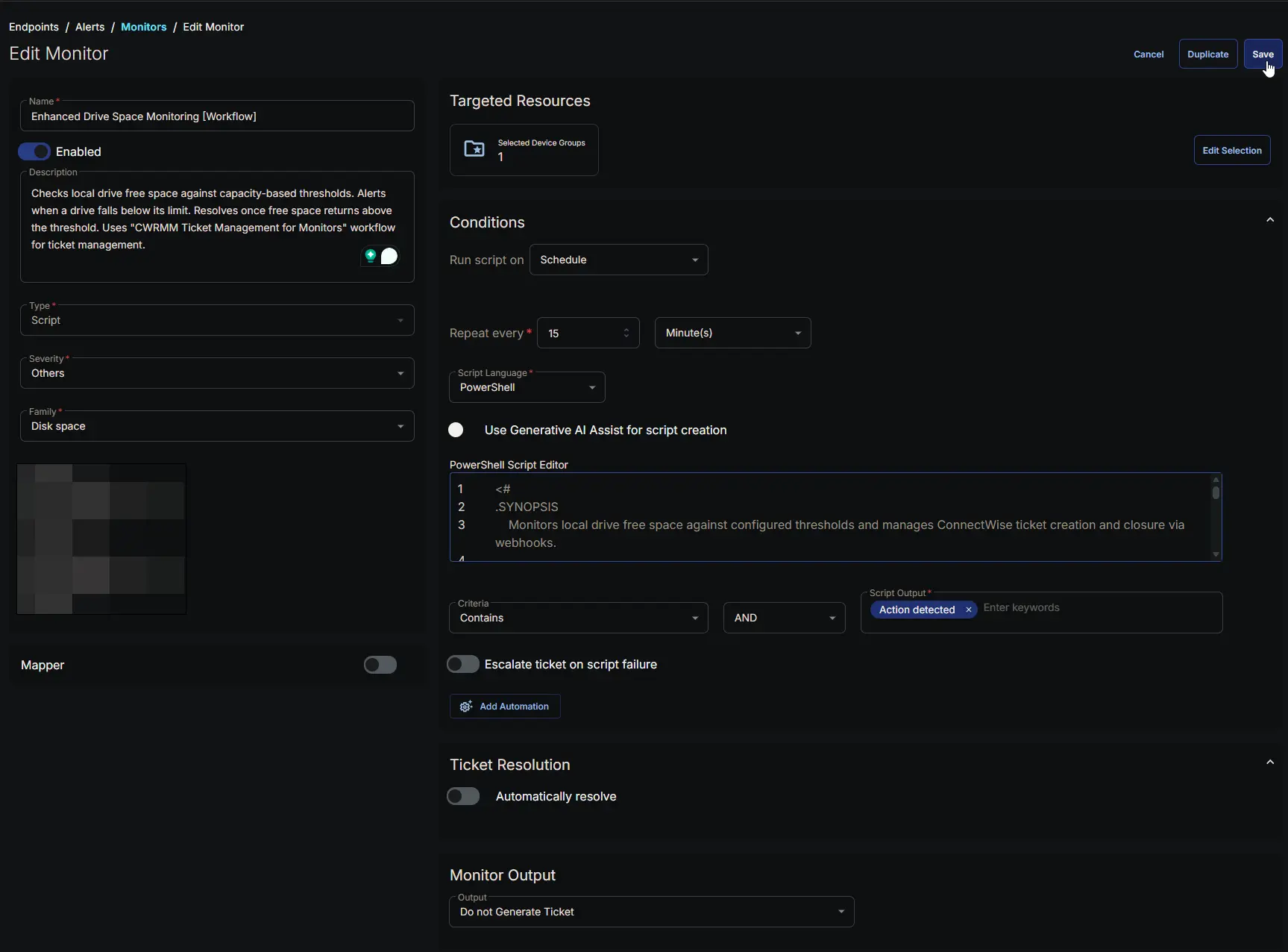
Ticket Resolution
- Automatically Resolve:
Disabled

Monitor Output
Output: Do not Generate Ticket

Completed Monitor
Changelog
2026-07-23
- Initial version of the document